
In crypto, ownership means little without strong security. As digital assets reshape the future of finance, one truth remains clear: without strong protection, your crypto holdings are constantly at risk. In 2023 alone, hackers stole over $1.7 billion worth of cryptocurrencies through phishing attacks, malware, and exchange breaches. stoThis surge in cybercrime has forced both retail investors and institutions to rethink how they store and secure their digital wealth. Here is a complete guide on Crypto Wallets.
Hot wallets offer speed and convenience, but they are also the most exposed. Because they remain connected to the internet at all times, they are vulnerable to a wide range of online threats. For serious investors, this convenience comes at too high a cost.
Cold wallets offer a more secure solution. By keeping private keys completely offline, they create a physical barrier between your assets and potential attackers. This approach significantly lowers the chances of unauthorized access and data compromise.
Yet, despite their growing popularity, cold wallets are often misunderstood. Many users do not know how to choose the right wallet, set it up properly, or use it securely without compromising usability.
In this blog, we’ll cover the definition of cold wallets, available types, how to set one up, essential security practices, and the top options available in 2025.
What is a Crypto Cold Wallet?

Photo by rc.xyz NFT gallery / Unsplash
A cold wallet or cold storage wallet, is a type of cryptocurrency wallet that operates without being connected to the internet. Unlike hot wallets, which are software-based and always online, cold wallets keep your private keys entirely offline. This fundamental difference significantly enhances security, making cold wallets the go-to solution for storing large amounts of digital assets for the long term.
Cold wallets function as secure vaults for cryptocurrencies. They are designed to generate and store private keys in isolated environments, ensuring that sensitive data is never exposed to online threats such as malware, phishing attacks, or remote hacking attempts. By eliminating internet connectivity, cold wallets create an air gap between your assets and the online world, offering unparalleled protection.
A Comprehensive Guide to Crypto Security
How Does it Differ from Hard Wallets?
Hard wallets are connected to the internet and are often used for daily transactions. These include mobile wallets, desktop wallets, and web wallets. While they are convenient and user-friendly, hot wallets are inherently more vulnerable to cyber threats.
Cold wallets, on the other hand, are designed for long-term storage and higher-value holdings. They include hardware wallets (like Ledger Nano X, Trezor Safe 3, and Arculus), paper wallets, and air-gapped computers. The lack of internet access greatly reduces the attack surface, making cold wallets the preferred choice for serious investors and institutional holders.
How It Works
Cold wallets work by generating private keys in a secure, offline environment. Transactions are signed offline using the private key and then broadcast to the blockchain using a separate internet-connected device. This process ensures that the private key never leaves the secure environment, drastically minimizing exposure to threats.
Most modern cold wallets use Hierarchical Deterministic (HD) architecture, allowing users to generate multiple receiving addresses from a single seed phrase. These seed phrases (12, 18, or 24 words) act as master keys and must be securely backed up, as they are the only way to recover funds if the device is lost or damaged.
Types of Cold Wallets
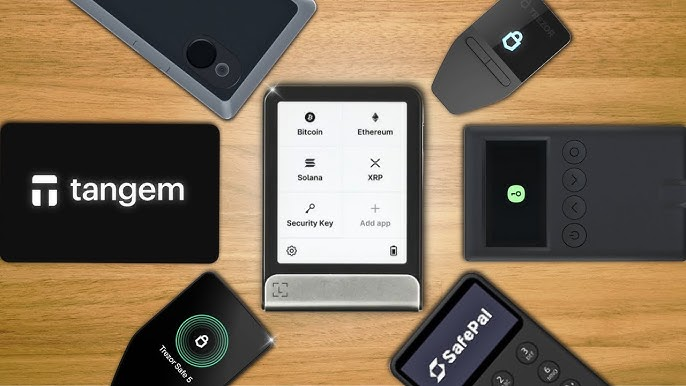
Image: Source
There are several types of cold wallets available in 2025, each catering to different user needs:
Hardware Wallets: Devices like Ledger Nano X, Trezor Safe 5, and Arculus Wallet offer secure, offline storage with user-friendly interfaces.
Paper Wallets: These involve printing your private and public keys on paper. While cheap, they are susceptible to physical damage and theft.
Air-Gapped Devices: Dedicated computers or smartphones that are never connected to the internet.
How to Set Up a Cold Wallet
Choose the Right Wallet: Select a cold wallet based on the cryptocurrencies you plan to store and your technical proficiency.
Purchase from Official Sources: Only buy hardware wallets directly from the manufacturer to avoid tampered or counterfeit devices.
Initialize the Device: Follow the on-screen instructions to generate a seed phrase. Write it down on paper or engrave it on a metal plate for durability.
Set PIN and Biometric Authentication: Most modern wallets allow you to set a PIN and, in some cases, biometric authentication for added security.
Install Companion App: Connect your cold wallet to its companion desktop or mobile app (like Ledger Wallet, Trezor Suite or the Arculus app) using USB, Bluetooth, or NFC.
Configure Supported Assets: Choose and install applications for the specific cryptocurrencies you plan to store.
Verify and Back Up Everything: Double-check your seed phrase and test receiving addresses before transferring large amounts.
Disconnect: Once setup is complete and funds are transferred, disconnect the wallet from the internet entirely.
How to Choose a Cold Wallet
Selecting the right cold wallet in 2025 requires aligning the wallet’s features with your individual security priorities, investment strategy, and comfort with technology.
Here are some factors to consider while choosing a cold wallet:
Define Your Security Requirements
Consider the amount of capital you’re protecting:
High-value holdings or institutional assets require features like multisig, air-gapped signing, or tamper-resistant hardware.
For individual investors, simplicity and a secure recovery process often take precedence.
Match the Wallet to Your Technical Proficiency
If you’re new to crypto, opt for wallets with clean interfaces, guided setup, and mobile support. Experienced users may prefer advanced tools that allow control over seed phrase generation, derivation paths, and offline signing workflows.
Verify Asset Support
Wallet support varies across blockchains. Some focus solely on Bitcoin, while others support thousands of tokens including Ethereum, Solana, and DeFi assets.
Ensure the wallet can securely manage, sign, and interact with the assets you plan to hold - not just store them.
Evaluate Backup and Recovery Options
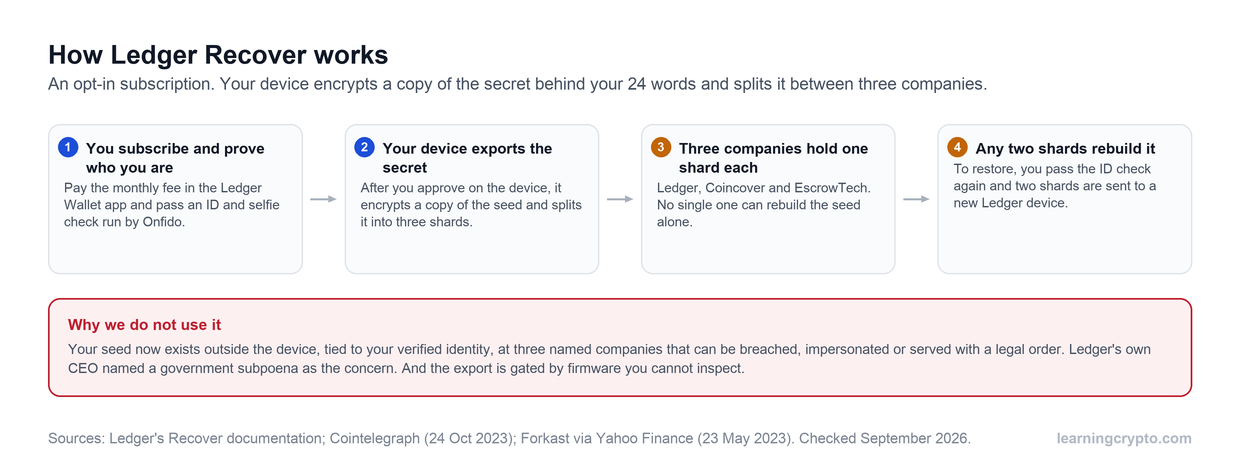
Ease of recovery during device loss or damage is essential. Look for wallets offering standard seed phrase recovery (BIP39), optional passphrases, and features like Shamir’s Secret Sharing for added redundancy.
Consider Physical and Operational Logistics
Choose a form factor that suits your lifestyle - USB, card-style, or mobile-connected.
If you travel, prioritize portability with offline signing capabilities. Plan storage of the wallet and backups carefully, possibly across multiple secure locations.
Integration with Your Broader Security Strategy
A cold wallet should integrate into your broader key management and estate planning. Consider questions like: Who has access if you're unavailable? What’s your recovery plan in case of theft or loss?
Final Tip: Before making your final decision, take time to read technical reviews, study wallet documentation, and test backup processes in a low-risk environment. The more proactive and thoughtful you are upfront, the more secure your assets will be over time.
Understanding Cold Wallet Security
Cold wallets employ advanced security protocols to ensure maximum protection:
Secure Elements: Many wallets use tamper-resistant chips with Common Criteria EAL6+ certification.
Multi-Factor Authentication: PIN codes, biometric scans, and physical possession requirements.
Air-Gapped Signing: Transactions are signed offline and broadcast later.
Firmware Integrity Checks: Boot-time checks ensure the software hasn’t been tampered with.
Tamper-Evident Design: Hardware shows visible signs if physically compromised.
Read More: Crypto Terminology for Beginners: 250+ Terms To Know
Safety Tips for Optimal Security
Multi-Signature Options
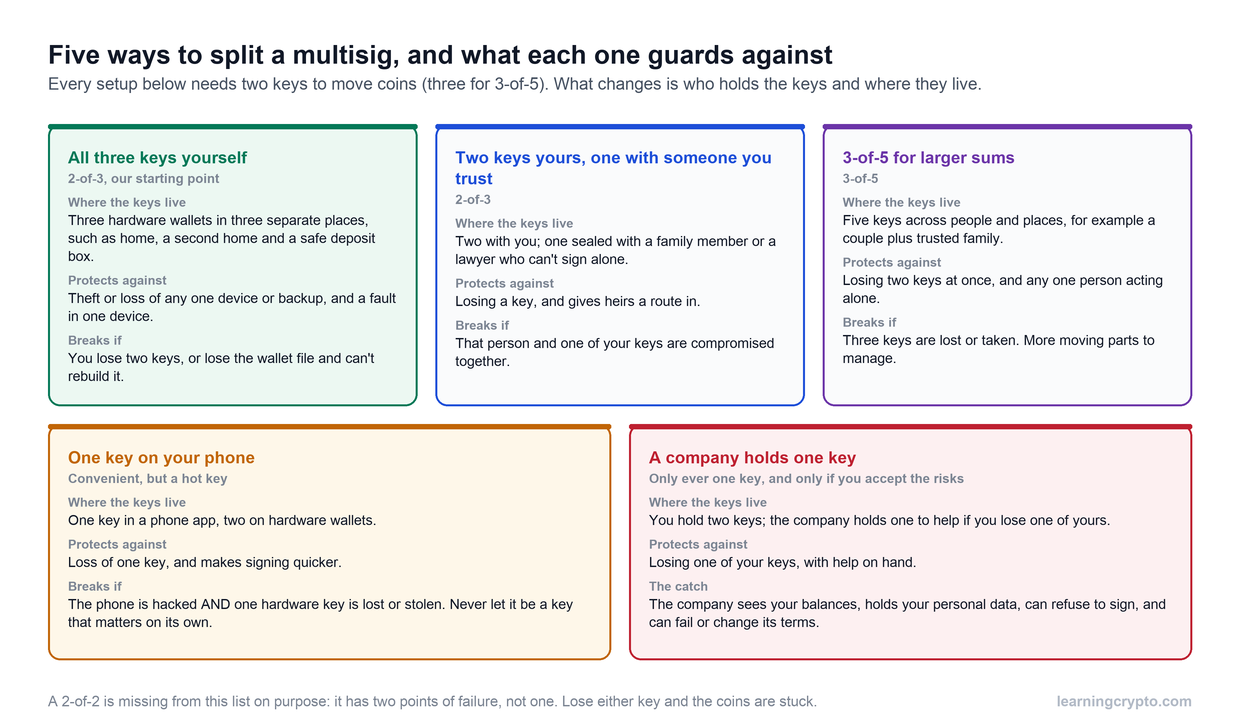
Advanced users can implement multi-signature (multisig) schemes, requiring multiple keys to authorize transactions. For example, a 2-of-3 multisig setup requires two out of three wallets to sign a transaction, reducing single point of failure.
Regular Update and Physical Security Measures
Firmware Updates: Always verify and install from official sources.
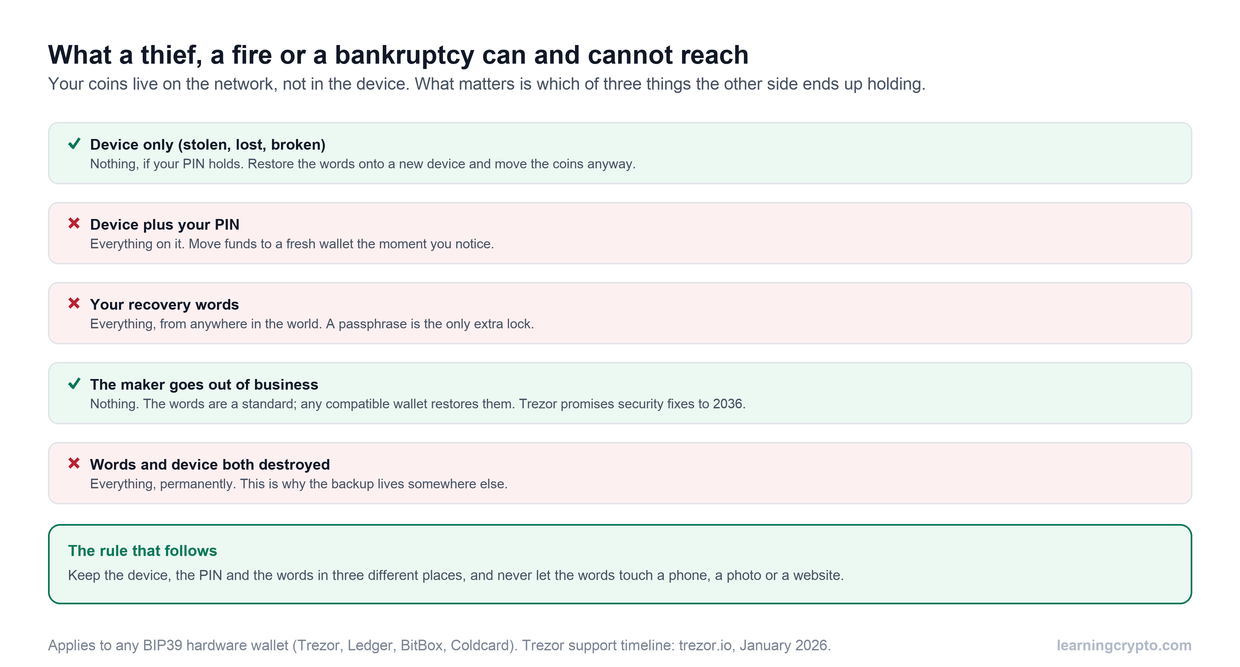
Seed Phrase Storage: Store multiple copies in secure, geographically distributed locations.
Use Metal Backups: Avoid paper, use fireproof and waterproof metal wallets.
Audit Practices: Regularly verify device integrity and seed phrase accuracy.
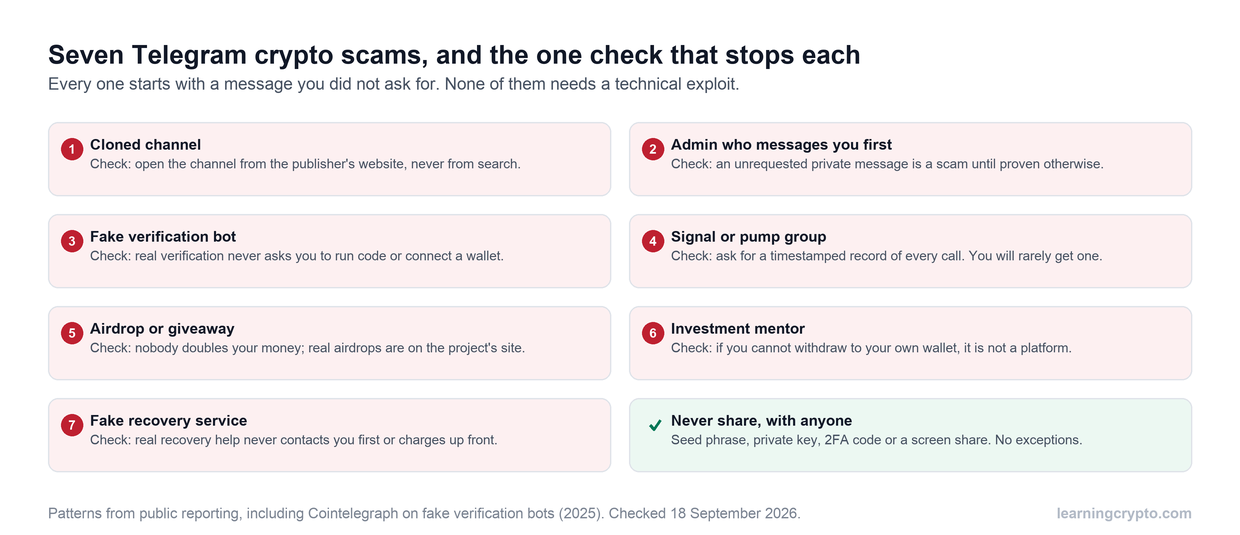
Avoid Exposure: Don’t display seed phrases or PINs near cameras or in public.
Best cold wallets in 2026
Choosing the right cold wallet is essential for securing your digital assets. In 2026, the cold storage market offers a variety of options tailored to different user preferences, security requirements, and usage scenarios.
Below are the top-performing cold wallets of the year, each with standout features and unique advantages:
Ledger Nano X
Ledger Nano X is Ledger's long-running Bluetooth model, pairing a secure element with a compact two-button design that suits both beginners and advanced users.
Key Features:
Bluetooth-enabled for wireless use via mobile apps
Holds 500+ coins and tokens in the Ledger Wallet app, including Bitcoin and Ethereum, plus thousands more through compatible third-party wallets, according to Ledger
Works with the Ledger Wallet app (renamed from Ledger Live in October 2025) on Android, iOS, Windows, and macOS
CC EAL5+ secure element for hardware-level protection (Ledger's newer Nano S Plus, Nano Gen5, Flex and Stax use EAL6+ chips)
Built-in battery for on-the-go access
Ideal For: Users seeking a mobile-friendly, feature-rich wallet that supports a wide asset range and doesn’t compromise on hardware-level security.
Trezor Safe 3, Safe 5 and Safe 7
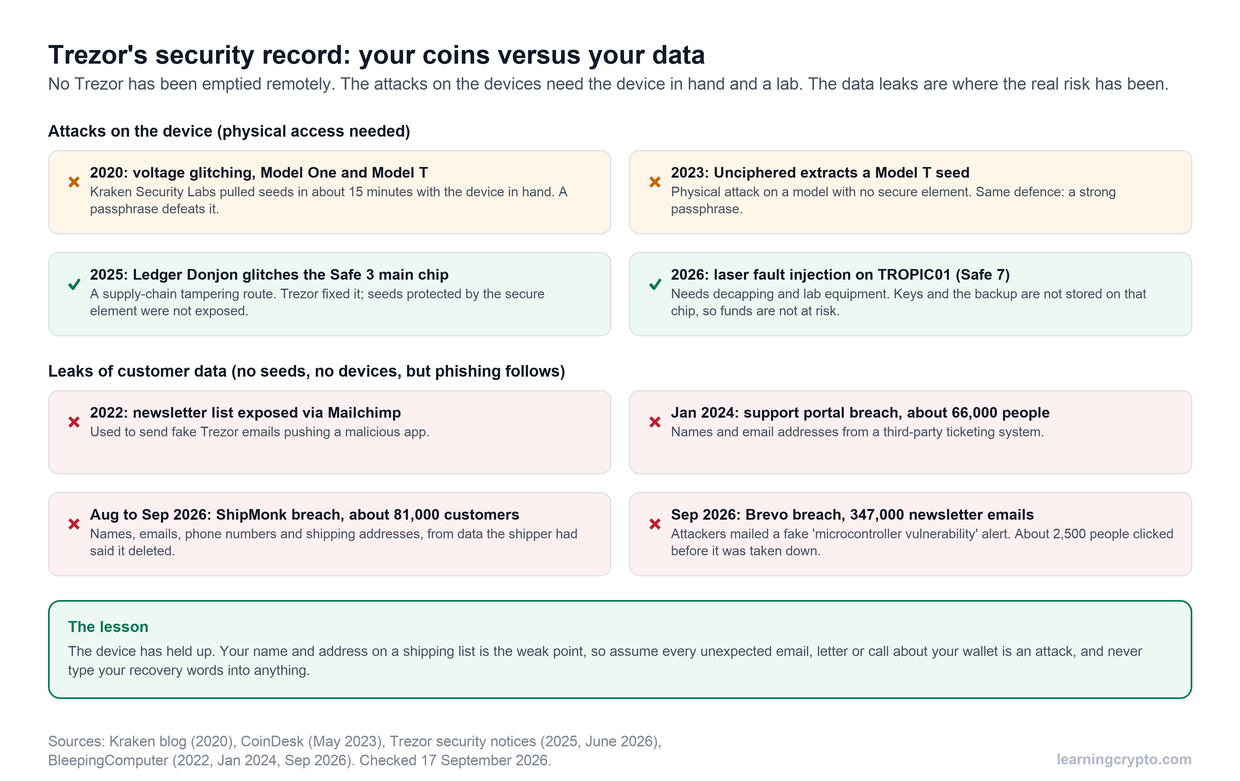
Trezor's Safe range is known for transparency: fully open-source firmware, a certified secure element in every model, and a plain, privacy-first companion app. Trezor removed the older Model One and Model T from its shop on 8 January 2026, so the Safe models are the ones to buy now.
Key Features:
A choice of screen: two buttons on the Safe 3, a colour touchscreen on the Safe 5, and a larger touchscreen with Bluetooth and wireless charging on the Safe 7
EAL6+ certified secure element guarding the PIN and wallet backup, with a second, auditable TROPIC01 chip on the Safe 7
Open-source firmware for full transparency and auditability
Supports major coins including BTC, ETH, LTC, and ERC-20 tokens in Trezor Suite
Passphrase protection and multi-share backup, which splits your recovery into several parts
Every model signs on Android over USB; on an iPhone, only the Safe 7 can sign
Ideal For: Developers, privacy advocates, and users who value transparency and control over their wallet firmware and recovery methods. The Safe 3 is the value pick; choose the Safe 5 or Safe 7 if you want a touchscreen. Our Trezor vs Ledger guide compares both ranges, and our Trezor Safe 7 review covers the top model.
Arculus Cold Storage Wallet
The Arculus Wallet represents the next generation of cold storage, integrating advanced security protocols in a sleek, NFC-powered card design.
Key Features:
Credit card-sized, NFC-based design for easy portability
No cables or Bluetooth, minimizing attack surfaces
Three-factor authentication: biometric, PIN, and card possession
Mobile app integration for secure, convenient asset management
Ideal For: Mainstream users and security-conscious investors who prefer simplicity and portability without sacrificing enterprise-grade protection.
CoolWallet Pro
CoolWallet Pro offers an innovative approach to cold storage, focusing on mobile-first users and crypto enthusiasts who actively engage in staking and DeFi.
Key Features:
Slim, water-resistant card design for discreet mobility
Encrypted Bluetooth connectivity for iOS and Android
Built-in staking for DOT, TRX, ATOM, and more
Multi-asset support, including BTC, ETH, and BNB
EAL5+ secure element for private key protection
Ideal For: Active mobile users and crypto holders who want a cold wallet that balances daily usability with strong security and staking capabilities.
BitBox02
BitBox02 is a Swiss-engineered wallet known for its minimalist design, secure architecture, and transparency through open-source software.
Key Features:
Swiss-made secure chip for hardware-level protection
Fully open-source firmware and apps
USB-C native for modern device compatibility
MicroSD backup for simple and secure recovery
Two editions: Bitcoin-only and multi-coin support
Ideal For: Security professionals, technical users, and anyone who prefers a minimalist, audit-friendly, and battle-tested wallet with optional Bitcoin-only firmware.
Conclusion
Cold wallets are no longer optional. They are a foundational layer of protection in the digital asset ecosystem. With over $2.2 billion stolen in 2024 alone, the risks of keeping crypto online are clear.
Cold storage offers the highest level of defense by keeping private keys completely offline, away from cyber threats. Modern wallets now combine robust hardware security with user-friendly features, making self-custody more accessible than ever.
As global adoption continues to rise, with more than 617 million crypto users by mid-2024, securing digital assets at scale has become a critical need. Whether you're just starting out or managing a large portfolio, a properly configured cold wallet is essential for long-term asset protection.
Read More: Best Crypto for Beginners to Know
At Learning Crypto, we’re here to help you get it right. Our goal is to make crypto education practical, clear, and trustworthy. Through guides like this, we empower you to take control of your assets and avoid the common pitfalls that have affected many investors.
Learning how to use a cold wallet isn't just about technology. It's about protecting your financial future. With the right knowledge and tools, you can stay ahead of the curve and secure your place in the evolving world of digital finance.
Stay safe. Stay informed. Keep learning with us.
How to set up cold storage for Ethereum
To set up cold storage for Ethereum, buy a hardware wallet that supports ETH directly from the manufacturer, generate the seed phrase on the device, install the Ethereum app through the companion software, then send a small test amount before moving the rest. The private key never touches an internet-connected device at any point.
Step by step:
- Pick a wallet with Ethereum support. Ledger Nano X supports Ethereum along with NFTs and DeFi tokens. Trezor Safe models support ETH and ERC-20 tokens. BitBox02 offers a multi-coin edition. Check support for any Ethereum-based tokens you hold, not just ETH itself.
- Buy from the official store. Third-party sellers are where tampered and counterfeit devices show up.
- Initialize the device and record the seed phrase. Write the 12, 18 or 24 words on paper or, better, a metal plate, and set a PIN.
- Install the companion app and the Ethereum app. Connect through Ledger Wallet, Trezor Suite or the equivalent app for your device, then add Ethereum under supported assets.
- Verify the receiving address on the device screen and send a small test transaction from your exchange or hot wallet.
- Move the balance and disconnect. Once the test arrives, transfer the rest and unplug the wallet.
If you plan to stake or use DeFi with the same ETH, confirm the wallet can sign those interactions, not just hold the coins. The same rule from the buying guide above applies: the wallet must be able to manage, sign and interact with the assets you hold.
How to set up a cold vault for DeFi tokens
A cold vault for DeFi tokens is a hardware wallet that holds the tokens you are not actively using, kept separate from the hot wallet you connect to DeFi apps. Set it up the same way as any cold wallet, then add one rule: the vault only signs transactions you planned in advance.
What makes DeFi tokens different is that they live on several chains and are often used, not just stored. So before you buy a device:
- Confirm chain and token support. Wallet support varies across blockchains. Some devices focus only on Bitcoin; others such as Ledger Nano X support DeFi tokens, and CoolWallet Pro adds built-in staking for assets like DOT, TRX and ATOM. If tokens have been bridged to another network, make sure the wallet supports that network too.
- Check it can sign, not just store. The wallet must be able to manage, sign and interact with the assets you hold if you ever intend to move them into a protocol.
- Consider multisig for larger vaults. A 2-of-3 setup requires two of three keys to authorise a transaction, removing the single point of failure. High-value holdings justify multisig, air-gapped signing and tamper-resistant hardware.
Then follow the standard setup: buy from the manufacturer, generate the seed on the device, back it up on metal in more than one location, install the apps for each chain, verify addresses, test with a small transfer, and disconnect. Keep a small hot wallet for day-to-day DeFi activity so a bad approval can never reach the vault.
Frequently asked questions
Is a hardware wallet the same as a cold wallet?
A hardware wallet is one type of cold wallet, not the only one. Cold wallet means any wallet that keeps private keys fully offline. That includes hardware devices like Ledger Nano X, Trezor Safe 3, and Arculus, paper wallets with the keys printed out, and air-gapped computers or phones that never touch the internet. Hardware wallets are the most practical option because they pair offline keys with a usable interface.
How does a cold wallet send transactions if it is offline?
The private key never leaves the device. The transaction is signed offline inside the wallet's isolated environment, then the signed transaction is passed to a separate internet-connected device, such as a phone or computer running the companion app, which broadcasts it to the blockchain. Because the key itself is never exposed to the online device, malware, phishing, and remote hacking attempts have nothing to grab.
What happens if I lose or break my cold wallet?
Your crypto is not on the device; it is on the blockchain, and the seed phrase is the master key. Modern cold wallets use hierarchical deterministic (HD) architecture, so entering your 12, 18, or 24 word seed phrase into a new device restores every address and balance. That is why the article says to back the phrase up on metal rather than paper and keep copies in separate secure locations.
Where should I buy a hardware wallet?
Only from the manufacturer's official store. The article is explicit: buying direct is how you avoid tampered or counterfeit devices, which are a real risk through third-party sellers. Good hardware wallets use tamper-evident designs that show visible signs if the device has been physically compromised, and firmware integrity checks at boot. Once you have it, generate your own seed phrase during setup and install firmware updates only from official sources.
How do I move crypto to cold storage?
Open the companion app, choose the asset, and copy the receiving address, checking it against the address shown on the hardware wallet's own screen. Send a small test amount from your exchange or hot wallet first, wait for it to arrive, then transfer the rest. Once the funds are in place, disconnect the device entirely and store it and your seed phrase backup in secure locations.
How should I set up cold storage for large BTC holdings?
Large Bitcoin holdings call for more than a single device. High-value holdings justify multisig, air-gapped signing and tamper-resistant hardware; a 2-of-3 multisig means one lost or stolen key cannot move the coins. BitBox02 offers a Bitcoin-only edition. Back up seed phrases on metal, keep copies in geographically separate locations, and plan who can access them if you cannot.
What are the best practices for crypto cold storage?
Buy hardware only from the manufacturer, generate your own seed phrase on the device, and back it up on fireproof, waterproof metal in more than one secure location. Set a PIN, verify addresses on the device screen, and test with a small transfer before large ones. Install firmware updates only from official sources, never show seed phrases near cameras, and audit your backups regularly.
What is the difference between a cold wallet and a hot wallet?
A hot wallet is software that stays connected to the internet, such as a mobile, desktop or web wallet, which makes it convenient for daily transactions but exposed to malware, phishing and remote attacks. A cold wallet keeps private keys entirely offline on a hardware device, paper or air-gapped computer, so it is slower to use but far safer for large or long-term holdings.
This guide is part of stage 3 of 8, holding it safely, in the free Learning Crypto curriculum. Next: Trezor vs Ledger: Which Hardware Wallet Should You Choose?
Keep learning
- Mastering Multi-Sig Wallets: Why Serious Crypto Holders Use Multiple Keys
- New to Crypto? Discover the Best Crypto for Beginners and Start Investing Like a Pro
- Comprehensive Guide to Bittensor Wallets: Securing Your TAO
- More guides in the Fundamentals hub
- Members: Ask Crypto AI, ask it any beginner question, privately