
You've purchased some crypto, and almost immediately someone hit you with that "not your keys, not your coins" line. Now you're side-eyeing that exchange account, wondering if your Bitcoin is actually safe just sitting there.
Your instincts are right, but you've got decisions to make. The cold wallet vs hot wallet choice comes down to what you're actually doing with your crypto.
Hot wallets keep everything connected for trading, spending, and using DeFi. Cold wallets lock it all down offline, where hackers can't reach it.
The difference between hot and cold wallet storage clicks once you see how they fit your situation. Most holders use both. Some crypto stays ready to move, the rest stays locked down tight.
What you'll learn:
The real difference between hot and cold wallets
Hot wallet types that fit your lifestyle, from mobile apps to browser extensions
Hardware wallet vs software wallet: which one protects your long-term stack
The hybrid strategy that keeps your crypto both safe and accessible
Common mistakes that cost people their funds (and how you'll avoid them)
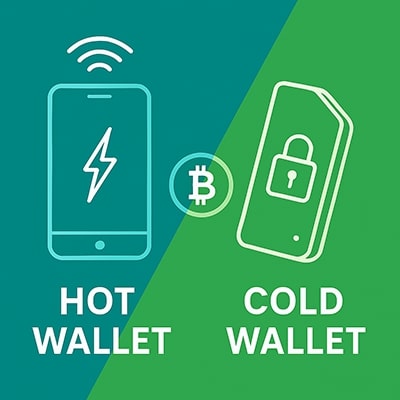
Quick Overview: Hot vs Cold Wallets
Hot Wallets:
| Cold Wallets:
|
What Is a Hot Wallet?
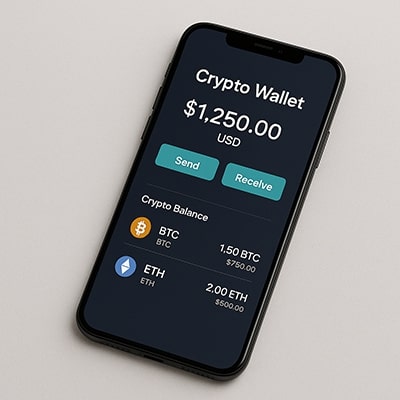
Hot wallets are the crypto equivalent of keeping spending money in your pocket. They live on devices that stay connected to the internet. For instance, your phone, laptop, or browser. So they’re always ready when you want to make a move with your crypto.
If you’re swapping tokens, checking a DeFi position, or sending a quick payment, a hot wallet handles it.
Hot Wallet Definition and Characteristics
A hot wallet is any cryptocurrency wallet that stays online. Your private keys are stored on an internet-connected device, encrypted and protected behind passwords, biometrics, or both. That connection is what makes hot wallets convenient for day-to-day activity, but it’s also what introduces more security risk compared to cold storage.
Hot wallets come in several flavours:
Mobile apps on iOS or Android
Desktop software you install on your computer
Browser extensions used for DeFi and Web3
Hot wallets are all about accessibility: fast transactions, frictionless dApp access, and simple setup. The trade-off is exposure - anything online can, in theory, be attacked.
Types of Hot Wallets
Wallet Type | Examples | Security Level | Best Use Case |
Mobile | Trust Wallet, MetaMask Mobile, Coinbase Wallet | Moderate | Daily transactions, moderate amounts |
Desktop | Electrum, Exodus, Atomic Wallet | Moderate | Regular trading, larger transactions |
Browser Extension | MetaMask, Phantom, Rabby | Moderate | DeFi, NFTs, dApp interactions |
Web | Exchange wallets, blockchain explorers | Low | Small amounts, immediate trading |
Mobile Wallets
Your smartphone becomes your crypto wallet with apps designed for iOS and Android. Trust Wallet, Exodus Wallet, Coinbase Wallet, and MetaMask Mobile are popular choices that put cryptocurrency access in your pocket. They're perfect for on-the-go transactions, such as paying with crypto, sending money to friends, or managing your portfolio from anywhere.
Desktop Wallets
Installing wallet software directly on your computer gives you more screen space for complex transactions and detailed portfolio management. Electrum (for Bitcoin), Exodus Desktop, and Atomic Wallet are well-established options.
The larger interface is helpful when dealing with multiple cryptocurrencies or when you need to carefully review transaction details, although your wallet's security ultimately depends on keeping your computer clean.
Browser Extension Wallets
Browser plugins like MetaMask, Phantom, Rabby, and Coinbase Wallet integrate with Web3 applications and DeFi protocols. If you want to swap tokens on Uniswap, mint NFTs, or interact with smart contracts, a browser extension wallet is essentially required.
They connect directly to decentralized applications running in your browser, though you need to be careful about which websites you're connecting your wallet to.
Web Wallets
Accessed entirely through a web browser without installing anything, web wallets offer maximum convenience but minimal security.
Many exchanges provide web wallets for quick trading, but these often aren't true self-custody solutions. The exchange controls the private keys, not you. They're convenient for active trading but should only hold small amounts you plan to use immediately.
How Hot Wallets Work
When you create a hot wallet, the software generates your private keys and encrypts them directly on the device. Those keys never leave your phone or computer; they stay stored locally, protected by your password, PIN, or biometrics.
Because the wallet is always connected to the internet, it can instantly broadcast transactions to the blockchain. The software handles the technical bits: building the transaction, signing it with your private key, and sending it out to the network. You just see a smooth interface and a “confirm” button.
Updates roll in automatically, new features appear without much effort, and integrating with exchanges or DeFi platforms is usually just a matter of clicking “Connect Wallet.” That ease is the main appeal and also the reason hot wallets come with more exposure.
What Is a Cold Wallet?
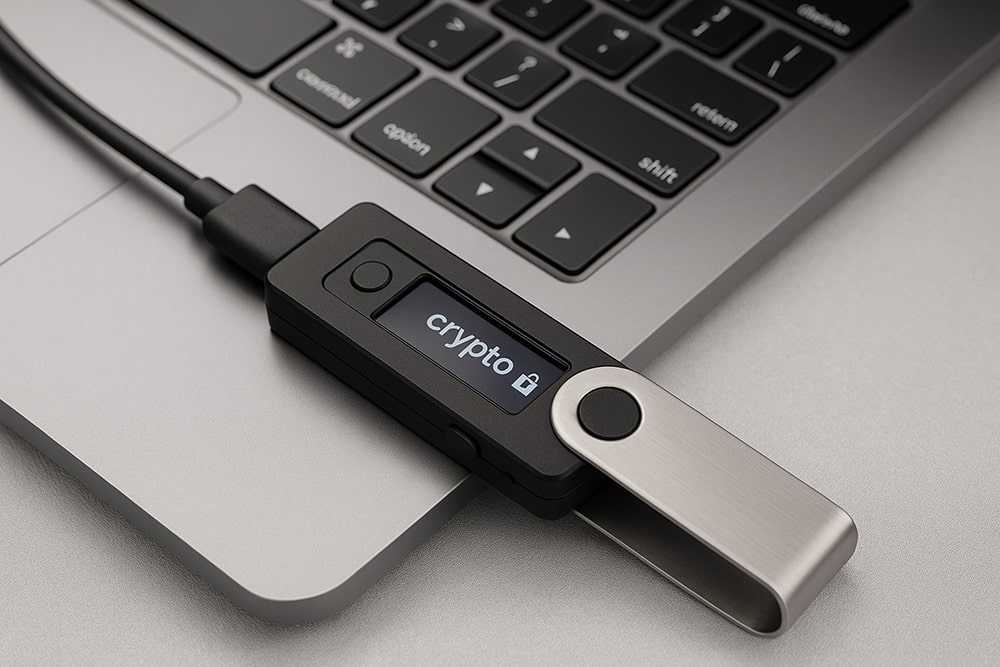
A cold wallet is where your long-term crypto goes to stay safe. Instead of keeping your private keys on an internet-connected device, everything is stored completely offline.
A device (or sometimes a piece of paper) that never touches the internet. That isolation is what makes cold storage so hard to compromise.
Cold Wallet Definition and Characteristics
A cold wallet is any storage method where your private keys are generated and kept offline from the start. Even when you send a transaction, the signing happens on the device itself, not on your computer or phone. That means malware, phishing attacks, and remote hackers essentially have nothing to grab.
Cold wallets are built around a “security first” mindset. They take a bit more time to use compared to hot wallets, but the trade-off is simple: long-term protection that doesn’t depend on luck or the hope that your phone won’t get hit with something nasty.
Cold wallets come in a few main forms:
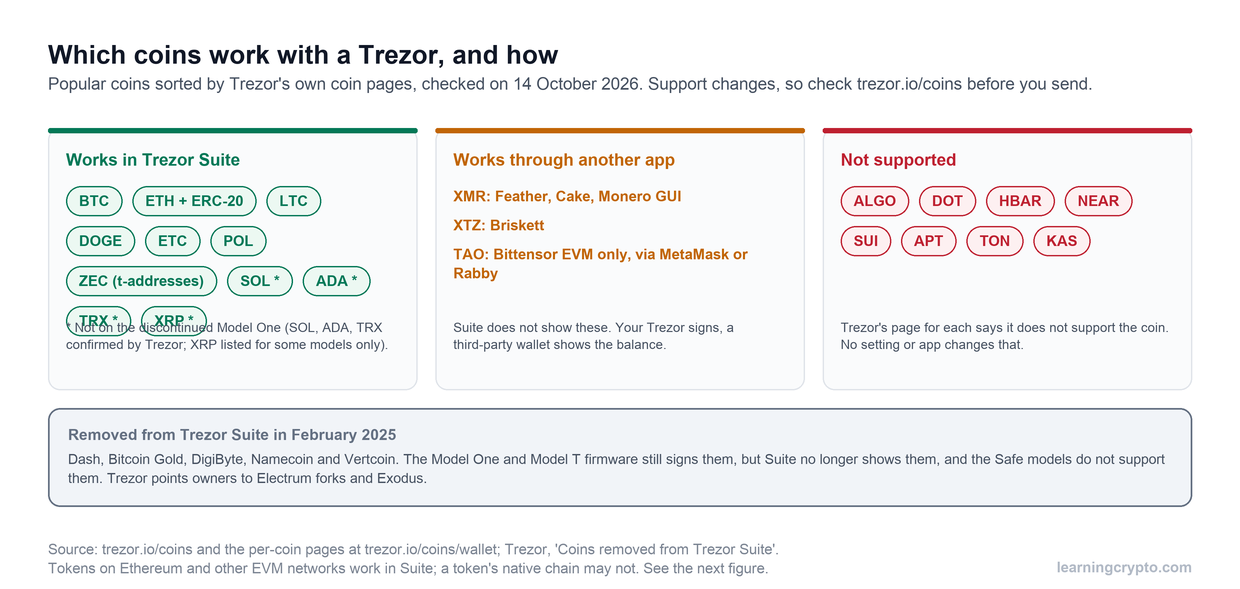
Hardware wallets like Ledger, Trezor, Tangem, and others
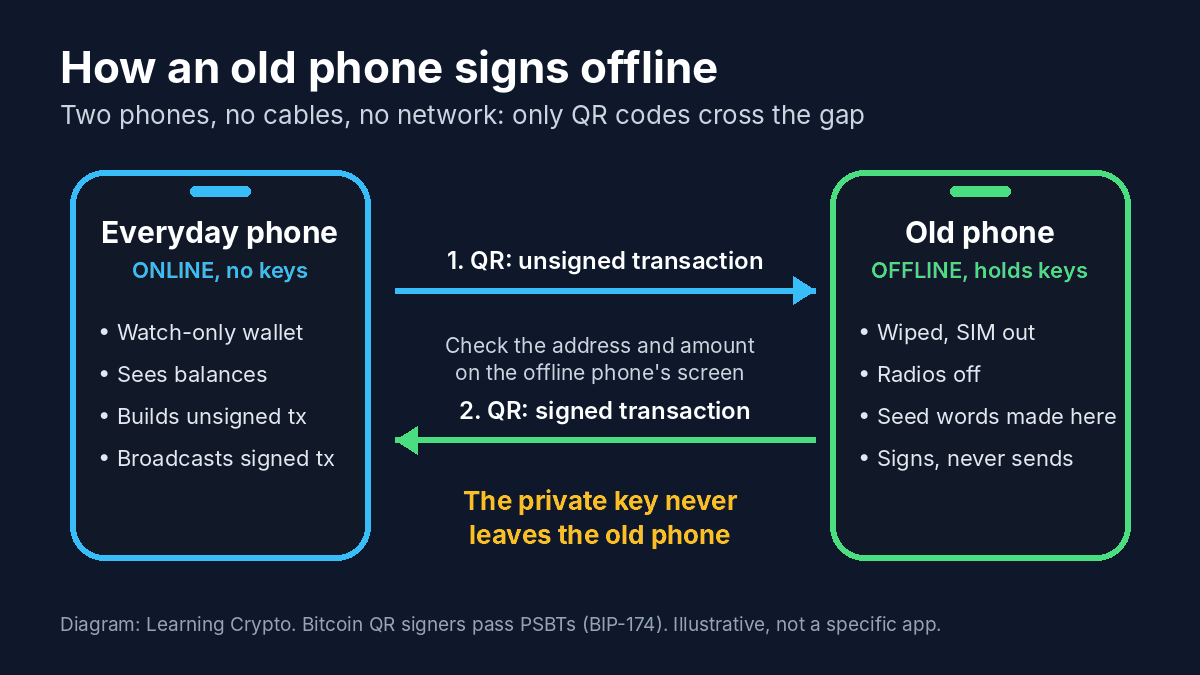
Paper wallets, which are literally printed private keysAir-gapped devices, old phones, or computers permanently kept offline.
Types of Cold Wallets
Wallet Type | Examples | Security Level | Best Use Case |
Hardware | Ledger Nano, Trezor, Tangem | Maximum | Long-term holdings, large amounts |
Paper | Printed private keys, QR codes | High (if stored properly) | Extreme long-term storage, inheritance |
Air-Gapped | Old phone/computer offline | High (if configured correctly) | Custom security setups |
Hardware Wallets
These are purpose-built physical devices about the size of a USB drive, specifically designed to generate and store private keys in a secure element chip.
The Ledger Nano X and Nano S Plus offer Bluetooth or USB connectivity with mobile and desktop apps, while Trezor's Safe 3, Safe 5 and Safe 7 offer button or touchscreen interfaces with open-source firmware.
Newer options like Tangem offer card-based designs, and the GridPlus Lattice1 provides a larger touchscreen experience. Private keys are generated inside the device and never leave it, even when you're signing transactions.
Paper Wallets
The simplest form of cold storage: your private key and public address printed on physical paper, often as QR codes for easy scanning. You generate these using offline tools, print them, and store the paper somewhere secure.
They have no electronic components to fail, and can't be hacked remotely because they exist purely in physical form.
But paper, as you can imagine, is also one of the most fragile. They're vulnerable to fire, water damage, fading ink, and simple loss.
And when you want to spend from a paper wallet, you typically need to "sweep" the entire balance into a hot wallet to use it, making partial withdrawals awkward.
It’s an old-school method that has largely fallen out of favour, but some people still use it for deep-cold storage or inheritance planning (with many caveats).
Air-Gapped Devices
This is the DIY route. An old phone, laptop, or single-board computer is wiped clean, set up with wallet software, and then permanently kept offline. No Wi-Fi. No Bluetooth. No SIM. Nothing.
You generate keys on the offline device, build transactions on it, and move them to an online device via QR codes or USB. It’s extremely secure when done correctly, but the setup is fairly technical, so not really beginner-friendly.
How Cold Wallets Work
Everything starts with the private keys being generated offline, inside the device itself. They never touch your computer, never sit in a browser, and never come into contact with anything connected to the internet.
When you want to make a transaction, the process works in two steps:
You create the unsigned transaction on your computer or phone (the part that says who you’re paying and how much).
Your cold wallet signs it internally, using the private key stored inside the device. Only the signed version leaves the wallet - your private key never does.
Most hardware wallets have a built-in screen so you can double-check the exact transaction details before pressing a physical button to confirm. That one step alone protects you from most malware tricks and clipboard hijacks.
Because nothing sensitive ever leaves the device, hackers have an extremely small attack surface to work with. The only real weaknesses are human ones: losing the device, mishandling your seed phrase, or buying compromised hardware from a sketchy seller.
Cold wallets can feel slower when you’re used to the instant nature of hot wallets, but once you realise everything is happening offline and away from attackers, the extra steps feel worth it.
Read Our Complete Guide on how to use Cold Wallets
Security Comparison: Hot vs Cold Wallets
When people ask, “Which wallet type is safer?” the honest answer is: it depends on what you’re protecting yourself from. Hot wallets and cold wallets each have their own weak spots, and the risks aren’t as obvious as “online bad, offline good.” So let’s break it down in a way that actually makes sense.
Hot Wallet Security Vulnerabilities
Hot wallets sit on internet-connected devices, which is both their superpower and their biggest weakness. Anything online can, in theory, be poked at by malware, keyloggers, or whatever nasty software happens to be circulating that week.
A compromised computer or phone can capture your private keys, flip your clipboard address during a transaction, or trick you into approving something you didn’t mean to.
Phishing is the classic trap: a fake MetaMask site, a fake browser extension, a fake “wallet update” all designed to make you type in something you shouldn’t. SIM swap attacks are another favourite, especially if your phone number is tied to 2FA.
Even if you avoid all that, bugs inside wallet software or malicious extensions can create their own risks. And, of course, if someone steals your phone or laptop and you’ve used weak passwords… well, you’ve just made their day a lot easier.
Mitigations exist: strong passwords, 2FA, sticking to reputable wallets, keeping your device clean, and never downloading crypto apps from random links.
Cold Wallet Security Advantages
Cold wallets win because they simply don’t play the online game. No internet means no remote hacking attempts, no malware stealing your keys, and no browser extension quietly siphoning off your funds.
Everything happens inside the device protected by a PIN and, in many cases, a secure element chip built to resist tampering.
When you send a transaction, the details appear on the hardware wallet’s screen, not your computer. You confirm it manually, so even if your laptop is acting possessed, it can’t change the transaction behind your back.
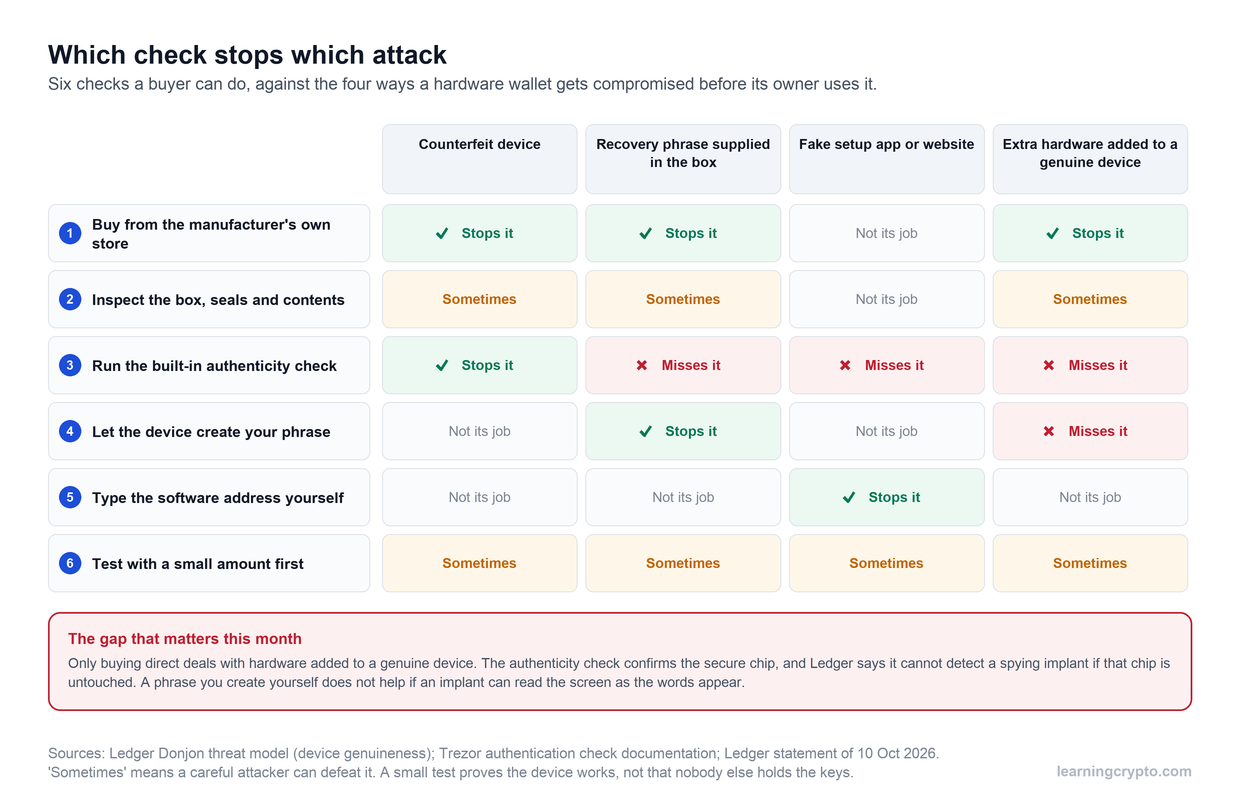
But “offline” doesn’t mean invincible. You still need to protect the device from physical loss, keep your seed phrase away from prying eyes, and buy hardware wallets directly from the manufacturer to avoid compromised devices.
Common Attack Vectors for Each Type
Hot wallet attacks:
Fake websites designed to mimic the real thing
Malicious browser extensions pretending to be helpfulDodgy software updates
Social engineering (“support” asking for your seed phrase - never fall for that)
Man-in-the-middle attacks on insecure networks
Cold wallet attacks lean physical rather than digital:
Someone steals your device (though the PIN protects you)
Buying from a reseller who tampered with the packaging
Careless seed phrase storage
The famous “$5 wrench attack” someone beats the password out of you
“Evil maid” attacks, where someone gets brief access to your device
Risk Assessment
Quick Guide | |||
|---|---|---|---|
Threat Type | Hot Wallet Risk | Cold Wallet Risk | Mitigation Strategies |
Remote Hacking | High | None | Strong passwords, 2FA, VPN |
Malware/Keyloggers | High | None | Antivirus, reputable software only |
Phishing | High | Low | Bookmark official sites, verify URLs |
Physical Theft | Medium | Medium | Device encryption, PIN protection |
Seed Phrase Compromise | High | High (paper only) | Multiple secure locations |
Supply Chain Attack | Low | Medium | Buy from official sources only |
Physical Coercion | Low | Low | Don't advertise holdings publicly |
Hot wallets aren’t “dangerous,” and cold wallets aren’t “bulletproof.” They’re just designed for different types of risk.
Hot wallets are more vulnerable to hacks and malware, but you’re unlikely to lose them physically. Cold wallets are incredibly hard to hack remotely, but if you lose the device and the seed phrase, that’s it - nobody’s getting your crypto back, including you.
Neither comes with insurance. You bear the full risk yourself. Historically, massive exchange hacks have stolen billions, but you rarely hear about individuals losing properly secured cold storage.
Most personal losses stem from mistakes such as sending to the wrong addresses or losing seed phrases, rather than sophisticated attacks.
Convenience and Usability Comparison
Hot Wallet Convenience Advantages
Hot wallets are ready when you are. Open the app, confirm with your fingerprint, and you're sending crypto in seconds. No cables, no extra devices, just your phone or computer doing what it already does. They work in tandem with DeFi protocols and dApps, swapping tokens, providing liquidity, and minting NFTs, all without friction.
Lose your phone? Restore your wallet on a new device with your seed phrase. Software updates happen automatically, adding new features and security patches while you sleep.
There's no upfront cost beyond the device you already own, and the interfaces are designed so your grandmother could probably figure them out.
Cold Wallet Usability Considerations
The hardware wallet vs. software wallet difference becomes most apparent in daily usability. Cold wallets make you work for that security. Every transaction means finding your hardware wallet, plugging it in, entering your PIN, reviewing details, pressing physical buttons to confirm, then disconnecting.
Forgot your device at home? You're not accessing those funds.
Firmware updates also don't happen automatically. You need to manually check for and install them through the companion app. Transaction signing that takes seconds in a software wallet stretches to 2-5 minutes with hardware. Try doing frequent DeFi interactions or active trading with that workflow, and it's miserable.
Transaction Speed Comparison
Hot wallets handle transactions in under 30 seconds from decision to broadcast. Cold wallets require 2-5 minutes minimum for the whole connect-verify-sign-disconnect dance.
For active trading, those extra minutes mean missing price movements. For DeFi strategies requiring multiple sequential transactions, hardware wallets turn a 5-minute task into a 20-minute ordeal.
Emergency situations expose the difference sharply. Need to move funds immediately? Hot wallet handles it. Hardware wallet at home while you're traveling? You're stuck.
Mobile and Desktop Experience
Hot wallets live on the device in your pocket. Touch interface, biometric login, push notifications, everything happens on hardware you carry everywhere.
Cold wallets need two devices: your phone or computer, plus the physical hardware wallet. Ledger and Trezor offer mobile apps that help, but you're still juggling two pieces of hardware.
Spontaneous transactions? Hot wallets win completely. With cold storage, you need to plan ahead and bring your hardware wallet with you. Most users treat this as a feature, not a bug, with little interest in carrying their hardware wallets around with them.
Cost Comparison
When people compare a hardware wallet vs a software wallet, cost is usually the first thing they notice. Hot wallets are free to download, free to set up, and free to use - Trust Wallet, MetaMask, Exodus, Phantom, all of them.
The only costs you’ll ever deal with are normal blockchain fees, which you’d pay no matter what wallet you use. From a pure convenience point of view, it’s hard to argue with “free.”
A hardware wallet is a one-time purchase, usually somewhere between $50 and $300, depending on the model.
Ledger Nano S Plus and Trezor Safe 3 sit at the cheaper end; touchscreen models such as the Trezor Safe 7 and Ledger Flex land on the premium side, and our Trezor vs Ledger comparison covers both current line-ups. There are no subscriptions, no ongoing fees, and the device should last years, but you may eventually replace it if it’s lost or damaged.
The real cost difference between hot and cold wallets isn’t the price tag; it’s the risk. A $79 hardware wallet protecting a four- or five-figure portfolio is a tiny investment for the security you get back.
Software wallets are free, but carrying your entire stack in a hot wallet is like walking around with every dollar you own in your back pocket.
In the hardware wallet vs software wallet comparison, hot wallets win on price, cold wallets win on protection.
Want the latest and safest in crypto hardware protection?
Check out our Review of the Trezor Safe 7
Use Cases: When to Use Each Wallet Type
Hot Wallet Best Use Cases
Active Trading
Day trading needs speed. You see a price dip and want to buy right now, not after digging out your hardware wallet and going through the whole connection routine. Hot wallets let you respond to market moves instantly. The integration with exchanges makes moving funds back and forth smooth.
Just keep your trading amounts reasonable, say whatever you're actually using that day, not your life savings.
DeFi Participation
If you're yield farming or providing liquidity, you're interacting with protocols constantly. Swapping tokens on decentralized exchanges might happen several times a day.
Every smart contract interaction goes faster with a hot wallet. NFT drops sell out in minutes, so you need that speed. And nobody's connecting hardware for every governance vote in every DAO they're part of.
Daily Transactions
Paying for stuff with crypto should feel easy, like using a credit card. Sending $20 to a friend shouldn't require a ceremony. If you're receiving payments regularly, an always-accessible wallet just makes sense.
Same with tipping creators or making small purchases, cold storage friction kills the convenience that makes crypto useful for everyday stuff.
Learning and Experimentation
When you're figuring out how DeFi works, you want to test protocols with small amounts without the hassle. Learning new blockchains means actually using them, which is easier with hot wallets. Exploring new tokens and networks goes smoother when you're not constantly plugging things in.
Cold Wallet Best Use Cases
Long-Term Holdings (HODLing)
That Bitcoin you're holding for years? Cold storage.
Crypto in your retirement portfolio that you won't touch for decades? Definitely cold storage.
These "set it and forget it" investments actually benefit from being harder to access, as you won't panic sell during crashes. If you're thinking about inheritance and legacy planning, you need the security and recoverability that cold wallets provide.
Large Portfolio Storage
Most people keep 80-90% of their portfolio in cold storage. If you're holding reasonable amounts of crypto, the cost of a hardware wallet is nothing compared to the protection it provides. Institutions require this level of security for a reason. Your business crypto holdings deserve the same treatment as any other valuable company asset.
Infrequent Transactions
Rebalancing your portfolio monthly or quarterly? The extra time hardware wallets take doesn't matter. Annual tax-loss harvesting happens once a year, so who cares if it takes a few extra minutes.
Big purchases are rare enough that the verification process feels appropriate rather than annoying. When someone sends you a large payment you plan to hold, it should go straight to cold storage anyway.
High-Value Assets
Large crypto positions that represent a chunk of your net worth shouldn't sit in a hot wallet. Nor should rare digital collectibles you can't replace; they also deserve cold storage. Basically, if losing it would genuinely hurt financially or emotionally, it belongs in a hardware wallet.
The Hybrid Approach (Recommended for Most Users)
Almost every serious crypto user who's been in the game for a while ends up running both a hot wallet and a cold wallet.
A hot wallet handles the fun stuff - trading, DeFi poking, sending a friend $20 in USDT. A cold wallet quietly sits in the background, holding the bulk of your stack, untouched, unbothered, and out of reach from anything online.
Most people park 80–90% of their long-term holdings on a hardware wallet and keep the remaining slice in a hot wallet for anything that needs quick movement.
You don’t need to choose sides in the hot vs cold wallet debate; just use each tool for what it’s good at. Easy trading when you need it, the strongest security when you don’t.
Hot Wallet vs Cold Wallet: Final Side-by-Side Comparison
Feature | Hot Wallet | Cold Wallet |
Internet Connection | Always online | Completely offline |
Security Level | Moderate (depends on device security) | Highest (physical isolation) |
Setup Complexity | Simple (minutes) | Moderate (30+ minutes) |
Cost | Free | $50-300 one-time |
Update Process | Automatic | Manual firmware updates |
Primary Risk | Hacking, malware | Physical loss, damage |
Best For | Daily use, trading, small amounts | Long-term holdings, large amounts |
Common Mistakes and How to Avoid Them
Even the best wallet setup can fall apart if you slip into bad habits. So, before we wrap up, here are the big ones to look out for and avoid from the start.
Hot Wallet Mistakes
✘ Keeping large amounts in a hot wallet: great for convenience, terrible for long-term safety.
✘ Falling for phishing links: fake sites and apps still catch people off guard.
✘ Using public Wi-Fi without a VPN: a hotspot isn’t the place to move crypto.
✘ Approving unlimited token permissions: one dodgy contract approval can drain your wallet.
✘ Storing your seed phrase on your phone: screenshots and notes apps are a thief’s dream.
Cold Wallet Mistakes
✘ Buying hardware wallets from unofficial sellers: some arrive pre-tampered.
✘ Typing your seed phrase into a computer: the fastest way to lose everything.
✘ Skipping the small test transaction: always test before sending big amounts.
✘ Keeping the device and seed phrase together: lose one and you lose both.
✘ Using cold storage for constant DeFi activity: it’s slow and increases risk.
Universal Wallet Mistakes
✘ Weak passwords or PINs: simple codes get cracked.
✘ Sharing wallet addresses tied to your identity: don’t make yourself a target.
✘ Believing “support” when they ask for your seed phrase: real support will never ask.
✘ Ignoring updates and security warnings: outdated software is easy to exploit.
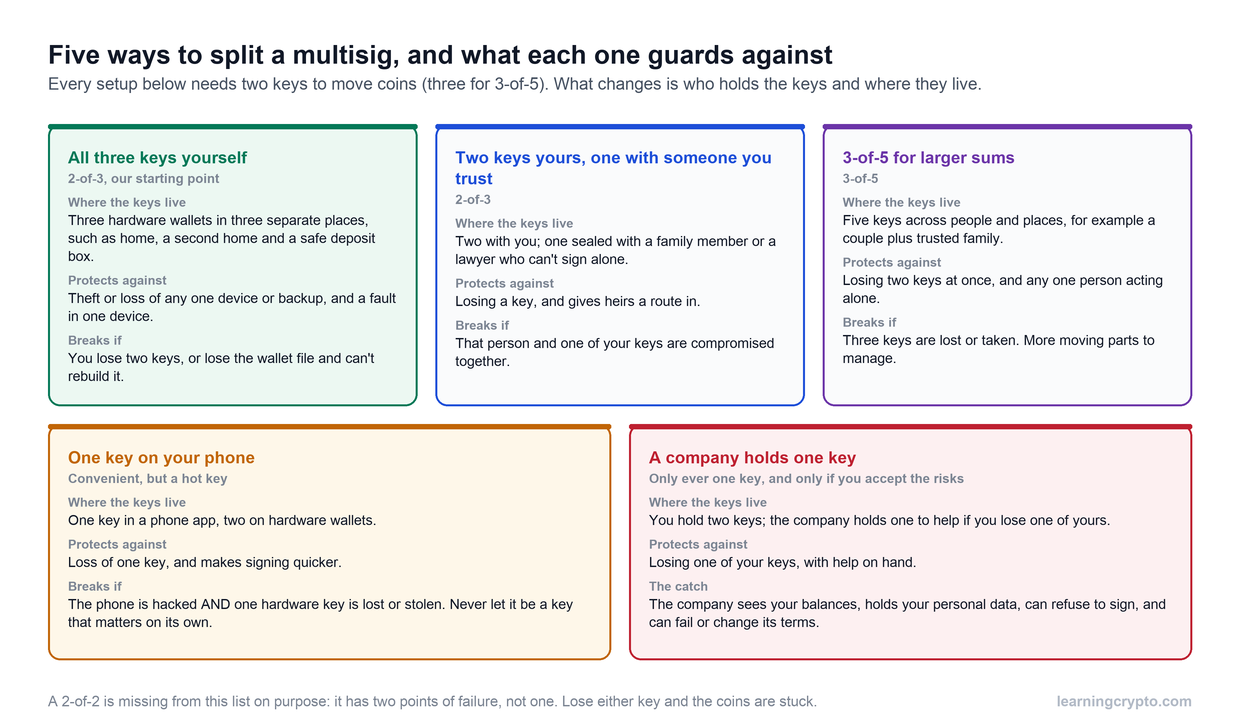
✘ Keeping all funds in one wallet: a single point of failure is the biggest risk of all.
Wrapping Up on the Difference Between Hot and Cold Wallets
The cold wallet vs hot wallet choice comes down to matching the right tool to what you're doing. Hot wallets keep you moving fast, cold wallets keep you sleeping soundly. Most people end up using both.
Want to build on what you've learned here?
Learning Crypto combines AI-powered learning with real-time portfolio tracking to help you invest smarter.
Get personalized answers from our AI assistants Tobo and Heido, monitor your investments with professional tracking tools, and access expert market analytics - all in one place.
Get Started with Learning Crypto today →
FAQs
What's better for beginners: hot wallet or cold wallet?
Beginners should start with a reputable hot wallet, such as Trust Wallet or Coinbase Wallet, to learn the basics without incurring upfront costs. Once you're comfortable with sending, receiving, and managing crypto and once your holdings reach $1,000 or more, add a hardware cold wallet for your long-term stack. Starting with only a cold wallet creates unnecessary friction while you're still learning,
Do I need a different wallet for every cryptocurrency?
Not necessarily. Many wallets support multiple blockchains, but no wallet handles every chain. You'll probably end up with 2-4 different wallets: a multi-currency cold wallet for main holdings, a general-purpose hot wallet for daily use, and possibly specialized wallets for specific ecosystems you participate in frequently.
Can I transfer cryptocurrency from a hot wallet to a cold wallet at any time?
Moving funds between hot and cold wallets is just a standard blockchain transaction. The only “timing” factor to consider is network fees. But there’s no limit, cooldown, or penalty for shifting your funds into colder storage whenever you choose.
Can my cold wallet be infected if my hot wallet is compromised?
Not directly. Even if your computer or phone is compromised, a hardware wallet keeps the keys isolated. Just verify every transaction on the device screen.
This guide is part of stage 3 of 8, holding it safely, in the free Learning Crypto curriculum. Next: What Is a Seed Phrase and Why It's Critical to Crypto Security.
Keep learning
- How to turn an old phone into a hardware wallet, and when to just buy one
- What Is a Hot Wallet in Crypto? Benefits and Risks Explained
- Coinbase vs Kraken: Key Differences for Crypto Traders
- Arbitrage Trading in Crypto: How to Profit from Price Differences
- More guides in the Fundamentals hub
- Members: Ask Crypto AI, ask it any beginner question, privately