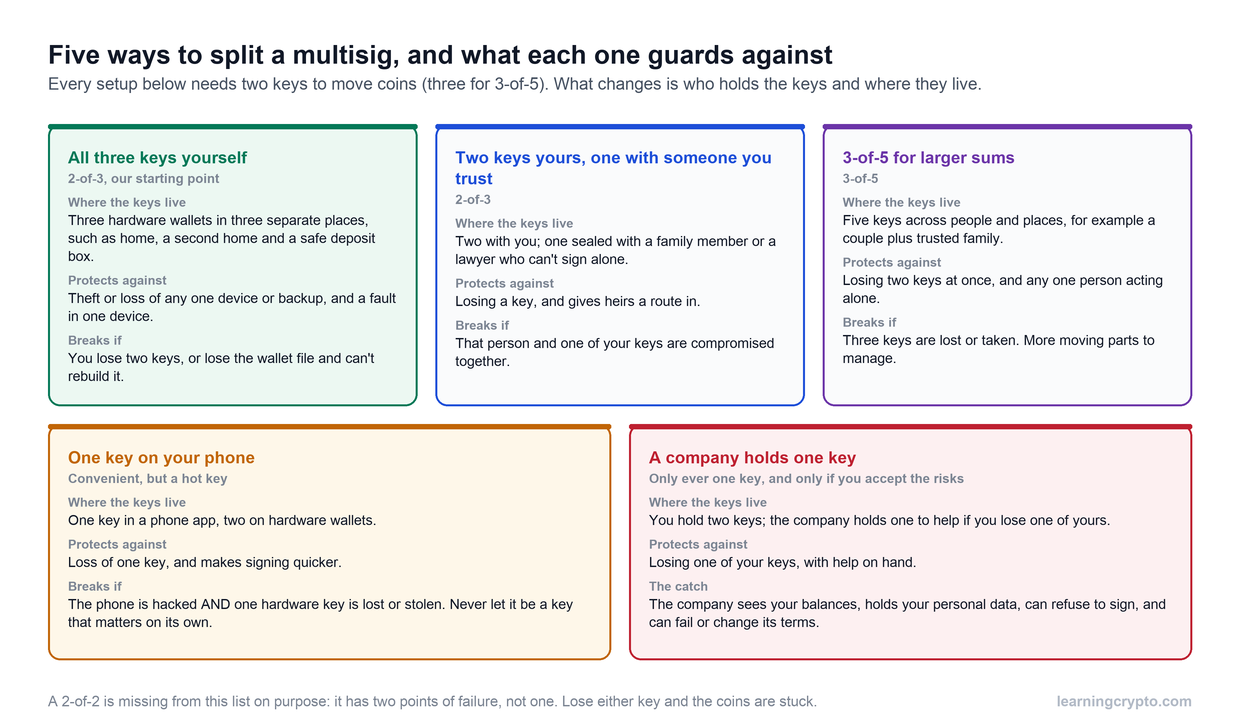

A multisig wallet needs more than one key to move your coins, so no single lost, stolen or faulty key can empty it. The good news is that you can set one up yourself in an afternoon, with free software and the hardware wallets you may already own, and without handing a key to anyone. This guide covers both routes: a 2-of-3 Bitcoin multisig built in Sparrow, and an Ethereum multisig built with Safe. If you are still deciding whether you need multisig, or how to split the keys, start with our guide to multisig setups.
Disclosure: we earn affiliate commission from Trezor and Ledger through links in our videos. Neither Sparrow nor Safe pays us. This is education, not personalised security advice. Steps and product details were checked on 30 September 2026, and apps change their menus from time to time.
What do you need before you start?
- Three hardware wallets. Each one will hold one key. Ideally they come from three different makers, so a flaw in one maker's firmware can only ever reach one key. Trezor devices work well as keys; pair them with hardware wallets from other makers.
- Metal backups. One set of recovery words per device, each stored in a different place.
- The coordinating app. For Bitcoin, Sparrow, a free desktop wallet. For Ethereum, Safe, used in a browser or its mobile app. Download both only from their official sites.
- A small test amount. You will send a little in and out before trusting the setup with savings.
- A decision on the threshold. 2-of-3 is the right choice for most people: it survives losing one key and stops a thief with one key. A 2-of-2 has two points of failure and is best avoided.
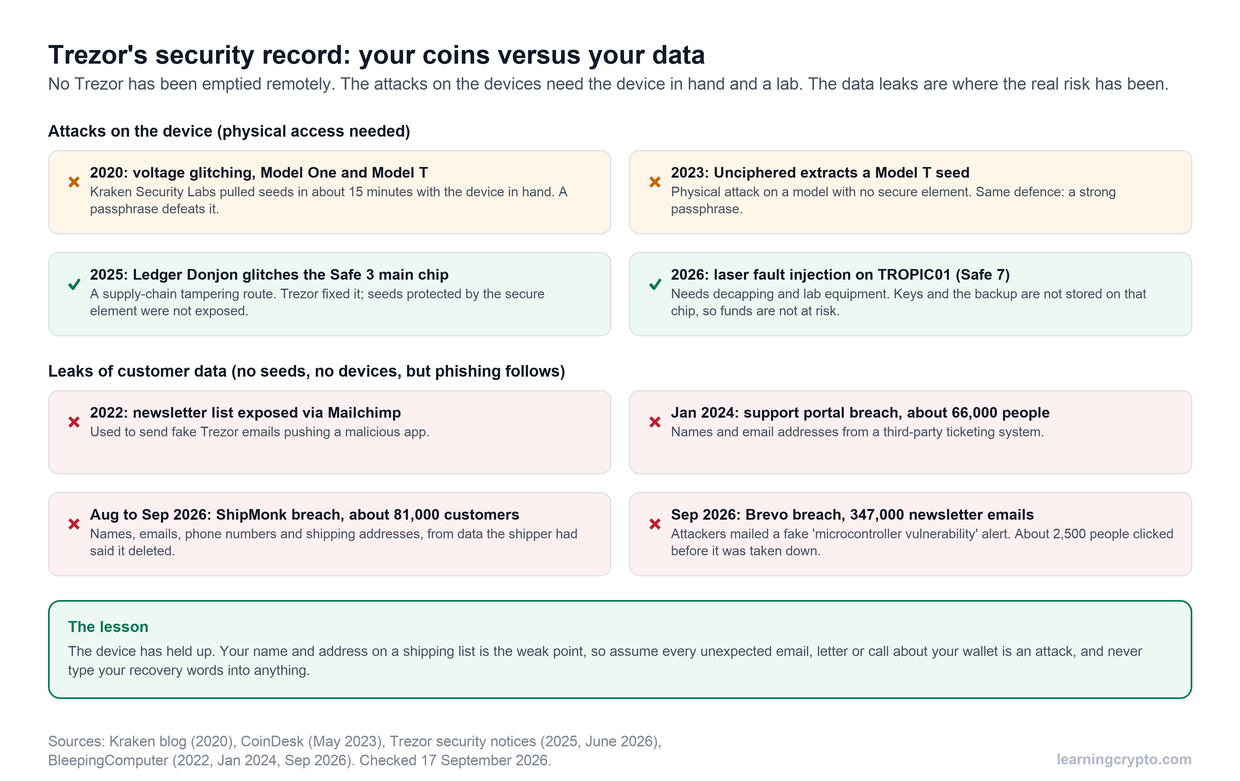
One thing to know up front: Trezor Suite, Trezor's own app, does not create or manage multisig wallets. That is not a problem. Your Trezor acts as one of the keys, and Sparrow or Safe coordinates the signing. Trezor's own multisig guide describes the same approach.
How do you set up a Bitcoin multisig in Sparrow?
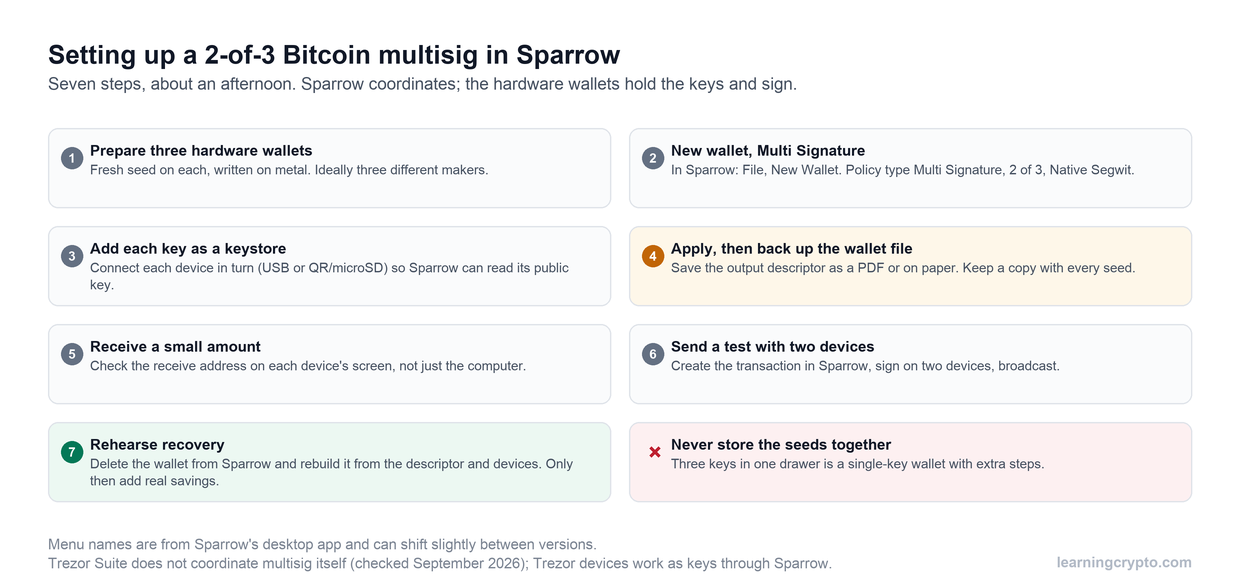
The Bitcoin route at a glance. Step 4, backing up the wallet file, is the one people skip and later regret.
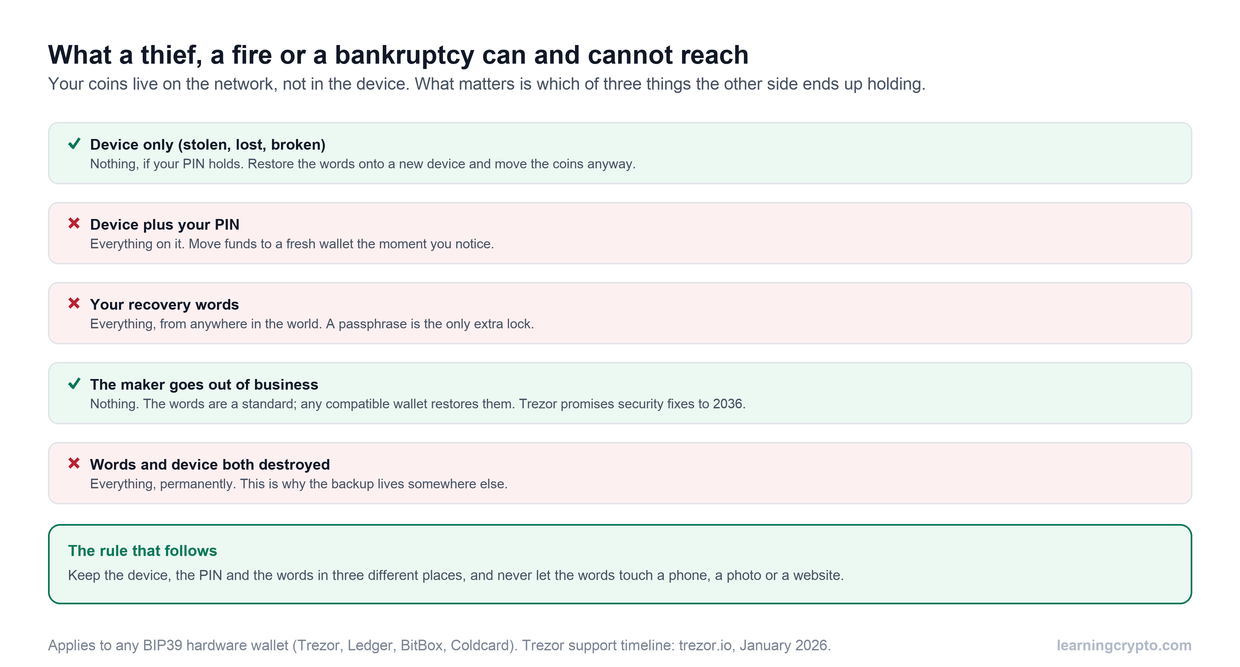
- Prepare each hardware wallet. Set up each device as new, so it creates its own recovery words, and write each set on metal. Never reuse one set of words across devices, and never type recovery words into a computer.
- Create the multisig wallet. In Sparrow, choose File, then New Wallet, and give it a name. Set the policy type to Multi Signature, move the slider to 2 of 3, and leave the script type on Native Segwit.
- Add each key. Sparrow shows three keystore tabs. For each one, connect a device by USB and choose Connected Hardware Wallet, or use Airgapped Hardware Wallet for devices that work by QR code or microSD card. Close Trezor Suite first, because only one app can talk to the device at a time. Sparrow reads each device's public key; the private keys never leave the devices.
- Apply, then back up the wallet file. Click Apply and set a password for the wallet file on your computer. Sparrow then offers a backup of the output descriptor, the text that records all three public keys and the 2-of-3 rule. Save it as a PDF or print it, and keep a copy with every set of recovery words. You can export it again later from the Settings tab.
- Receive a small amount. Go to Receive and use Display Address to show the address on a connected device's screen. Check it matches what Sparrow shows before sending anything to it.
- Send a test with two devices. Create a transaction in the Send tab, then sign it with two of the three devices. Check the amount and destination on each device's screen, then broadcast.
- Rehearse recovery. Delete the wallet from Sparrow, then rebuild it by importing the descriptor (File, Import Wallet) and confirming the balance appears. Only once that works should you move real savings across.
Multisig transactions on Bitcoin are a little larger than single-key ones, so fees are slightly higher. For long-term savings that you rarely move, the difference is small.
How do you set up an Ethereum multisig with Safe?
Ethereum has no built-in multisig, so it uses a smart-contract account instead. Safe is the standard, securing more than $60 billion across more than 57 million deployed accounts, according to its own figures. It works on Ethereum and many compatible networks, and it handles tokens as well as ETH. The owners, called signers, are ordinary wallets; the Safe is the account they control together.
- Prepare your signer wallets. Each signer is a separate wallet, ideally on its own hardware wallet from a different maker. You will need each signer's address.
- Connect a signer. Open the Safe app and connect your first signer. A hardware wallet can connect through a browser wallet such as MetaMask or Rabby with the device attached, or through WalletConnect.
- Create the Safe. Choose Create account, pick the network, give the Safe a name (Safe stores it only on your computer), then add the other signer addresses and set the threshold, for example 2 of 3. Safe's help centre warns that if you cannot reach enough signers to meet the threshold, you cannot recover the assets.
- Deploy it. You can pay the network fee to deploy now, or choose to pay later with your first transaction. Safe does not charge a fee to create or hold an account; some optional in-app features, such as swaps, can carry fees.
- Send a test. Send a small amount in, then create an outgoing transaction. One signer proposes and signs it, a second signer confirms, and then it executes.
- Record the Safe itself. Write down the Safe's address, the network it lives on, the threshold and the signer addresses, and keep that note with each set of recovery words.
One detail catches people out. A Safe exists on the network where you deployed it. The same address on another network is a separate account until you deploy it there too, so never send funds to your Safe address on a network where you have not set it up.
What did the Bybit hack teach about signing?
Multisig stops a single stolen key, but it cannot stop you and your co-signers approving the wrong transaction. That is what happened in February 2025, when about $1.5 billion was taken from the exchange Bybit's Safe. Attackers had broken into a Safe developer's computer and planted code in the Safe website, which showed Bybit's signers a normal-looking transfer while asking them to sign something else entirely. The signers approved it on their hardware wallets without being able to read what they were signing, a practice known as blind signing. NCC Group's technical analysis sets out how the attack worked. Safe has since rebuilt its infrastructure and added extra checks.
The lesson applies to every multisig, on any network:
- Read the transaction on the device screen, not the computer screen. The device is the only part a website cannot fake.
- If the device shows a hash or data you cannot read, compare it with what the app says you are signing, or check it with a second, independent tool. If you can't confirm it, don't sign.
- Use transaction simulation where the app offers it, so you can see what will actually happen before you approve.
- Never rush. An urgent request to sign is a warning sign in itself.
What must you back up?
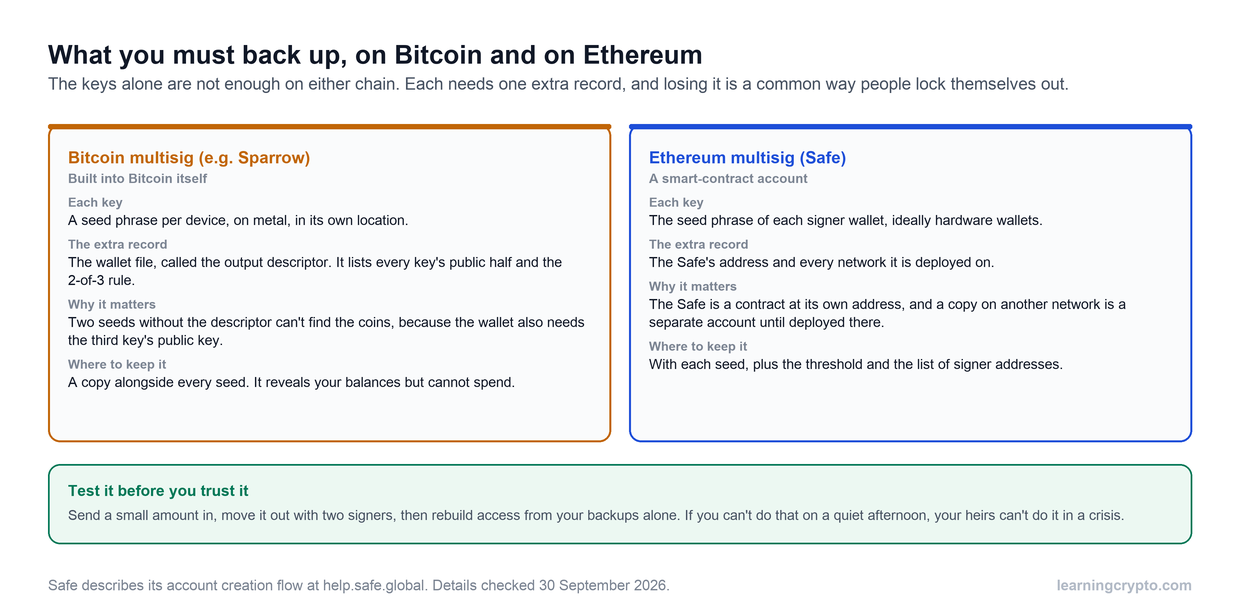
Neither network is covered by the keys alone. Each needs one extra record.
On Bitcoin, the recovery words for two keys are not enough on their own. The wallet is defined by all three keys together, so to find your coins you also need the descriptor, which holds the third key's public half. The descriptor cannot spend anything; its only risk is that it reveals your balance to whoever reads it. That is why it belongs next to each set of words, in every location.
For an Ethereum Safe, your signers' recovery words let you sign, but you also need to know which Safe you are signing for. Record the Safe's address, the networks it is deployed on, the threshold and the signer addresses. Then spread the keys: three sets of words in three places, never together. Our multisig operational playbook covers the routine of running a multisig over time, and the crypto inheritance plan shows how to leave clear instructions for your family.
What mistakes should you avoid?
- Losing the wallet file. The single most painful multisig mistake. Keep the descriptor, or your Safe details, with every set of words.
- Keeping the keys together. Three sets of recovery words in one drawer is a single-key wallet with extra steps.
- Skipping the recovery test. A backup you have never restored is a hope, not a backup.
- Trusting the computer screen. Check addresses and amounts on the device, every time.
- Using one maker for most keys. If two of three keys share a maker, one firmware flaw could reach the threshold, as the 2026 Coldcard drain showed.
- Using a 2-of-2. Losing either key locks the coins. Use 2-of-3.
- Sending to your Safe on the wrong network. Deploy the Safe on a network before you send anything to it there.
Members can keep a multisig in view alongside every other wallet, without connecting a key, through the Portfolio Tracker. More guides are in the Wallets and Custody hub.
Frequently asked questions
What is the easiest way to set up a multisig wallet?
For Bitcoin, Sparrow with three hardware wallets is the most straightforward route you control entirely: create a Multi Signature wallet, add each device as a key, and back up the descriptor. For Ethereum and compatible networks, Safe walks you through adding signers and choosing a threshold. Either can be done in an afternoon. Practise with a small amount before moving savings.
Can I use a Trezor in a multisig?
Yes. A Trezor can be one of the keys in a Bitcoin multisig coordinated by Sparrow or Electrum, and it can be a signer on an Ethereum Safe through a browser wallet such as MetaMask or Rabby. Trezor Suite itself does not create multisig wallets, so you use it to set up and update the device, then close it while Sparrow is connected.
How much does a multisig wallet cost?
The software is free. Sparrow costs nothing, and Safe does not charge to create or hold an account. You pay the network's fees: Bitcoin multisig transactions are slightly larger than single-key ones, and a Safe costs gas to deploy and use. The main cost is the hardware wallets, one per key, plus metal backups for each set of recovery words.
What happens if Sparrow or Safe disappears?
Your coins stay where they are, on the network. A Bitcoin multisig can be rebuilt in other wallets that support descriptors, such as Electrum or Bitcoin Core, using your descriptor and two keys. A Safe is a smart contract that lives on the network itself and its code is open source, so its signers can still reach it through other interfaces.
What if one of my hardware wallets breaks?
In a 2-of-3, you can still sign with the other two. Restore the broken device's recovery words onto a new device if you want to keep the same setup, or better, create a fresh key and move the coins to a new multisig. Unless the device was lost or stolen, restoring the words is fine. If it was, move the coins promptly.
Is Safe secure after the Bybit hack?
The Bybit theft came from a compromised Safe developer computer and a tampered website, not from a flaw in the Safe smart contracts. Safe rebuilt its infrastructure and added checks afterwards. The lasting lesson is about signing: verify every transaction on your hardware wallet's screen, use simulation, and never approve anything you cannot read, whichever app you use.
This guide is part of stage 3 of 8, holding it safely, in the free Learning Crypto curriculum. Next: Crypto Inheritance: How to Pass On Your Crypto Safely.
Keep learning
- Multisig Explained: How to Split Your Bitcoin Keys and Why It Matters
- Multisig Operational Playbook: A Guide to Secure Shared Crypto Custody
- Crypto Inheritance: How to Pass On Your Crypto Safely
- How to Use Cold Wallets for Crypto Like a Pro (Step-by-Step)
- Is Trezor Safe? The Honest Record for the Safe 3, Safe 5 and Safe 7
- More guides in the Wallets and Custody hub
- Free headlines: the Learning Crypto news feed on Telegram