
The two questions we have answered most often in nine years of wallet videos are "what if someone steals my hardware wallet?" and "what if Ledger or Trezor goes out of business?". The answers are reassuring, but only if you set the wallet up properly, so this guide covers both the mechanics and the setup. It is for anyone who owns a hardware wallet or is about to, and who wants to know exactly which mistakes are recoverable and which are not.
Education, not advice. The principles apply to any wallet that uses the BIP39 standard for recovery words, which includes Trezor, Ledger, BitBox, Coldcard and most others. Product support dates were checked on 17 September 2026.
Where is your crypto actually stored?
On the blockchain, recorded against an address. The hardware wallet never contains a coin; it contains the private key that can sign a transaction from that address, and it keeps that key in a chip that never reveals it. The recovery words you wrote down at setup are that key in a different form: 12 or 24 words from a fixed list that any compatible wallet can turn back into the same keys and the same addresses.
That means there are three things in play, not one: the device, the PIN that opens it, and the words. Who ends up holding which of them decides everything below. Our guide to what a seed phrase is covers the standard itself.
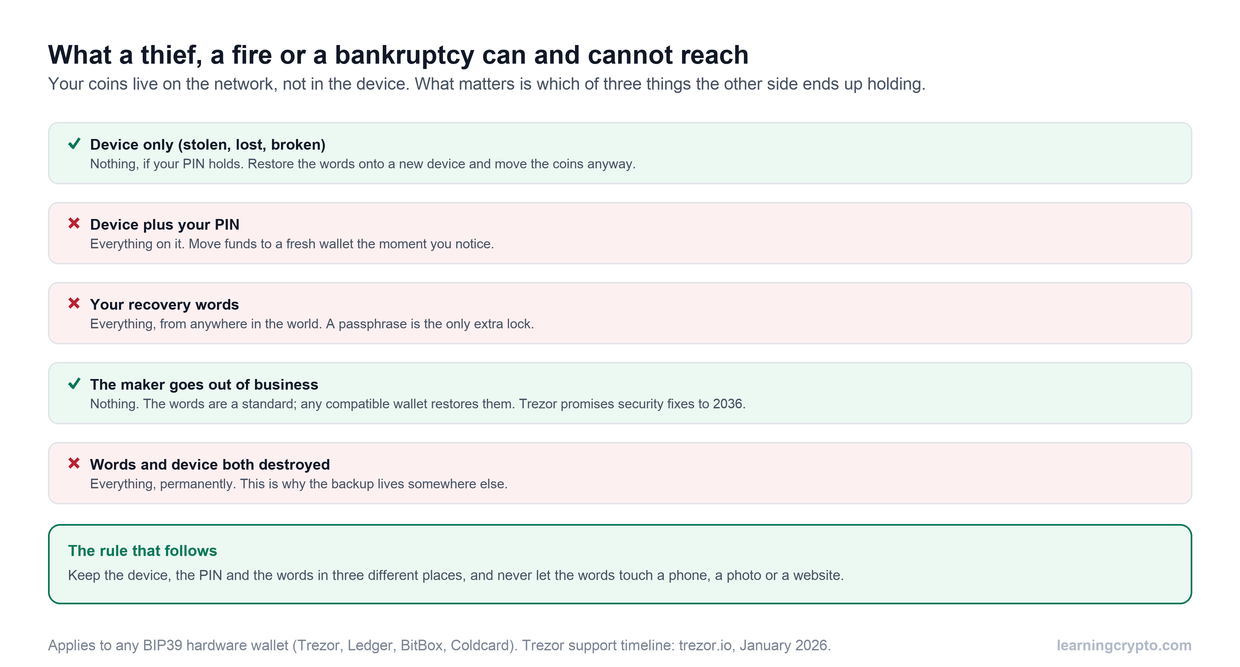
The device on its own is the least valuable of the three things. The words are the most valuable, which is why they never travel with the device.
What happens if someone steals the device?
With the device alone, a thief has a locked box. Every current hardware wallet wipes itself or slows to a crawl after repeated wrong PINs, and the models we recommend keep the PIN check inside a secure element, so the older trick of extracting the key with lab equipment no longer works on them. Trezor's Safe 3, Safe 5 and Safe 7 and every current Ledger have this; older Trezor Model One and Model T devices do not, and with those a strong passphrase is the protection.
What you do next matters more than the theft:
- Get a new device, or use a temporary software wallet on a clean computer, and restore your words onto it.
- Create a brand new wallet with new words on the new device.
- Send everything from the restored old wallet to the new one, in a small test amount first.
- Only then relax. The thief now holds a key to empty addresses.
If the thief also has your PIN, because you kept it with the device or they watched you enter it, skip to step one immediately and treat it as an emergency. Heidi's 2020 video below walks through the three layers with a Ledger.
Heidi on the three things that protect a hardware wallet, why the words and the device must never be stored together, and the case for owning a second device as a spare. Recorded in 2020; the principles have not changed. Watch it on our CryptoTips channel.
What happens if the device is lost or destroyed?
The same as theft, without the urgency. Restore the words onto a new device and carry on; you can even restore onto a different brand. The gap to plan for is the wait: in the 2021 bull market both makers had order backlogs of weeks, and a lost device meant weeks without access. A second device from the same maker, set up from the same words and kept elsewhere, removes that gap for the price of the device. Many long-term holders keep one for exactly this reason.
Fire and flood are the case people forget, because they can take the words and the device at the same time if both live in the same drawer. Stamped or engraved metal backups survive a house fire; paper does not. Wherever the words live, the device should not.
What happens if Trezor or Ledger goes out of business?
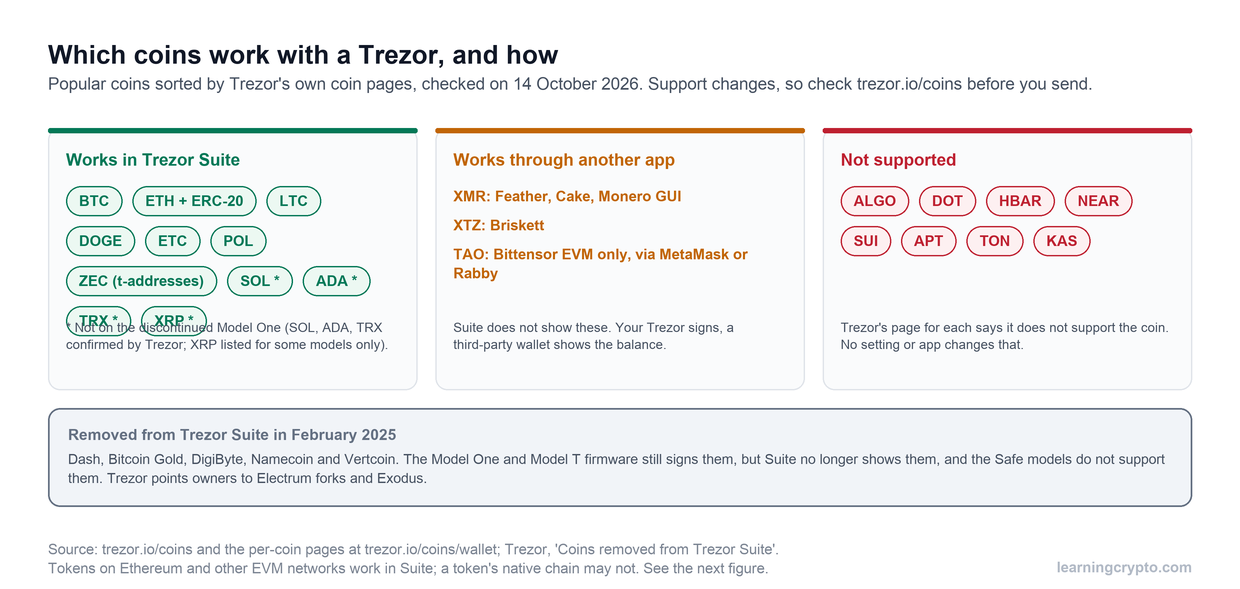
Nothing happens to your coins. They were never with the company. The recovery standard is open, the derivation paths are documented, and your words restore into any compatible wallet whether or not the maker exists. Trezor's firmware is fully open source, so the software could be maintained by others; Ledger's device apps and desktop software are open even though its secure element code is not.
The realistic risk is the end of support rather than bankruptcy. Ledger stopped software updates for the original Nano S in 2025. Trezor removed the Model One and Model T from sale in January 2026 but has promised critical security fixes until at least 2036. When a device reaches the end of its life, the migration is the same as after a theft: restore, create new, move.
Why BIP39 is your safety net, how to restore into a software wallet that covers as many of your coins as possible, and why a seed typed into any computer should be treated as exposed afterwards. Watch it on our CryptoTips channel.
What happens if you lose the recovery words?
As long as the device works and you know the PIN, you can still move the coins, so do that first: create a new wallet, write down its new words properly, and transfer everything. Do not keep using a wallet whose backup is missing; the next device failure would be permanent. If the device is gone too, and there is no passphrase-protected copy anywhere, the coins are unrecoverable. No company, no court order and no recovery service can produce a key that only ever existed in your handwriting.
This is the failure that actually loses money, far more often than theft, and the fix is boring: two copies of the words on metal, in two places, checked once a year by restoring onto a spare device.
What if someone gets the words?
Then they have everything, from anywhere, without the device. Treat it as a theft in progress: move the coins to a new wallet immediately. Because the words are the target, they are what every scam is built around. A fake support agent, a fake firmware alert, a fake wallet app and a fake letter from the manufacturer all end with the same request. Trezor and Ledger have both had customer data leaked by suppliers, which is why those messages arrive at all. No legitimate process ever needs your words typed into anything; our guide to fake crypto support scams shows how the approaches are written.
A passphrase, the optional extra word, is the one defence that survives the words being exposed. With one set, the 24 words alone open an empty decoy wallet, and the real one needs the passphrase too. Store it separately from the words, and never lose it, because it is not recoverable either.
What about the Coldcard case, where nothing was stolen?
In July 2026 thousands of Bitcoin wallets created on Coldcard devices were emptied without any device, PIN or words being taken, because a firmware bug had generated the words with too little randomness since 2021. The attacker simply listed the possible words. It is the one scenario this guide's layers cannot describe, and the lesson is the one Trezor gave its own users: if you created your words on an affected device, restoring them onto a new device does not help, because the weakness is in the words. Create a new wallet and move the coins. Our Trezor safety review covers why other makers were not affected.
The setup that makes all of this survivable
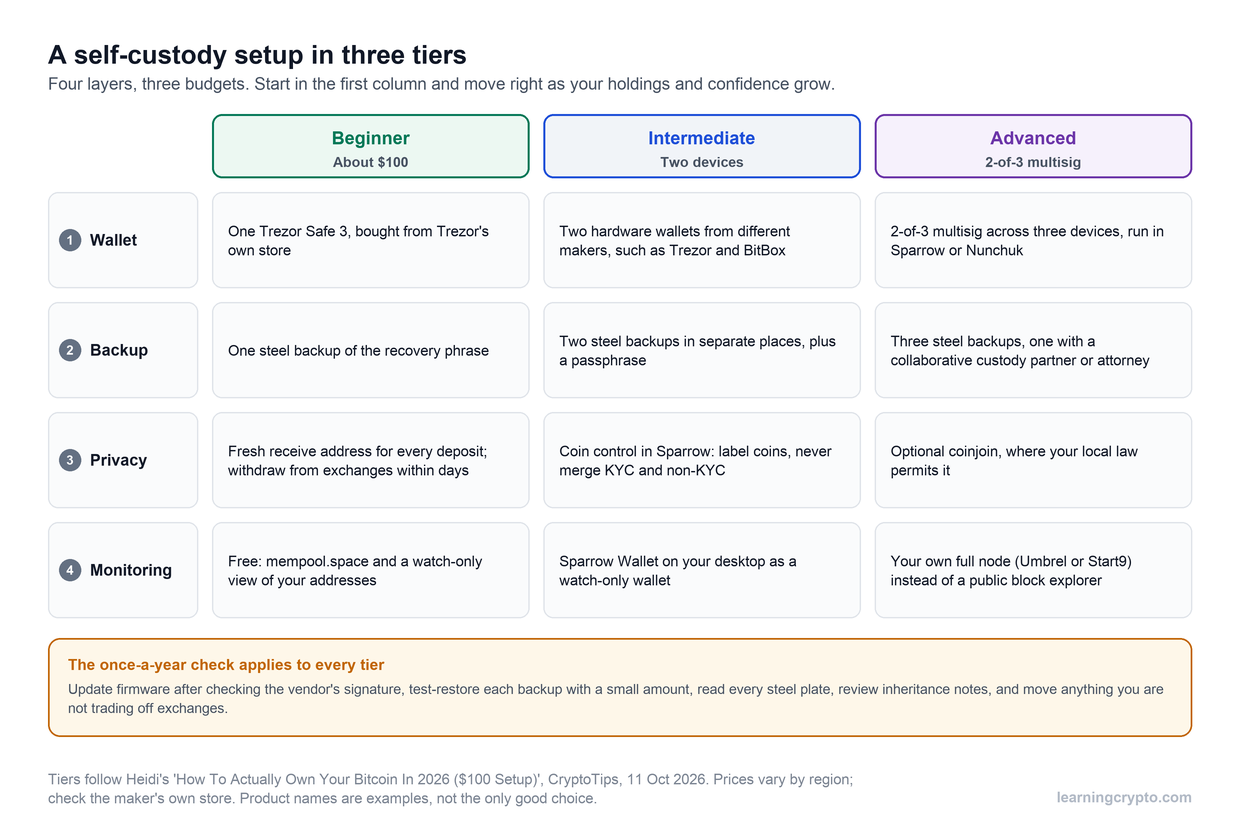
- Words on metal, two copies, two places, never on a phone, a photo or a cloud.
- Device, PIN and words kept apart.
- A passphrase for any balance that would hurt to lose, stored separately again.
- A spare device, or at least a plan for the wait.
- A yearly restore test, so you know the backup works before you need it.
Our guide to how to use a cold wallet covers the first setup step by step, and for larger sums the multisig operational playbook spreads the risk across devices. Members can keep every wallet in view without touching a key through the Portfolio Tracker. More guides are in the Wallets and Custody hub.
Frequently asked questions
Can someone steal my crypto if they steal my hardware wallet?
Not with the device alone. They would need your PIN, and current devices from Trezor and Ledger lock the PIN check inside a secure element and wipe after repeated failures. Restore your recovery words onto a new device anyway, create a fresh wallet and move the coins, so the stolen device holds a key to empty addresses. Older Trezor Model One and Model T devices need a passphrase to be safe if stolen.
What happens to my crypto if Ledger goes out of business?
Nothing. Your coins are on the blockchain and your recovery words follow the open BIP39 standard, so they restore into any compatible wallet, including a Trezor or a software wallet, whether or not Ledger exists. Ledger's desktop software and device apps are open source. The practical risk is loss of software support, as happened to the original Nano S in 2025, and the answer is to migrate to a supported device.
Can I recover a hardware wallet without the seed phrase?
Only while the device still works and you know the PIN: create a new wallet with new words and move the coins there immediately. If the device is lost or broken and the words are gone, there is no recovery. No manufacturer holds a copy, and no service can regenerate words that existed only on your paper. This is the most common way people lose crypto.
Should I restore my Ledger seed onto a Trezor?
You can, because both use the BIP39 standard, and it is a sensible emergency step. Do not stop there. A seed that has been typed into a second device or a computer should be considered exposed, so after restoring, create a new wallet on the new device and transfer the coins to it. If you are switching brands permanently, that is the moment to start with fresh words.
Is a second hardware wallet worth buying?
For most holders, yes. A spare device set up from the same words and kept in another place removes the wait for a replacement if one is lost or broken, and it lets you test your backup once a year by restoring onto it. It costs the price of an entry-level device and removes the single largest gap in most people's recovery plan.
What is a passphrase and does it protect against theft?
A passphrase is an optional extra word or sentence added to your recovery words that creates a separate hidden wallet. Anyone who obtains only the words opens an empty decoy. It protects against both device theft and exposure of the words, but it is not stored anywhere, so losing it loses the hidden wallet. Store it apart from the words and test it before moving funds.
Keep learning
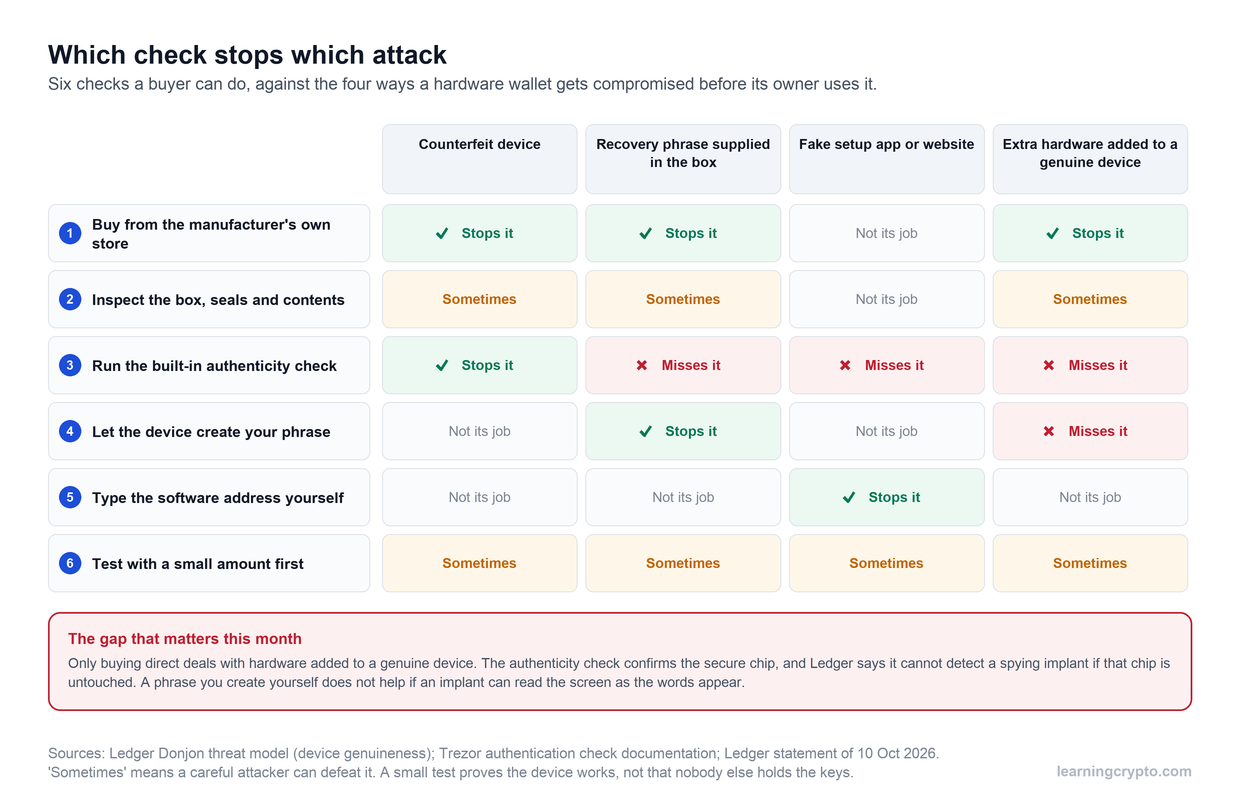
- How to check a hardware wallet is genuine, and what the checks miss
- How to turn an old phone into a hardware wallet, and when to just buy one
- Multisig explained: how to split your keys and why it matters
- What Is a Seed Phrase and Why It's Critical to Crypto Security
- Is Trezor Safe? The Honest Record for the Safe 3, Safe 5 and Safe 7
- Trezor vs Ledger (2026): Which Hardware Wallet Should You Trust?
- Multisig Operational Playbook: A Guide to Secure Shared Crypto Custody
- More guides in the Wallets & Custody hub
- Members: Portfolio Tracker, see all your wallets in one place