
Trezor vs Ledger: Which Hardware Wallet Should You Choose?

26 min read

TL;DR Choosing between Trezor and Ledger is a choice between two industry giants, each with a distinct philosophical approach to security. 

Ledger is often preferred by users who prioritize a highly polished, all-in-one software experience, broad altcoin support, and the time-tested physical security of a certified Secure Element chip. 

Trezor appeals to users who value open-source transparency, community auditability, and advanced self-custody features, such as Shamir Backup, especially now that its newer models have also incorporated a Secure Element. 

For beginners, both are excellent options, but Ledger offers a slightly smoother entry into the broader crypto ecosystem, while Trezor provides greater peace of mind for the security-conscious user.


When you think about hardware wallets, two names tower over the industry: Ledger and Trezor. Between them, they've shipped millions of devices and secured billions in cryptocurrency holdings. 

What makes this comparison interesting is that they've taken completely opposite approaches to solving the same problem.

We've spent time with both manufacturers' current lineups, compared their security architectures, and tracked their real-world track records. 

This guide isn't so much about picking a winner. Both companies make legitimate hardware wallets that blow hot wallets and exchange storage out of the water.  But they appeal to different types of crypto holders, and understanding why you'd choose one over the other matters when you're trusting a device with serious money.

What You’ll Learn

  • Why Ledger's Secure Element chips and Trezor's open-source code represent fundamentally different security philosophies, and which matters more for your threat model

  • How the 2020 Ledger customer data breach and Trezor's physical attack vulnerabilities actually impact your crypto security (spoiler: neither compromised funds)

  • Which wallet wins for Bitcoin maximalists versus altcoin collectors

  • Whether closed-source Secure Element firmware is a dealbreaker for true crypto custody

  • Which models offer Bluetooth connectivity and touchscreens, and whether these features matter for security

  • How Ledger Live compares to Trezor Suite for portfolio management and everyday crypto tasks

Trezor vs Ledger: Which Hardware Wallet Should You Choose?

Trezor vs Ledger: Quick Comparison

Feature

Ledger (S Plus, X, Flex, Stax)

Trezor (Model One, T, Safe 3/5/7)

Founded

2014 (France)

2013 (Czech Republic)

Open-Source

(Software only)

Fully open-source (firmware & hardware)

Secure Element

All models

Only on Safe series (Safe 3, 5, 7)

Touchscreen

(Stax only)

(Model T, Safe 5, Safe 7)

Wireless Connectivity

((Nano X = Bluetooth; Flex = NFC)

Safe 7 only (Bluetooth + Qi wireless)

Native App

Ledger Live

Trezor Suite

Coin Support

5,500+

8,000+

Ideal For

Altcoin users, mobile-first, polished UX

Bitcoiners, open-source advocates, security geeks

Note: Check manufacturer websites for current pricing, as models and costs are subject to change regularly.

Company Background and Track Record

Ledger: Security-First Since 2014

Trezor vs Ledger: Which Hardware Wallet Should You Choose?

Ledger launched in Paris in 2014, founded by security experts who wanted to bring bank-grade protection to cryptocurrency storage. The strategy worked. Today, Ledger has sold over 6 million devices worldwide and serves more than 8 million users.

The company's approach: proprietary Secure Element chips, the same technology protecting passports and credit cards, adapted for crypto security.

Security Track Record

The good news: Ledger devices have never been successfully hacked in the wild. No user has lost funds due to a device vulnerability in over a decade of real-world use.

The bad news: In 2020, hackers breached Ledger's e-commerce database, exposing personal information of roughly 270,000 customers:

  • Email addresses, phone numbers, and physical addresses leaked

  • No cryptocurrency or seed phrases compromised

  • Led to targeted phishing campaigns and physical threats

  • Damaged trust in Ledger's data handling practices

Ledger has since improved data security and now offers options to purchase without creating an account.

The Ledger Recover Controversy

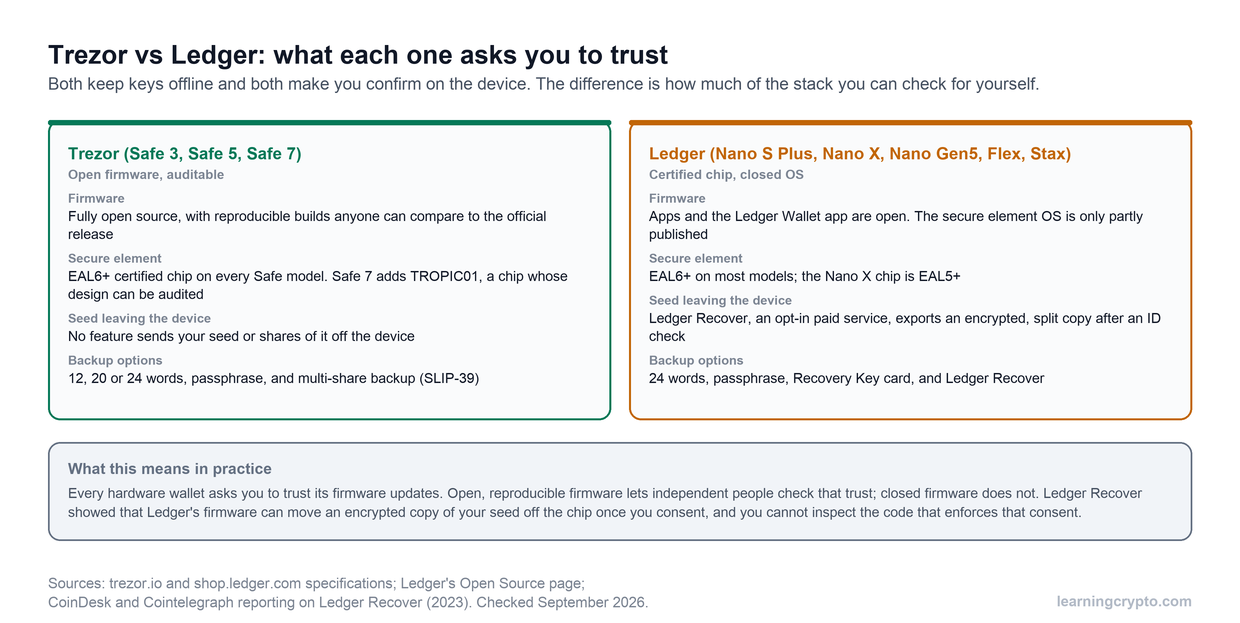
Mid-2023 brought a bigger trust crisis. Ledger announced Ledger Recover, an optional cloud backup service that would split seed phrases into encrypted shards stored with third-party custodians.

The community exploded. Thousands voiced concerns about potential backdoors, even though the feature was opt-in. Many long-time users jumped ship to competitors.

Ledger postponed the launch and open-sourced parts of the firmware. By late 2025, they'd pivoted to the Recovery Key, a PIN-protected physical smartcard with no cloud storage. Much better received.

Trezor: The Original Hardware Wallet

Trezor vs Ledger: Which Hardware Wallet Should You Choose?

Trezor invented the hardware wallet category. SatoshiLabs launched the Trezor One in 2014, making it the world's first commercially available crypto hardware wallet.

Their philosophy from day one was that of complete open-source transparency. Every line of code, every circuit diagram, every security decision made public for community scrutiny. This aligned perfectly with crypto's trustless ethos.

Security Track Record

The good news: Trezor has never experienced a customer data breach. Their minimal data collection approach meant there was simply less to steal.

The challenge: older Trezor devices (One and Model T) were vulnerable to physical attacks. With the device in hand, expensive lab equipment, and considerable expertise, attackers could extract seed phrases.

Trezor's response was characteristically transparent:

  • Acknowledged the limitation openly

  • Recommended strong passphrases as additional protection

  • Worked toward hardware improvements

The vulnerability was well-known but considered an acceptable tradeoff for complete transparency. No widespread exploitation occurred in practice.

The Safe Series Evolution

The 2024-2025 Safe series launch changed everything. All new models include Secure Element chips while maintaining full open-source firmware:

  • Safe 3, Safe 5, Safe 7 all feature EAL6+ certified Secure Elements

  • Safe 7 introduces TROPIC01: world's first open-source auditable Secure Element

  • Physical security vastly improved without sacrificing transparency

Trezor essentially closed the gap critics had pointed to for years.

The Philosophical Difference

The Ledger vs Trezor debate comes down to trust models:

Ledger's approach: Trust our expertise and certifications. Our Secure Element chips use battle-tested technology from passports and credit cards. The firmware is closed-source, so you can't verify what it's doing, but we've proven it works.

Trezor's approach: Trust the open-source community's ability to audit and verify. Everything is transparent and checkable. We've now added Secure Elements while keeping everything auditable.

Both have proven secure in practice for over 10+ years. Neither has seen users lose funds due to device exploitation in everyday use. The choice often reflects your personal philosophy about security and trust.

Security Architecture: The Fundamental Difference

This is where Ledger and Trezor diverge most dramatically. They've taken opposite approaches to solving the same problem: how do you protect private keys from every possible attack vector?

Ledger's Secure Element Fortress

Ledger bet everything on specialized hardware. Every Ledger device uses a Secure Element chip certified to Common Criteria EAL5+ or higher. These aren't standard microcontrollers. They're the same chips protecting your passport, credit card, and SIM card.

How it works:

  • Private keys never leave the Secure Element chip

  • The chip has hardware-level tamper resistance

  • Physical attacks trigger self-destruct mechanisms

  • Side-channel attack protections built into silicon

  • PIN attempts are rate-limited by hardware

The Secure Element runs Ledger's proprietary BOLOS operating system. This is where things get controversial: the firmware is closed-source. You cannot inspect the code running on that chip. You have to trust Ledger's implementation.

Ledger's argument: Security through certification plus obscurity. The chips undergo rigorous third-party testing. Publishing the code would give attackers a roadmap. Their Donjon security lab constantly tests their own devices and competitors' to find vulnerabilities.

The critics' concern: Closed-source means you're trusting Ledger completely. You can't verify that there are no backdoors. The Ledger Recover controversy proved the firmware could theoretically export seed data (even if opt-in and encrypted). This violates crypto's trustless principles.

Real-world result: Zero successful remote attacks in 10+ years. No one has extracted seeds from a Ledger without the PIN through any known exploit.

Trezor's Open-Source Transparency

Trezor took the opposite bet: radical transparency over proprietary protection. For a decade, Trezor devices used standard microcontrollers with no Secure Element. Every line of code was public. Anyone could audit, verify, and even build the firmware themselves.

The original approach:

  • All firmware fully open-source on GitHub

  • Hardware schematics published

  • Reproducible builds (verify your device runs published code)

  • Community security auditing

  • Software-based protections instead of specialized chips

The tradeoff: Without a Secure Element, sophisticated physical attacks were possible. Researchers demonstrated seed extraction from Trezor One and Model T using:

  • Voltage glitching to bypass PIN checks

  • Physical chip decapping and memory reading

  • Side-channel analysis

These attacks required physical device access, expensive equipment (thousands of dollars), and considerable expertise. No widespread exploitation ever occurred. But the vulnerability existed.

Trezor's mitigation: Strong passphrases. Even if someone extracted your seed, they'd need your passphrase (stored nowhere on the device) to access funds. This worked but put more responsibility on users.

The Safe Series: Best of Both Worlds

The 2024-2025 Safe series represents Trezor's evolution. They kept complete open-source transparency while adding Secure Element protection.

Safe 3 and Safe 5:

  • Single Secure Element (Infineon OPTIGA Trust M, EAL6+ certified)

  • Firmware remains fully open-source

  • SE handles PIN verification and seed encryption

  • Physical attacks are now as difficult as Ledger

Safe 7's breakthrough:

  • Dual Secure Element architecture

  • TROPIC01: world's first open-source auditable Secure Element chip

  • Second chip: traditional certified Infineon OPTIGA

  • Hardware design published, ROM code verifiable

  • Built on RISC-V open architecture

The TROPIC01 chip is groundbreaking. It provides hardware tamper resistance with full transparency. The community can verify exactly what it does. No black box secrets.

Why dual chips? Defense in depth. If one chip has an unknown vulnerability, the other provides independent protection. One chip is completely auditable (TROPIC01), one has decades of certification history (Infineon). Best of both security philosophies.

Read Our Trezor Safe 7 Review

Physical Attack Resistance: Current State

As of late 2025:

Ledger devices (all models): Extremely resistant to physical attacks. The Secure Element's protections have held up for over a decade. No public demonstrations of seed extraction without PIN.

Trezor Safe series: Now comparable to Ledger. The Secure Element chips in Safe 3/5/7 provide similar physical tamper resistance. The Safe 7's dual-chip approach arguably exceeds Ledger's single-chip design.

Trezor Model One and Model T: Still vulnerable to sophisticated physical attacks if no passphrase is used. These older models remain in circulation, but Trezor is clearly steering new buyers toward the Safe series.

Remote Attack Surface

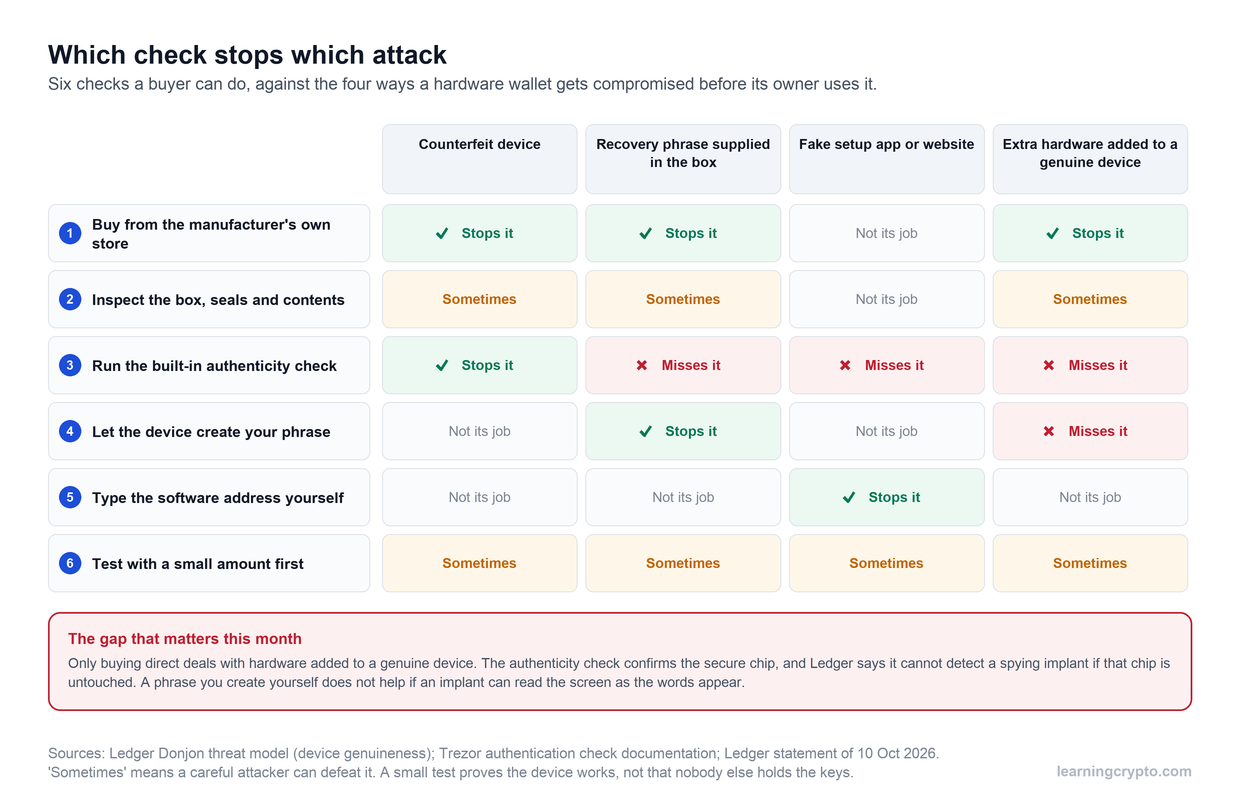
Both companies have maintained excellent records here. Neither device has been remotely compromised through network attacks, malware, or software exploits that would leak keys.

The attack vectors that do exist are user-focused:

  • Phishing websites asking for recovery phrases

  • Fake wallet software

  • Social engineering

  • Compromised USB cables (theoretical, not observed)

  • Man-in-the-middle attacks on unsigned transactions

Both Ledger and Trezor require physical confirmation on-device for every transaction, which neutralizes most software-based attacks.

The Passphrase Layer

Both support BIP39 passphrases (the "25th word"). This creates a completely separate wallet that exists nowhere on the device. Even if someone extracted your seed, they'd need the passphrase to access funds.

Trezor's advantage here: Model T, Safe 5, and Safe 7 let you enter passphrases directly on the touchscreen. More secure than typing on a potentially compromised computer. Safe 3 uses a multi-press system with buttons.

Ledger's approach: You can set a secondary PIN that auto-applies a hidden passphrase, or type it into Ledger Live (less secure). The non-touchscreen models make on-device passphrase entry awkward.

Firmware Updates and Verification

Ledger: Firmware updates are signed by Ledger and verified cryptographically. The device won't accept unofficial firmware. Ledger Live handles updates seamlessly. You're trusting Ledger's signing keys and update process.

Trezor: Firmware updates are signed by SatoshiLabs. However, since everything is open-source, you can compile and install your own firmware if desired. The device warns you if it's running non-official firmware, but it won't brick itself. Power users can verify every update before installing.

Which One Wins?

Trick question. Both work extremely well.

Choose Ledger if you're comfortable with certified security chips and closed firmware, and you trust established security practices used by governments and banks.

Choose Trezor if you want to verify everything yourself, prefer community-audited code, and value the crypto ethos of "don't trust, verify."

The Safe 7's dual-chip approach with an open Secure Element might actually be the most sophisticated security design in any consumer hardware wallet right now. It combines everything: open verification, hardware tamper resistance, and defense in depth.

But Ledger's single Secure Element approach has also proven bulletproof in practice for over a decade.

The real answer is that either device will protect your crypto far better than any exchange or software wallet. The differences matter to security researchers and philosophy nerds. For normal usage, both are excellent.

Trezor vs Ledger Hardware and Build Quality

Security matters, but so does user experience. You'll interact with this device every time you move funds, check balances, or sign transactions. A clunky interface doesn't just annoy you - it increases the chances of mistakes that could cost you money.

What's it actually like to use these things day to day?

Ledger's Lineup: From Budget to Luxury

Ledger Nano S Plus

Trezor vs Ledger: Which Hardware Wallet Should You Choose?

Image via Ledger 

The entry-level workhorse. Small USB stick form factor with a 128x64 pixel OLED screen and two physical buttons. No battery, no Bluetooth - pure wired simplicity.

Pros

✓ Supports 5,500+ cryptocurrencies 

✓ Can hold up to 100 apps simultaneously 

✓ USB-C connection 

✓ Compact and portable 

✓ Budget-friendly entry point

Cons:

✗ Tiny screen makes address verification tedious 

✗ Two-button navigation feels like a 2005 MP3 player 

✗ Entering anything complex is painful 

✗ Desktop-only usage 

✗ Small screen strains eyes

Best for: Budget-conscious users, backup devices, desktop-only usage.

Ledger Nano X

Trezor vs Ledger: Which Hardware Wallet Should You Choose?

Image via Ledger 

The mobile-friendly middle child. Same form factor as the S Plus, but adds Bluetooth 5.0 and a rechargeable battery.

Pros

 ✓ Wireless connection to iOS and Android

 ✓ Battery lasts weeks between charges 

✓ Same 100-app capacity 

✓ Mobile freedom without cables 

✓ Works with Ledger Live app seamlessly

Cons

 ✗ Still uses a tiny screen and two buttons 

✗ Bluetooth concerns for security purists 

✗ Battery will degrade over time 

✗ More expensive than S Plus


Best for: Mobile users who want to manage crypto on the go without cables.

Ledger Flex

Trezor vs Ledger: Which Hardware Wallet Should You Choose?

Image via Ledger 

The mid-tier touchscreen option launched in 2025. Features a 2.8-inch E-Ink display (480x600 pixels, 16-level grayscale) with touch capability.

Pros

 ✓ Way easier to verify addresses

 ✓ Touch interface for navigation 

✓ Bluetooth, NFC, and USB-C connectivity 

✓ Magnetic protective case included 

✓ Can display custom lock screen or NFTs ✓ Excellent battery life with E-Ink


Cons

 ✗ E-Ink refresh slower than LCD 

✗ Grayscale only (no color) 

✗ Mid-tier pricing 

✗ Not as large as Stax


Best for: Users who want easier interaction without Stax's premium price.

Ledger Stax

Trezor vs Ledger: Which Hardware Wallet Should You Choose?

Image via Ledger 

The flagship designed by iPod creator Tony Fadell. Large 3.7-inch curved E-Ink touchscreen (400x670 pixels) in a minimalist frame.

Pros

✓ Biggest display on any mainstream hardware wallet 

✓ Qi wireless charging 

✓ Bluetooth and NFC 

✓ Sleek curved design 

✓ NFT artwork display on lock screen 

✓ Magnetic shell case

Cons

✗ Premium pricing

✗ Plastic body despite luxury price 

✗ Functionally the same as cheaper models 

✗ E-Ink limits animation/video 

✗ Overkill for basic crypto storage


Best for: Premium experience seekers, NFT collectors who want to showcase artwork, people with large portfolios who use their wallet daily.

Trezor's Lineup: From Utilitarian to Advanced

Trezor Model One

Trezor vs Ledger: Which Hardware Wallet Should You Choose?

Image via Trezor

The original hardware wallet, still kicking. Tiny monochrome OLED screen, two buttons, micro-USB or USB-C depending on revision.

Pros

 ✓ Fully open-source 

✓ OG hardware wallet history 

✓ Supports 1,000+ cryptocurrencies 

✓ Simple, no-frills operation

Cons

✗ No Secure Element (older design) 

✗ Some newer coins not supported 

✗ Safe 3 is vastly superior for a similar price 

✗ Limited memory for apps 

✗ Vulnerable to physical attacks without a passphrase


Best for: Extreme budget constraints, Bitcoin-only cold storage.

Trezor Safe 3

Trezor vs Ledger: Which Hardware Wallet Should You Choose?

Image via Trezor

The modern entry-level champion. Compact device with 0.96-inch monochrome OLED and two buttons.

Pros

✓ Secure Element chip (EAL6+) 

✓ Supports 8,000+ coins and tokens 

✓ Shamir Backup support 

✓ Can enter passphrase on device 

✓ Available in multiple colors 

✓ Fully open-source firmware 

✓ Excellent value proposition

Cons

✗ Button navigation not sexy 

✗ Small monochrome screen 

✗ No wireless connectivity 

✗ USB cable required for mobile


Best for: Value seekers, Bitcoin-focused users, anyone who wants open-source security without compromise.

Trezor Model T

Trezor vs Ledger: Which Hardware Wallet Should You Choose?

Image via Trezor

The older premium model. Features a 1.54-inch color touchscreen (240x240 pixels).

Pros

 ✓ Color touchscreen

 ✓ Easier PIN/passphrase entry

 ✓ Touch interface intuitive

Cons

 ✗ No Secure Element 

✗ Likely being phased out 

✗ Poor value vs newer models


Skip this unless you find it heavily discounted.

Trezor Safe 5

Trezor vs Ledger: Which Hardware Wallet Should You Choose?

Image via Trezor

The mid-tier touchscreen option. Similar in size to the Model T, but with upgraded internals.

Pros

✓ 1.54-inch color LCD touchscreen 

✓ Secure Element (EAL6+) 

✓ Touch interface for PIN and passphrase 

✓ Fully open-source 

✓ On-device passphrase entry secure 

✓ Intuitive scrambled PIN keypad

Cons

✗ No Bluetooth or wireless 

✗ Smaller screen than Safe 7 

✗ USB-C cable required 

✗ Plastic construction 


Best for: Users who want easier on-device input but don't need wireless connectivity.

Trezor Safe 7

Trezor vs Ledger: Which Hardware Wallet Should You Choose?

Image via Trezor

The latest flagship model and potential cold storage  game-changer. Large 2.5-inch high-res color touchscreen (520x380 pixels) in an aluminum unibody.

Pros

 ✓ Dual Secure Element architecture

 ✓ TROPIC01 open + Infineon certified

 ✓ Bluetooth 5.0 connectivity

 ✓ Qi wireless charging

 ✓ Premium aluminum construction

 ✓ Haptic feedback on touch 

✓ Large, readable screen 

✓ Quantum-ready security architecture

Cons

 ✗ Just launched, ecosystem maturing 

✗ Higher price point 

✗ Battery to maintain long-term 

✗ Mobile app still developing


Best for: Users who want premium features, cutting-edge security, and full open-source transparency.

Screen Size Matters More Than You Think

Verifying a Bitcoin address on a Nano S Plus's tiny OLED: You scroll horizontally through 42 characters, a few at a time. Easy to miss a character. Takes 30 seconds.

Verifying the same address on a Safe 7 or Stax: The entire address appears on screen. One glance confirms it's correct. Takes 3 seconds.

This isn't just convenience. It's security. The easier it is to verify transaction details, the more likely you'll actually do it properly instead of getting lazy.

Build Quality and Durability

Ledger devices: The Nano series uses a mix of plastic and brushed aluminum. They feel solid but lightweight. The swivel USB connector on older Nanos was a weak point (prone to loosening). 

Newer models with fixed USB-C are better. The Stax and Flex use plastic bodies with glass fronts - premium looking but not rugged.

Trezor devices: Safe 3 and Safe 5 are plastic construction - functional but not luxurious. They feel lighter and more utilitarian than Ledgers. The Safe 7 changes this with its aluminum unibody - it feels premium and substantial.

Both brands' devices are durable enough for normal use. Neither is waterproof or particularly ruggedized. Treat them like you'd treat your phone.

Buttons vs Touchscreen: The Daily Experience

Two-button navigation (Nano S Plus, Nano X, Safe 3):

  • PIN entry: scroll through numbers, click to select

  • Menu navigation: left/right to browse, both buttons to confirm

  • Address verification: scroll through characters horizontally

  • Works but feels dated in 2025

Touchscreen (Model T, Safe 5, Safe 7, Flex, Stax):

  • PIN entry: tap numbers on scrambled keypad

  • Menu: swipe and tap

  • Address verification: see entire address at once

  • Feels like using a modern device

The touchscreen advantage is real. If you'll use your hardware wallet frequently, it's worth considering the upgrade.

Connectivity: Wired vs Wireless

USB-only devices:

  • Nano S Plus, Safe 3, Safe 5, Model T, Model One

  • Pros: No wireless attack surface, no battery to maintain

  • Cons: Need cables, limited mobile use (Android only via OTG)

Bluetooth-enabled devices:

  • Nano X, Flex, Stax (Ledger), Safe 7 (Trezor)

  • Pros: Wireless mobile convenience, easier daily use

  • Cons: Battery degrades over time, wireless skepticism from purists

Ledger's Bluetooth implementation has been secure for 5+ years with no known exploits. All transactions still require physical device confirmation. The convenience usually outweighs theoretical wireless concerns.

The Hardware Bottom Line

Best value: Trezor Safe 3. Secure Element, open-source, supports 8,000+ coins, Shamir Backup. Incredible bang for buck.

Best mobile experience: Ledger Nano X. Bluetooth works seamlessly with iOS and Android. Mature Ledger Live app. Just works.

Best user interface: Tie between Trezor Safe 7 and Ledger Stax. Both have large touchscreens that make everything easier. Safe 7 edges ahead on value and dual-chip security.

Best desktop workhorse: Trezor Safe 5. Touchscreen for easy input, USB-only keeps it simple, Secure Element for security, open-source for peace of mind.

Your choice depends on priorities: Budget? Safe 3. Mobile? Nano X. Premium? Safe 7. All of them will secure your crypto effectively; the differences are primarily about comfort and convenience.

Cryptocurrency Support

Both wallets cover the essentials, but there are gaps worth knowing about.

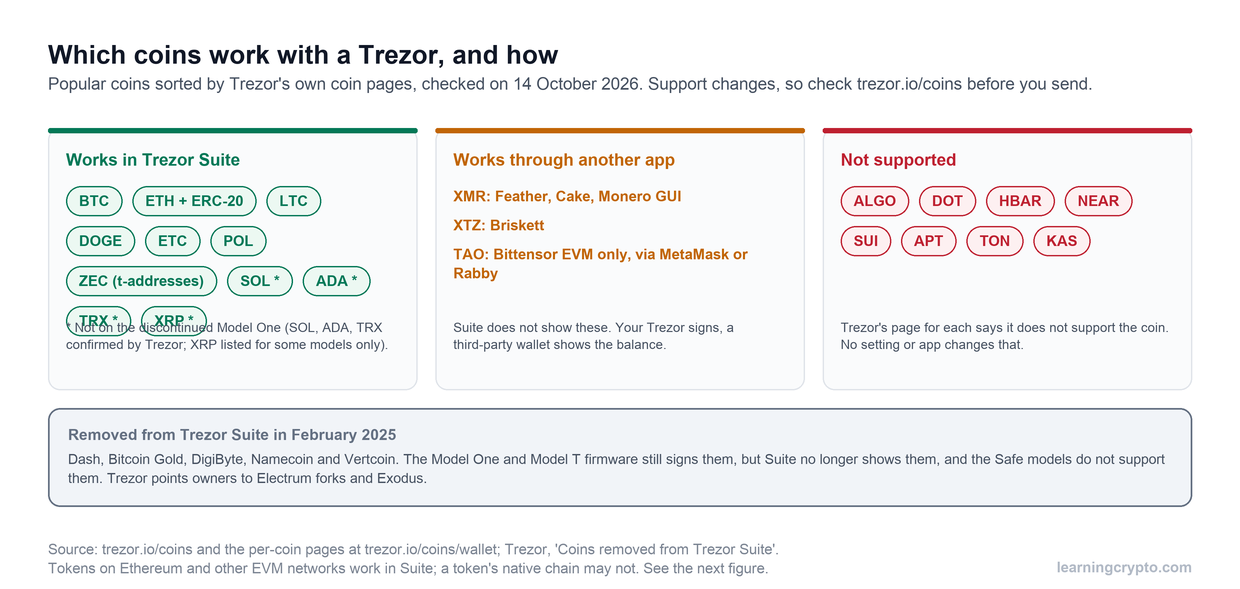
Ledger supports 5,500+ cryptocurrencies 

Includes all major chains: Bitcoin, Ethereum, Solana, Cardano, Polkadot, Cosmos, Algorand, Tron, Hedera, and thousands of tokens. Ledger Live handles most directly, though some require third-party wallets like Monero GUI.

Ledger advantage: Ledger supports coins Trezor doesn't, particularly Tron (TRX), Algorand (ALGO), Hedera (HBAR), and Cosmos (ATOM). If you hold these, Ledger is your only option between the two.

Trezor supports 8,000+ cryptocurrencies

All major assets like Bitcoin, Ethereum, Cardano, Solana (added 2024), Ripple, and most top coins. The higher number stems from extensive token support across multiple blockchain networks.

Trezor gaps: Trezor doesn't support Algorand (ALGO), Hedera (HBAR), or Tron (TRX) at all. Some coins require third-party wallets rather than Trezor Suite: Stellar (XLM), Polkadot (DOT), and Cosmos (ATOM) fall into this category. Your Trezor still secures the keys, but you'll manage these coins through external applications.

In February 2025, Trezor Suite dropped native support for Dash, Bitcoin Gold, DigiByte, Namecoin, and Vertcoin. These coins still work with your device through third-party wallets.

For most investors, both cover what you need. Bitcoin, Ethereum, and the top 20 coins work natively on both. The difference matters if you're invested in specific ecosystems like Cosmos or Algorand.

NFT Support

Both now handle NFTs on Ethereum and Polygon. Ledger Live has a built-in gallery, and Trezor Suite added NFT viewing in early 2025.

Always check the official supported coin lists on each respective website before buying.

Software and Staking: The Daily Drivers

Let’s finish by discussing their companion apps. 

Ledger Live: The All-in-One Platform

Ledger Live (recently rebranded as "Ledger Wallet") is available on desktop (Windows, Mac, Linux) and mobile (iOS, Android). It's designed to be a complete crypto management platform, not just a wallet interface.

The experience:

You open Ledger Live and see your entire portfolio with real-time pricing. Multiple accounts per coin are easy to manage. The interface is clean and beginner-friendly.

Want to buy crypto? Built-in through partners like Coinify and MoonPay. Swap between assets? Powered by Paraswap and DEX aggregators. Stake your coins? Click through simple interfaces for Ethereum, Solana, Cardano, Polkadot, Cosmos, Tezos, and Tron.

The NFT gallery displays your Ethereum and Polygon collections with images and metadata. WalletConnect integration lets you connect to thousands of dApps securely.

Mobile shines here:

Bluetooth pairing with Nano X, Flex, or Stax works seamlessly. Check balances, send transactions, and stake coins from your phone. No computer needed. The iOS and Android apps offer nearly full feature parity with desktop.

The tradeoffs:

No built-in privacy tools like CoinJoin or Tor routing. Limited coin control for Bitcoin power users who want to select specific UTXOs. Some users feel the integrated services push them toward Ledger's partners rather than their preferred platforms.

Overall: Ledger Live excels at convenience. Everything you need in one polished package.

Trezor Suite: Privacy-First Simplicity

Trezor Suite runs as a desktop app (Windows, Mac, Linux) or web app through suite.trezor.io. The approach is different from Ledger's all-in-one strategy.

The philosophy:

Trezor Suite focuses on wallet fundamentals done right. Clean interface without upselling. Security and privacy tools front and center.

What makes it different:

Built-in Tor network toggle lets you route all connections anonymously. Native CoinJoin integration for Bitcoin privacy uses the Wasabi coordinator right in the app. Advanced coin control for Bitcoin lets you select specific UTXOs to spend, helping prevent address linking.

WalletConnect support (added 2025) connects you to dApps. Staking dashboards for Ethereum, Cardano, and Solana are straightforward. Buy and swap features exist but are less prominent than Ledger's.

Mobile situation:

Trezor Suite Lite exists for iOS and Android, primarily for portfolio viewing. Full transaction signing on mobile is limited compared to Ledger's mature mobile app. The Safe 7's Bluetooth capabilities should improve this, but the ecosystem is still developing.

The tradeoffs:

Fewer integrated buy/sell/swap options. Staking support covers major coins but fewer options overall than Ledger. The interface is more utilitarian, less polished. No native mobile transaction signing yet (except through browser workarounds).

Overall: Trezor Suite excels at giving you control. Privacy tools, transparency, and no hand-holding.

Staking: The Practical Differences

Ledger's approach: Maximum convenience. Native staking in Ledger Live for Ethereum, Solana, Cardano, Polkadot, Cosmos, Algorand, Tezos, and Tron. Partner validators handle the technical details. Click a few buttons and you're earning rewards.

Trezor's approach: Core assets covered. Ethereum, Cardano, and Solana staking work directly in Suite. Other coins require third-party integrations or external wallets. You might need to connect your Trezor to a specialized staking platform.

What this means for you:

If you stake multiple different coins and want everything managed in one app, Ledger wins on convenience. If you mainly stake ETH or ADA and prioritize privacy tools over one-click staking, Trezor works fine.

Neither wallet actually does the staking (that happens on the blockchain). Both just sign the necessary transactions securely. The difference is integration polish.

Which Software Experience Wins?

Depends what you value. Ledger Live feels like a modern fintech app with crypto built in. Trezor Suite feels like a tool built by and for serious crypto users who want control over convenience.

Beginners usually prefer Ledger Live's guidance and polish. Power users often prefer Trezor Suite's transparency and privacy features.

Both get the job done. Both let you manage crypto securely.

Which Hardware Wallet Should You Choose?

Choose Ledger If You...

Choose Trezor If You...

✓ Want the most polished mobile experience with seamless Bluetooth

✓ Prioritize complete open-source transparency and code auditability

✓ Need to manage many different cryptocurrencies in one app

✓ Are comfortable with Bitcoin, Ethereum, and major coins (but not Tron/Algorand/Cosmos)

✓ Hold Tron, Algorand, Hedera, or Cosmos

✓ Want built-in privacy tools like CoinJoin and Tor routing

✓ Value integrated staking for multiple coins (ETH, SOL, ADA, DOT, ATOM, XTZ, TRX)

✓ Prefer entering passphrases and PINs directly on the device touchscreen

✓ Want everything in one app: buy, sell, swap, stake, NFT gallery

✓ Value the crypto ethos of "don't trust, verify"

✓Are comfortable trusting certified Secure Element chips with closed firmware

✓ Want the most sophisticated security architecture (Safe 7's dual open/certified chips)

✓ Prefer a more guided, beginner-friendly interface

✓ Are willing to use third-party wallets for some coins

Which Wins, Ledger or Trezor? Both (And Neither)

Ledger and Trezor both represent excellent choices for securing your cryptocurrency. Neither has seen users lose funds due to device exploitation in over a decade of real-world use.

The decision comes down to philosophy and priorities. Ledger offers superior convenience, broader coin support, and a polished all-in-one experience. You're trusting their certified security chips and closed firmware, but that trust has proven justified in practice.

Trezor offers complete transparency, privacy-focused tools, and the most advanced open-source security architecture ever built into a consumer hardware wallet. The Safe series eliminated the physical security concerns that once separated it from Ledger.

Both will protect your crypto far better than any exchange or software wallet.

Ready to Take Control of Your Crypto?

Once you've secured your assets with a hardware wallet, the next step is managing them intelligently. Learning Crypto gives you the tools to track your portfolio, understand market movements, and make all the right decisions.

Get instant answers about any coin or wallet through our AI chat assistants. Track your holdings with professional portfolio tools. Access real-time data from 25+ blockchains and on-chain analytics. 

Our team shares exactly what we're holding through market cycles, backed by 10+ years of crypto experience.

Get Started Today


Disclaimer: This article is for educational purposes only and does not constitute financial advice. Cryptocurrency investments carry risk; you should always do your own research before making any investment decisions.

Disclaimer: This article is for educational purposes only and does not constitute financial advice. Cryptocurrency investments carry risk; you should always do your own research before making any investment decisions.

On this page