
Cryptocurrency is exciting; there’s no doubt about it. The potential for financial freedom, the allure of decentralized systems, and the cutting-edge technology have captivated millions. But here’s the thing: with all the advantages comes a big, unavoidable question: How do I keep my digital assets safe?
This isn’t a small issue. In 2022 alone, over $3 billion worth of cryptocurrency was lost to hacks, scams, and thefts. It’s easy to get caught up in the thrill, but the fear of losing everything can be overwhelming.
Here’s the problem: Crypto is decentralized, meaning there are no banks or safety nets. If your exchange gets hacked or you lose access to your account, your funds could disappear, and they’re gone for good.
So, what’s the solution?
It’s simple: the crypto wallet, a device or application that ensures your assets remain under your control, away from prying eyes and malicious scams.
With our years of experience in investing in cryptocurrency, we’ve figured out that hardware wallets are hands down the best option, especially for beginners. They offer the highest level of security by keeping your assets offline and out of reach from hackers.
Some of the best hardware wallets to consider are:
- BitBox: Known for its robust security and support for a wide range of cryptocurrencies.
- Trezor Safe 3, Safe 5 or Safe 7: Another top-tier option, with a certified secure element, fully open-source firmware, and a choice of buttons (Safe 3) or a touchscreen (Safe 5 and Safe 7).
- KeepKey: A solid, budget-friendly option that doesn’t compromise on security, perfect for first-time users.
Here are some of the reasons why hardware wallets are a must-have,
In this blog, we are going to walk you through everything you need to know about how to set up a crypto wallet, and ways to keep your digital wealth safe.
Crypto Wallet: A Digital Tool
A crypto wallet is a software program or hardware device that enables you to manage your crypto holdings. Unlike a traditional wallet that holds physical cash, these wallets store the private keys needed to access your digital assets on the blockchain.
Please note - These wallets do not store cryptocurrencies themselves. Instead, they store the keys that enable you to interact with the blockchain, where your crypto exists.
Types of Crypto Wallets
Before understanding which crypto wallet to choose, here are the different types of crypto wallets you must know:
Hardware Wallets (Cold Wallets)
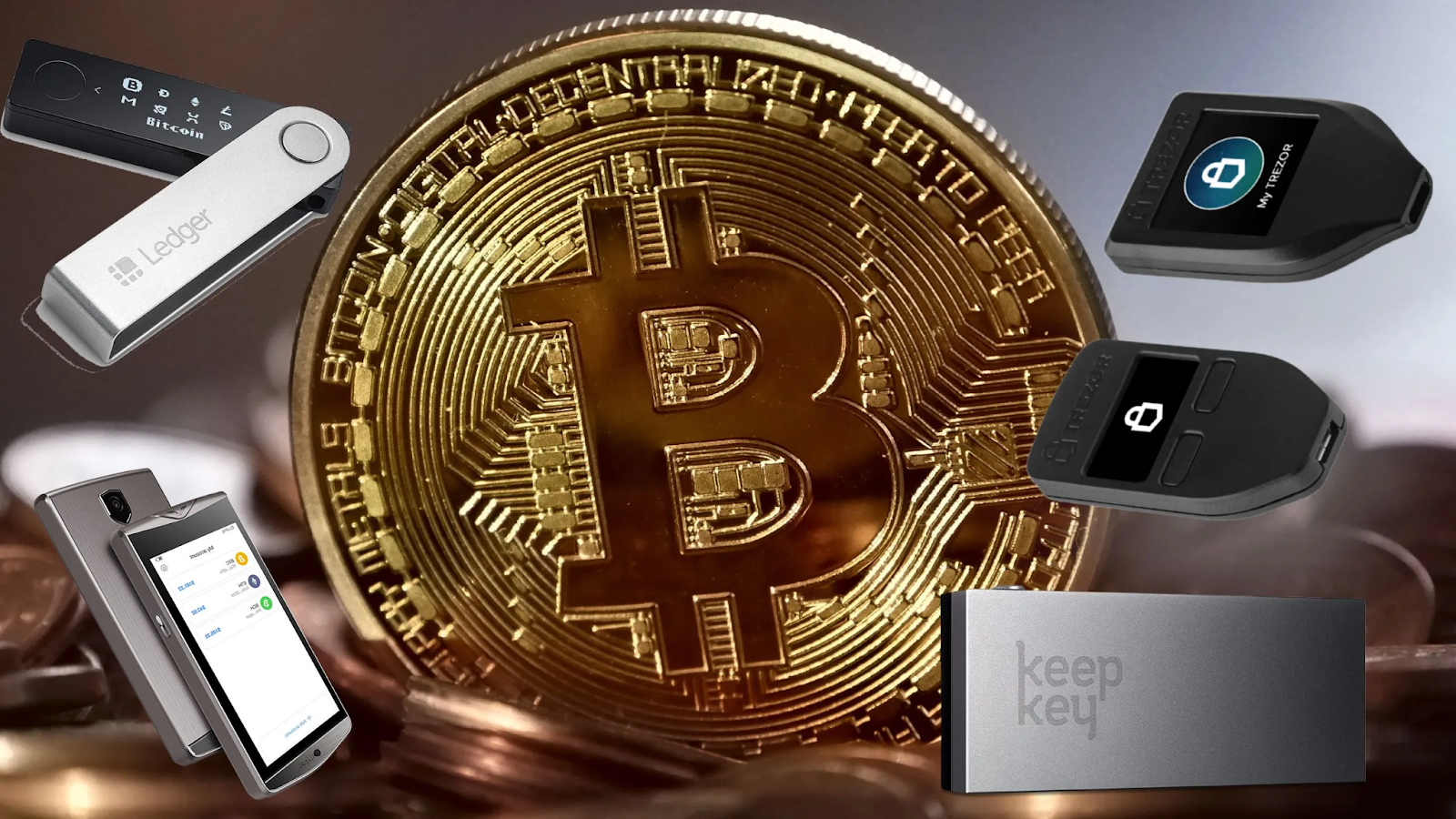
Hardware wallets are physical devices that store your private keys offline, making them highly resistant to online hacking attempts. These compact and portable devices are often considered the most secure option for long-term storage.
Pros:
- High-level security as private keys are never exposed to the internet
- Immune to malware and phishing attacks
- Ideal for large, long-term holdings
Cons:
- Initial cost (typically $50 to $150)
- Less convenient for frequent transactions
- Risk of losing the device if not properly backed up
Mobile Wallets Vs. Hardware Wallets,
Software Wallets (Hot Wallets)
Software wallets are applications that run on smartphones, desktops, or as browser extensions. These wallets are connected to the internet, providing convenience and accessibility.
Types of Software Wallets:
- Mobile Wallets: Apps designed for smartphones (e.g., Trust Wallet)
- Desktop Wallets: Programs installed on computers (e.g., Exodus)
- Web Wallets: Browser-based wallets (e.g., MetaMask).
Pros:
- User-friendly and suitable for beginners
- Often free to download and use
- Accessible from anywhere with an internet connection
Cons:
- Vulnerable to hacking and phishing attacks
- Relies on the security of your device
- Requires regular updates to maintain security
Mobile wallets are easy-to-use, but are they secure? Know here.
Paper Wallets
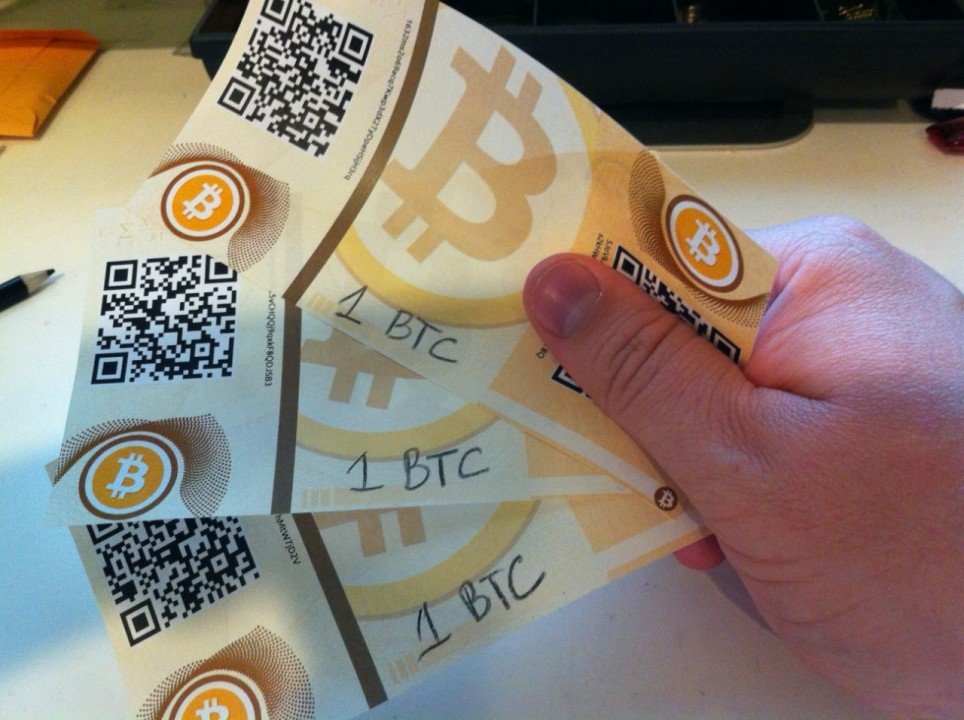
A paper wallet is a physical document that contains your public and private keys, often represented as QR codes. These wallets are generated online and then printed for offline storage, making them immune to online attacks.
Pros:
- Extremely secure when stored properly
- No reliance on hardware or software
Cons:
- Easily damaged or lost
- Difficult to use for regular transactions
- Requires careful handling to avoid exposure
Custodial Wallets
In custodial wallets, a third party, such as an exchange or wallet provider, manages your private keys on your behalf. They make digital asset management easy and are often integrated with exchange platforms like Coinbase and Binance.
Pros:
- Convenient for beginners
- Recovery options available if credentials are lost
Cons:
- Do not have full control over their assets
- Vulnerable to exchange hacks or platform failures
The other types of crypto wallets include:
- Non-custodial wallets: These give you full control over your private keys and funds, meaning you're solely responsible for your security.
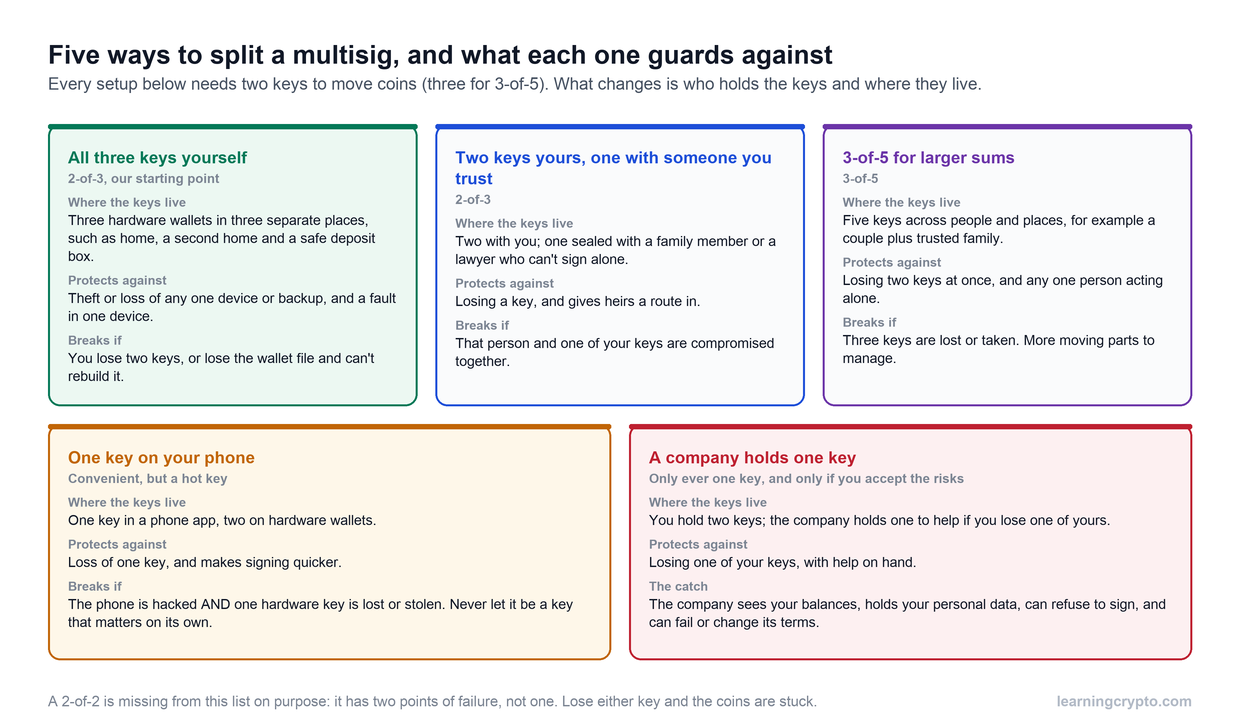
- Multi-signature wallets: These require multiple private keys to authorize a transaction, adding an extra layer of security by ensuring that more than one party must approve a transaction.
- Hybrid wallets: Combining the convenience of software wallets with the added security of hardware wallets, hybrid wallets offer a balanced solution for both ease of use and protection.
Best Crypto Wallets For Beginners in 2025
Disclosure: some wallet links on this page are affiliate links, so we may earn a commission at no extra cost to you. Trezor invited us to its Safe 3 and Safe 7 launches. This is education, not financial advice. Device details were checked on 17 September 2026.
Here are some of the best crypto wallets for beginners and expert investors available in 2026, focusing on their features, security measures, and ideal use cases.
Trezor Safe 3, Safe 5 and Safe 7
Type: Hardware Wallet
Trezor's current range is the Safe 3, Safe 5 and Safe 7. Trezor stopped selling the older Model One and Model T in its shop on 8 January 2026, so if you see one listed as new, buy a Safe model instead.
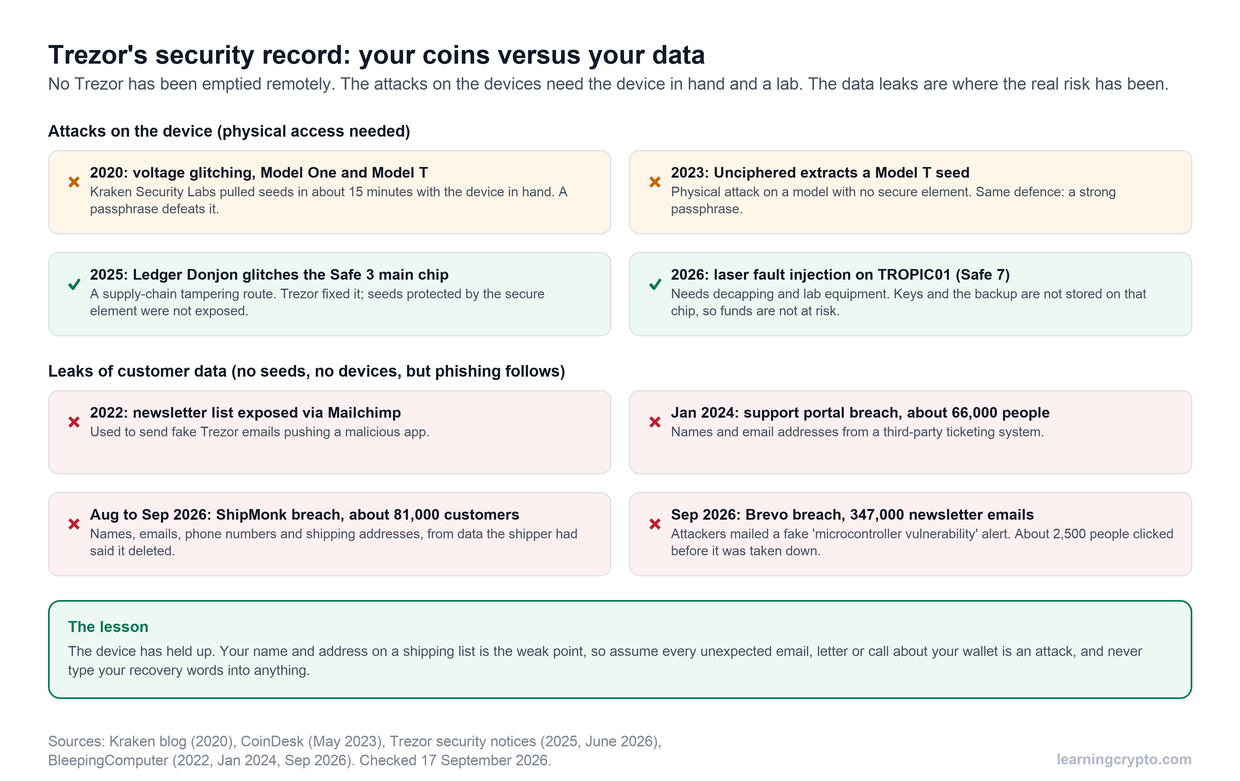
All three Safe models protect your PIN and wallet backup with an EAL6+ certified secure element, run fully open-source firmware, and work with the Trezor Suite app. They differ mainly in screen and connectivity:
- Safe 3: two buttons and a small screen. The value pick for a first hardware wallet.
- Safe 5: the same security with a colour touchscreen, which makes checking addresses and entering a passphrase quicker. USB only.
- Safe 7: a larger touchscreen, Bluetooth, wireless charging, a second auditable secure element, and the only Trezor that can sign from an iPhone. Read our Trezor Safe 7 review before buying.
Features:
- Passphrase protection and multi-share backup, which splits your recovery into several parts.
- Open-source firmware that allows for community scrutiny and transparency in its security practices.
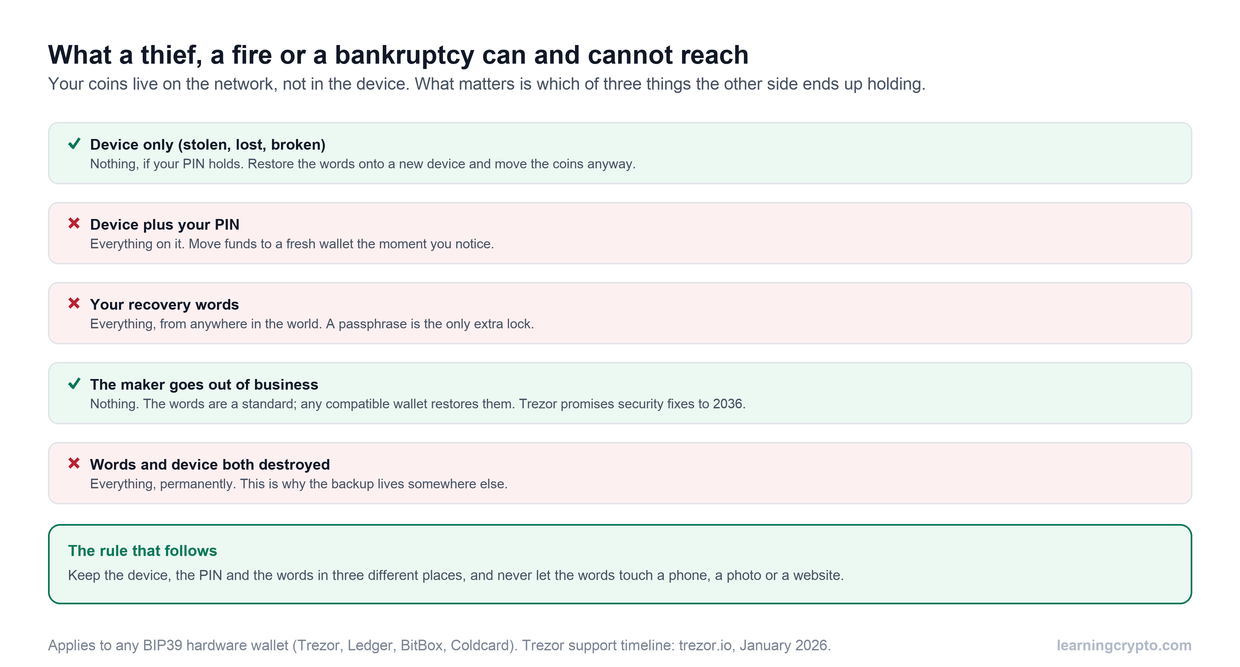
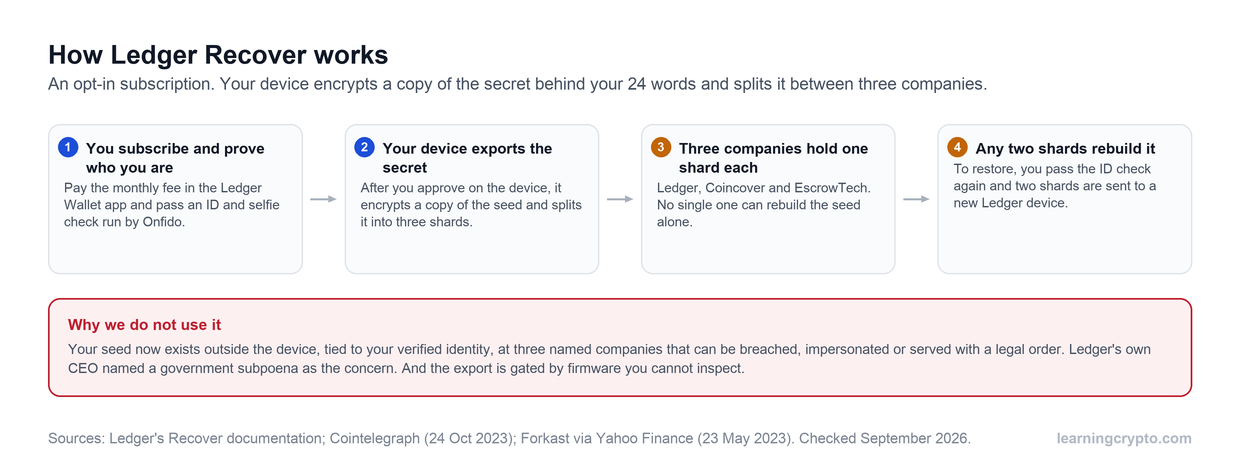
- No seed export service: your recovery words never leave the device.
- Trezor Suite on desktop and mobile. Every model signs on Android over USB; iPhone signing needs the Safe 7.
For a video walkthrough of how the two brands differ, watch our comparison below. Models change faster than videos, so our written Trezor vs Ledger guide covers the current line-ups.
BitBox
Source: Image
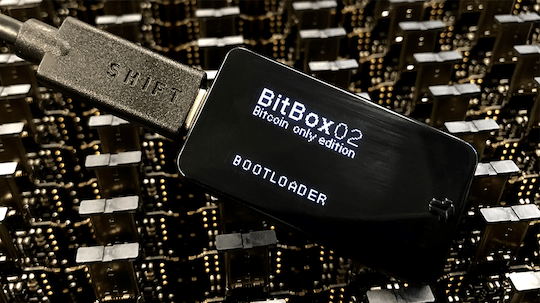
BitBox is a Swiss-made open source hardware wallet developed by Shift Crypto AG, designed for secure and user-friendly cryptocurrency management. The latest model, the BitBox02, enhances security and usability, making it ideal for both beginners and experienced users.
It is an open source code that comes with a dual-chip architecture protecting it against tampering.
Features
- Combines a secure chip (ATECC608B) with an open-source microcontroller for robust protection
- Easy backup via a microSD card for secure recovery information storage
- Supports Bitcoin, Ethereum, Litecoin, Cardano, Chainlink, BAT, and over 1500 ERC20 tokens.
- The BitBoxApp enables users to manage assets and execute transactions securely.
- Provides additional coverage through partnerships like Bitsurance
Exodus Wallet
Type: Software Wallet (Desktop & Mobile)
Platform Supported: Windows, macOS, Linux, Android, iOS
The Exodus wallet is a popular software wallet known for its beautiful user interface and ease of use. It supports over 150 cryptocurrencies and offers built-in exchange functionality.
The wallet also offers strong encryption to protect private keys stored locally on users’ devices. Since it does not support 2FA, you should take extra precautions to secure your recovery phrases.
Key Features:
- Offers an intuitive layout that makes managing assets easy
- Swap cryptocurrencies directly within the wallet without needing to transfer funds to an exchange
- Provides real-time portfolio tracking and market data for various cryptocurrencies
MetaMask
Type: Software Wallet (Browser Extension & Mobile)
Platform supported: Chrome, Firefox, Brave, iOS, Android
MetaMask is primarily known as a browser extension that facilitates interaction with Ethereum-based decentralized applications (dApps). It also functions as a mobile wallet.
MetaMask employs strong encryption methods to protect user data but does not offer hardware-level security like hardware wallets do. You can use additional security measures such as strong passwords and secure backups of the seed phrases.
Features:
- Allows access to DeFi platforms and manage NFTs seamlessly
- Offers complete control over their private keys and can export them if needed
- Wallet supports multiple languages, making it accessible to a global audience
Trust Wallet
Type: Software Wallet (Mobile)
Platform Supported: iOS, Android
The Trust Wallet, owned by Binance, is a mobile-first cryptocurrency software wallet that supports a wide variety of coins and tokens. Trust Wallet does not store user data or private keys on its servers; instead, all sensitive information remains on the user's device. The wallet also has built-in biometric authentication options for added security.
Features:
- Supports thousands of cryptocurrencies across multiple blockchains
- Provides access to decentralized applications directly from the wallet app
- Allows you to stake certain cryptocurrencies directly within the app to earn rewards
How to Store Coins Safely In A Wallet
Once you’ve chosen a wallet, proper storage practices are essential to protect your assets. Follow these steps to ensure optimal security:
Secure Your Private Keys
Your private key is the master key to your funds. Store backups in multiple secure locations, such as a safety deposit box or encrypted USB drive.
Safeguard Your Seed Phrase
Most wallets provide a seed phrase (a series of 12–24 words) to recover your wallet, if needed. Write down your wallet’s seed phrase on paper and store it in a secure location. Avoid saving it on cloud storage or any device connected to the internet.
How to recover your hardware wallet:
Diversify Storage
For enhanced security, divide your holdings across multiple wallets. Use a hardware wallet for long-term storage and a software wallet for daily transactions.
Update Your Wallet Regularly
Keep your wallet software up to date to protect against vulnerabilities and ensure compatibility with new blockchain developments.
Avoid Public Wi-Fi
When accessing your wallet, use a secure and private internet connection to minimize the risk of hacking.
Test with Small Transactions
Before transferring significant amounts, conduct a test transaction to ensure the wallet is set up correctly and functioning as expected.
Factors to Consider When Choosing a Wallet
With numerous wallet options available, it's essential to evaluate each one based on key factors to ensure it meets your specific needs. Here are the most important considerations when choosing a crypto wallet:
Security Features
When selecting a wallet, prioritize those with robust security features.
- Private Key Control: As the crypto adage goes, “Not your keys, not your crypto.” Ensure the wallet allows you to manage your private keys. Example: Custodial wallets, while convenient, leave the responsibility of your keys with a third party, increasing the risk of loss if the provider is hacked.
- Two-Factor Authentication (2FA): Wallets with 2FA add an additional layer of protection. This requires a second step of verification, such as a code sent to your mobile device or email, ensuring only authorized users can access the wallet.
- Backup and Recovery Options: Wallets that provide a seed phrase allow you to recover your wallet in case of loss, theft, or damage.
Compatibility and Supported Coins
Not all wallets support every cryptocurrency. Before committing to a wallet, verify that it is compatible with the digital assets you intend to hold.
- If you are focusing on a single cryptocurrency or ecosystem, then choose a blockchain-specific wallet like Bitcoin Core wallet for Bitcoin or the Ethereum-compatible MetaMask wallet.
- If you plan to diversify your portfolio across various cryptocurrencies, then opt for a wallet that supports multiple coins and tokens. Example- Trust Wallet and Ledger Nano X.
Ease of Use
The user interface (UI) of a wallet plays a significant role, especially for beginners.
- As a beginner, choose wallets that are easy to navigate and provide educational resources like Trust Wallet and Exodus.
- As an experienced investor, choose wallets with advanced features, such as staking, decentralized application (DApp) integration, etc.
Cost
The cost of a wallet can vary significantly depending on its type and features.
- Entry-level hardware wallets like the Ledger Nano S Plus and Trezor Safe 3 cost far less than touchscreen models but offer the same core security. Check the maker's shop for current prices.
- Software wallets including mobile, desktop, and web wallets, are usually free to download and use and may not offer the same level of security as hardware wallets.
Reputation and Reviews
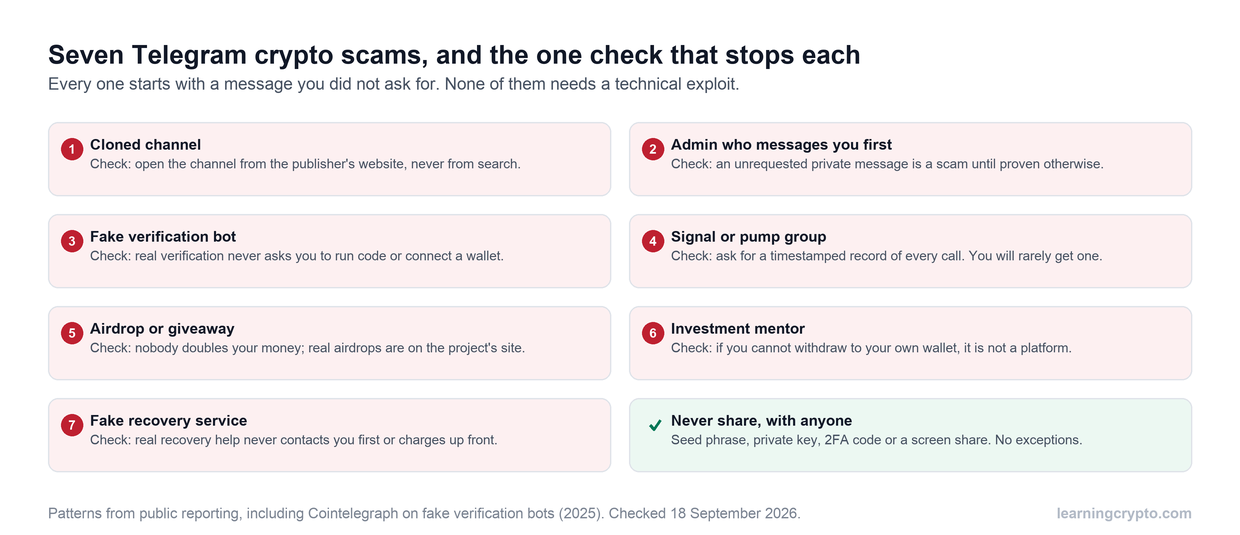
The crypto space is rife with scams, conducting thorough research before settling on a wallet is wise.
You can look for user reviews on platforms like Reddit, Trustpilot, or app stores to get an idea of the wallet’s reliability and customer satisfaction. Look for patterns of recurring issues or complaints about security breaches.
As an investor you can also consider joining Crypto Clubs and communities where you can interact with fellow investors and get guidance from crypto investors on various aspects of investing.
How to Set Up A Crypto Wallet
Whether you choose a hardware or software wallet, the process is generally straightforward. Here is a set by set guide on how to set up a crypto wallet:
Step 1: Choose the Right Type of Wallet
Before setting up a wallet, decide on the type that best fits your needs: a hardware wallet or a software wallet.
Step 2: Create Your Wallet Account
Follow these steps to create your account:
- Download the Wallet App or Purchase Hardware:
- For software wallets, download the app from the official website or app store.
- For hardware wallets, purchase directly from the manufacturer’s website to avoid tampering.
- Install the Software (for Hardware Wallets):
- If using a hardware wallet, install the associated software (e.g., Ledger Wallet, formerly Ledger Live, for Ledger devices, or Trezor Suite for Trezor) on your computer or mobile device.
- Create an Account:
- Open the app or software and follow the prompts to create an account. You’ll typically need to provide an email address and create a strong password.
Step 3: Secure Your Wallet
Security is paramount when it comes to managing cryptocurrencies. Here’s how to secure your wallet:
- Set Up a Strong Password:
- Create a unique password and avoid using easily guessable information.
- Enable Two-Factor Authentication (2FA):
- If your wallet supports it, enable 2FA for an extra layer of security. This often involves receiving a code via SMS or an authenticator app.
- Backup Your Wallet:
- Most wallets will provide you with a recovery seed phrase. Write this down and store it in a safe place.
- Confirm your seed phrase by selecting each word in order as prompted by the wallet.
Step 4: Deposit Cryptocurrency into Your Wallet
With your wallet set up and secured, you can now add funds:
- Find Your Wallet Address:
- Locate your wallet address in the "Receive" or "Deposit" section of the app. This address is unique to your wallet and is used to receive cryptocurrency.
- Transfer Funds:
- To deposit cryptocurrency, initiate a transfer from an exchange or another wallet by entering your wallet address.
- Double-check that you are sending the correct type of cryptocurrency to avoid loss of funds.
- Confirm Receipt:
- Once the transaction is completed on the blockchain, you should see the funds reflected in your wallet balance.
Step 5: Manage Your Assets
Now that your crypto wallet is set up and funded, you can start managing your assets:
- Send Cryptocurrency: To send funds to another wallet, enter their wallet address and specify the amount.
- Monitor Transactions: Keep track of your transaction history within the app for better asset management.
- Explore Additional Features: Many wallets offer features such as staking, swapping currencies, and accessing decentralized applications (dApps).
Key Takeaway
Taking control of your digital assets is not just a recommendation; it’s a necessity! By combining smart security measures like using hardware crypto wallets.
By keeping your assets offline, they offer the highest level of security. Leading options include the Ledger Nano X, with its secure element and Bluetooth connectivity, and the Trezor Safe range, which pairs a certified secure element with open-source firmware and offers touchscreens on the Safe 5 and Safe 7. Both are excellent choices to keep your crypto safe.
Feeling overwhelmed by the complexity of crypto? We are a one-stop resource for navigating the crypto world, offering comprehensive learning, expert insights, crypto community support, and a lot more!
With us you can confidently protect your investments, expand your knowledge, and seize the financial opportunities that crypto offers!
How to set up a crypto wallet step by step
Setting up a crypto wallet takes six steps: choose a wallet type, get it from the official source, create the wallet, secure it with a strong password and your written seed phrase, fund it with a small test deposit, and then start managing your assets. Most beginners can finish the whole process in under an hour.
Quick summary of the process (the detailed walkthrough is further down the page):
- Choose the wallet type. A hardware wallet for long-term holdings, or a free software wallet such as Trust Wallet, Exodus or MetaMask for everyday use.
- Get it from the official source. Download software wallets from the official website or app store. Buy hardware wallets directly from the manufacturer to avoid tampering.
- Create the wallet. Install any companion software (Ledger Wallet or Trezor Suite, for example), open it and follow the prompts.
- Secure it. Set a unique password, enable two-factor authentication where supported, write down the 12 to 24 word seed phrase on paper and confirm it in order when prompted. Never store the phrase in the cloud.
- Fund it. Find your wallet address under Receive or Deposit, send a small test transaction from an exchange, confirm it arrives, then transfer the rest. Double-check you are sending the right type of cryptocurrency.
- Use it. Send by entering the recipient's address and amount, keep an eye on your transaction history, and explore features such as staking, swaps and dApps.
If anything happens to your device, the seed phrase restores the wallet on a new one, which is why step four matters more than any other.
How to set up a cold crypto wallet
To set up a cold crypto wallet, buy a hardware device such as a Trezor Safe 3, BitBox02 or KeepKey directly from the manufacturer, install its companion software, generate and write down the seed phrase during setup, then test it with a small deposit. Because the private keys are created and stored on the device, they never touch the internet.
The process in detail:
- Buy direct. Order from the manufacturer's website rather than a marketplace so you know the device has not been tampered with. Expect to pay roughly $50 to $150.
- Install the software. Hardware wallets pair with a desktop or mobile app (Ledger Wallet for Ledger devices, Trezor Suite for Trezor, the BitBoxApp for BitBox) that shows balances and builds transactions for the device to sign.
- Initialize and back up. Follow the prompts, set a PIN or password, and write the recovery seed phrase on paper. Confirm each word in order when asked. Store the paper somewhere safe and never photograph it or save it online.
- Test with a small transaction. Copy the receiving address, send a small amount from an exchange, and confirm it appears in the wallet before moving larger sums.
- Diversify. Keep the hardware wallet for long-term storage and a software wallet for daily transactions, so most of your holdings stay offline.
Hardware wallets are less convenient for frequent transactions, and losing the device without a backup means losing access, so the seed phrase backup is the step you cannot skip. If you want to go deeper, our guide on how to use a cold wallet covers advanced setups such as multisig and metal backups.
Frequently asked questions
Which type of crypto wallet is safest for a beginner?
A hardware wallet. It stores your private keys on a physical device that never touches the internet, which makes it resistant to malware and phishing, the two most common ways people lose crypto. Entry-level options like the Trezor Safe 3, BitBox02 and KeepKey cost roughly $50 to $150. The trade-off is convenience: they are slower for frequent transactions, and you must back up the device properly.
Does a crypto wallet actually store my coins?
No. Your cryptocurrency exists on the blockchain. A wallet, whether hardware or software, stores the private keys that prove ownership and let you sign transactions. That is why the seed phrase matters so much: it regenerates those keys. Lose the device but keep the seed phrase and your funds are recoverable; lose both and they are gone, because there is no bank or support desk to reset access.
Do I need a hardware wallet or is a free software wallet enough?
Many people use both. A hardware wallet is the better home for larger, long-term holdings, while a free mobile or desktop wallet such as Trust Wallet or Exodus handles small daily transactions and access to apps. Software wallets are convenient but rely on the security of your phone or computer. Splitting holdings this way limits how much is exposed if one device is compromised.
What happens if I lose my crypto wallet or phone?
If your wallet gave you a seed phrase of 12 to 24 words during setup and you wrote it down, you can restore the same wallet and funds on a new device or hardware unit. Keep that phrase on paper in a secure place, never in cloud storage or on an internet-connected device. Custodial wallets on exchanges offer password recovery instead, but the exchange controls your keys.
What are the easiest crypto wallets for beginners?
For ease of use, this guide points beginners to Trust Wallet and Exodus, both free software wallets with simple interfaces and educational resources. MetaMask is the easiest route into Ethereum apps. If you want offline security with a beginner-friendly setup, the Trezor Safe 3's step-by-step setup in Trezor Suite and the BitBox02's guided app make hardware wallets approachable too, at roughly $50 to $150.
What is a crypto wallet address?
A crypto wallet address is the unique string of characters that identifies where funds should be sent, found in the Receive or Deposit section of your wallet app. You share it to receive cryptocurrency, and you enter someone else's to send. Always check you are sending the correct type of cryptocurrency to a matching address, because funds sent to the wrong network can be lost.
What are the best security tips for a crypto wallet?
Keep your private keys under your own control, back up the seed phrase on paper in a secure place and never in cloud storage, and enable two-factor authentication where the wallet supports it. Split holdings between a hardware wallet for savings and a software wallet for spending, keep the software updated, avoid public Wi-Fi, and test with a small transaction before sending large amounts.
What is the difference between a hot and a cold crypto wallet?
A hot wallet is software on a phone, desktop or browser that stays connected to the internet, which makes it convenient and usually free but vulnerable to hacking and phishing. A cold wallet, typically a hardware device, keeps private keys offline, so it is immune to online attacks and better for large, long-term holdings, at the cost of convenience and a purchase price.
This guide is part of stage 3 of 8, holding it safely, in the free Learning Crypto curriculum. Next: Cold Wallet vs Hot Wallet: Key Differences Explained.
Keep learning
- Multisig Operational Playbook for Shared Crypto Custody
- Guide to Long Term Crypto Investment Strategy
- What Does Volume Mean In Cryptocurrency? [A Complete Guide]
- Daily Essential Crypto Tips & Resources For 2025
- More guides in the Fundamentals hub
- Members: Ask Crypto AI, ask it any beginner question, privately