
Cryptocurrency has transformed the global financial system by giving ordinary people decentralized, borderless, and censorship-resistant assets. The same features that make it appealing, such as pseudonymity, no intermediaries, and irreversible transactions, also make it a prime target for criminals, because there is no bank to call when something goes wrong.
- In 2021 alone, over $14 billion was lost to cryptocurrency theft and fraud, a figure that underscores the need for robust security habits.
- High-profile incidents, such as hacks of major exchanges like Bitfinex and Mt. Gox, have demonstrated that even large, well-funded platforms can lose customer funds.
The good news is that the practices which stop the vast majority of losses are not technical. They are habits. We have been holding crypto since 2016, and almost every loss we have seen up close, our own early mistakes included, came from skipping one of the basics below rather than from a sophisticated attack. This guide covers them in order of importance, then goes deeper on exchange accounts, wallets, devices, and what to do if the worst happens.
What are the most important crypto security best practices?
If you do nothing else: hold long-term coins in a wallet where you control the keys, back up the seed phrase offline, turn on strong two-factor authentication everywhere, and never act on an unexpected message. Those four habits would have prevented most individual losses in the incidents above.
They matter so much because crypto flips the usual security model. A bank can reverse fraudulent transfers. With crypto, whoever holds the keys holds the coins, transactions are final, and the attacker's easiest route is nearly always to get you to hand over access voluntarily. So the defences that count are about controlling keys, logins and your own reactions.
Crypto security checklist
Here is the full checklist we use ourselves. Work through it top to bottom; the first items protect the most value for the least effort.
- Self-custody for savings. Exchanges are for buying and selling, not storage. Mt. Gox customers waited more than a decade for partial repayment.
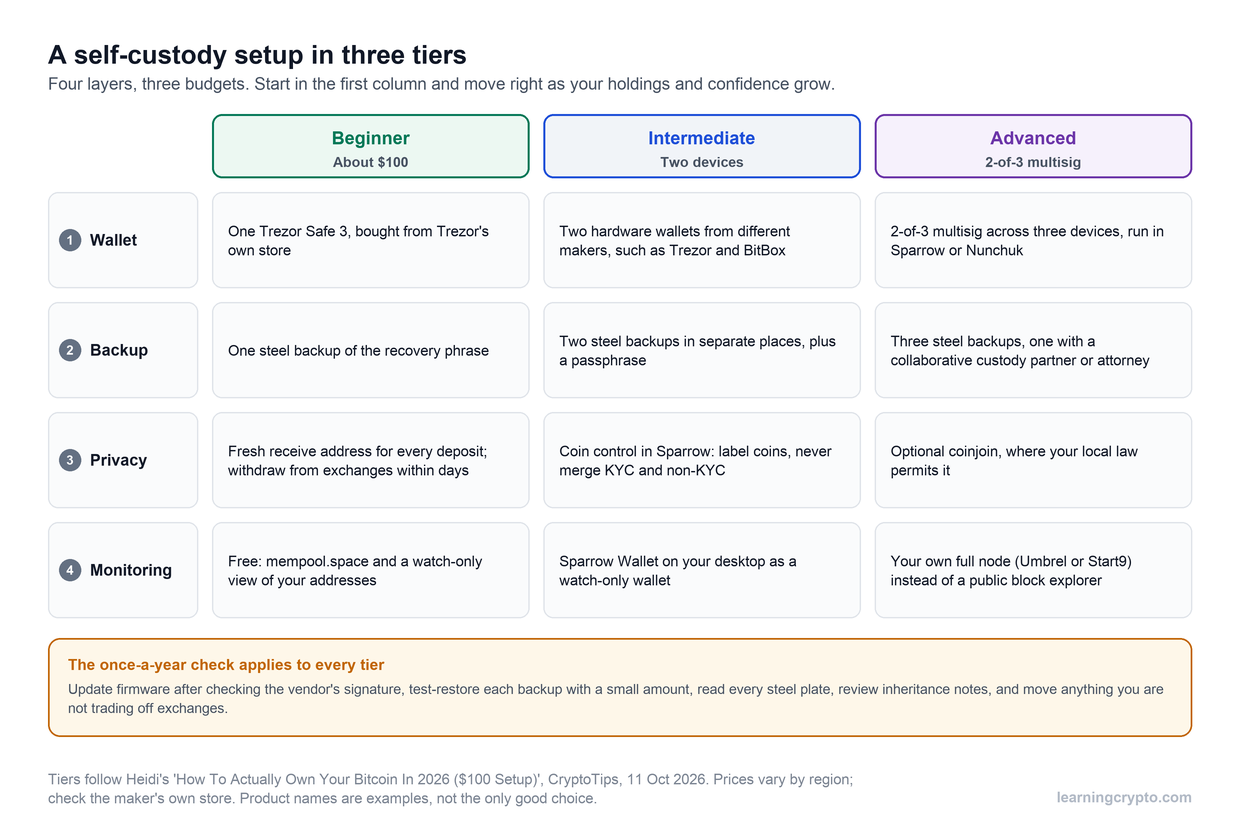
- A hardware wallet for anything you cannot afford to lose. Private keys never touch an internet-connected device.
- Seed phrase offline, never digital. No photos, no cloud notes, no password manager entries.
- Test your backup by restoring it to a spare device before you send serious money to the wallet.
- Unique passwords and app-based or hardware 2FA. SMS codes can be hijacked with a SIM swap.
- A dedicated email address for exchange accounts that you never use anywhere else.
- Withdrawal allowlists and anti-phishing codes switched on at every exchange that offers them.
- Separate wallets for separate jobs. A small hot wallet for daily use, a cold wallet for savings, a throwaway wallet for new sites.
- Verify addresses and URLs every time. Bookmark exchange sites, check the first and last characters of any address, and send a test amount first.
- Review and revoke token approvals on DeFi wallets regularly.
- Keep devices updated and clean. Operating system and wallet software patched, no pirated software, no browser extensions you do not need.
- Never share your screen, seed phrase or 2FA codes with anyone, including people who say they are support staff.
- Keep your holdings private. People who advertise their crypto get targeted online and, in some cases, in person.
- Write an inheritance plan. Someone you trust should be able to find and use your backups if you cannot.
How should you store private keys and seed phrases?
Your seed phrase is the master key to everything in the wallet. Write it on paper or stamp it into metal, store it where only you and a trusted person can reach it, and never type it into a website, app or chat. Anyone who asks for it is trying to rob you, whoever they claim to be.
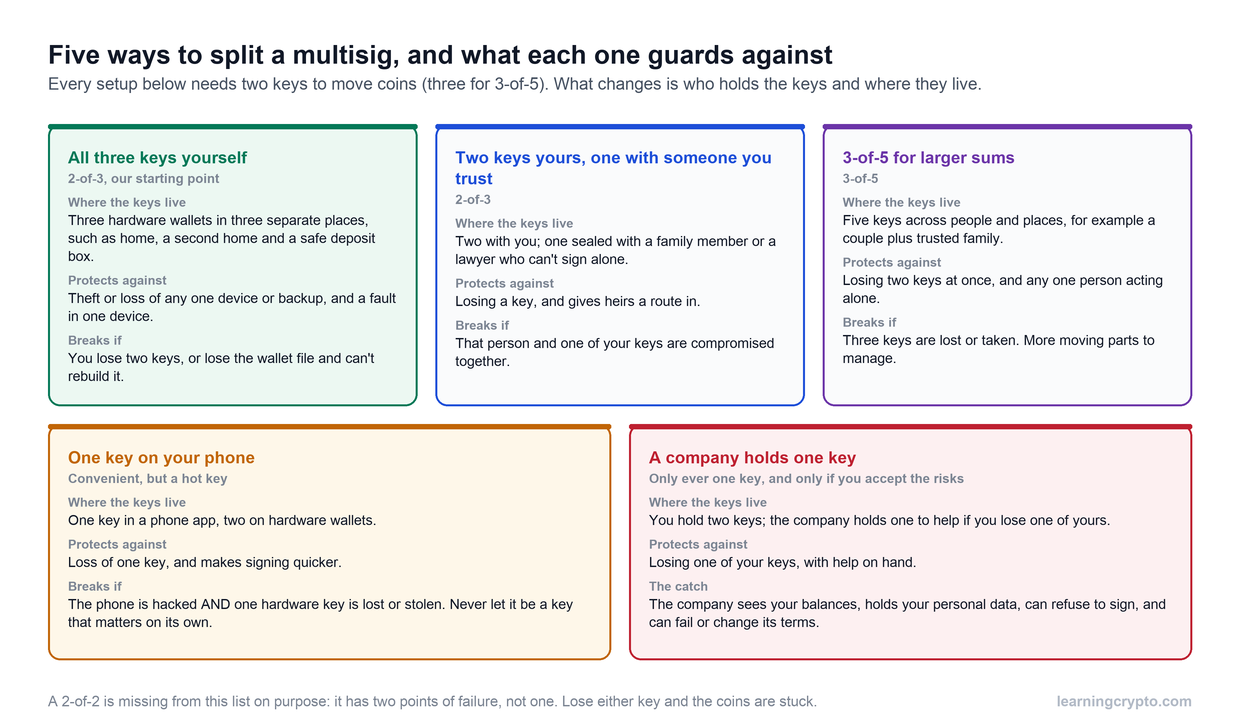
The choice between a hot wallet on your phone and a cold wallet that stays offline is the most important decision most holders make. We break it down in cold wallet vs hot wallet, and our guide to what a seed phrase is and why it matters covers backups in detail. For larger amounts, a multi-signature wallet spreads the risk so that losing or leaking one key does not lose the funds.
Two practical points people miss. First, test your backup by restoring it to a spare device before you send serious money to the wallet. Second, write down where the backup is and how to use it for whoever inherits your estate; more crypto is lost to death and forgetfulness than to sophisticated hackers.
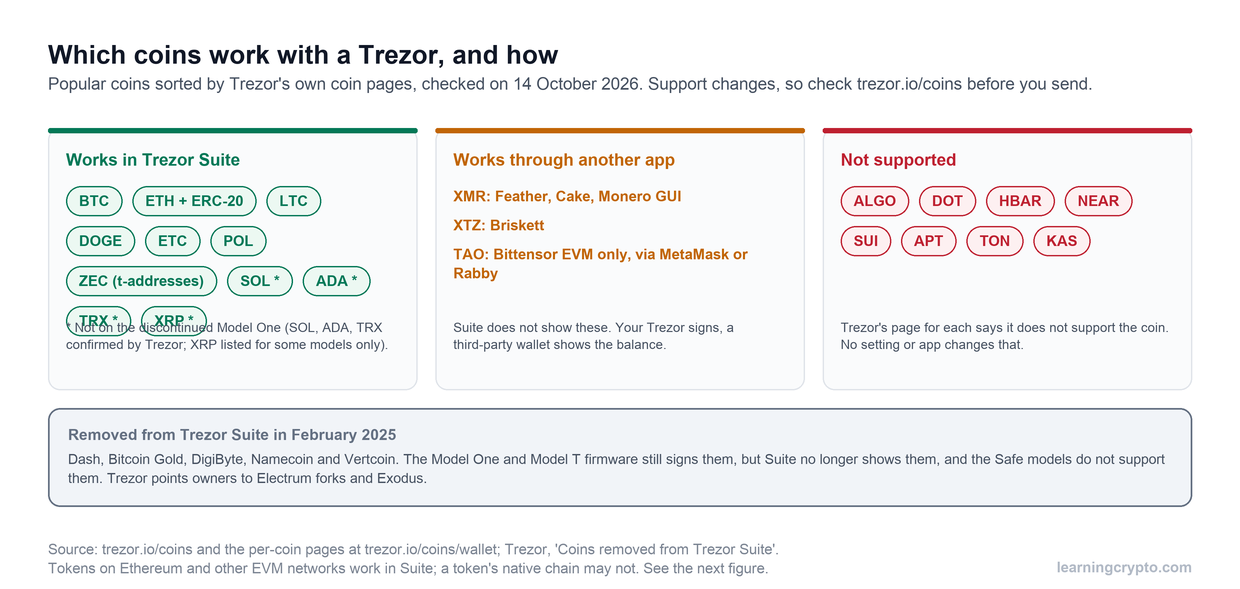
For anyone comparing hardware wallets, our Trezor vs Ledger comparison goes through the differences; either is fine when bought new and initialised by you. Never use a "pre-configured" device that arrives with a seed phrase already in the box. That is a known scam.
How do you protect exchange accounts and hot wallets?
Treat every online account as if it will eventually be attacked. Use a unique, long password, enable authenticator-app or hardware-key 2FA, set a withdrawal address allowlist where the exchange offers one, and use a dedicated email address that you never use anywhere else.
Exchange account security settings worth enabling
Used together, these make a takeover very hard even if your password leaks. Most people never switch them on.
- Hardware 2FA (a security key). A physical key such as a YubiKey is the strongest second factor because it cannot be phished: it only signs for the real domain, so a lookalike site gets nothing. Authenticator apps are next best. If an exchange lets you remove SMS as a recovery method, do it.
- Withdrawal address allowlist (whitelist). Once enabled, funds can only go to addresses you approved in advance, and adding a new one triggers a waiting period, often 24 hours or more. An attacker inside your account cannot simply send your coins to themselves.
- Anti-phishing code. A word or phrase you choose that the exchange includes in every genuine email. If a message claiming to be from the exchange does not contain your code, it is fake.
- API keys. If you use a portfolio tracker or trading bot, create read-only keys wherever possible and delete keys you no longer use.
We looked at how one large exchange implements these controls in our review of whether Kraken is safe; the same checklist applies to any platform you use.
Browser and mobile wallets
For browser and mobile wallets, install only from the official source, keep the software updated, and use a separate browser profile for crypto. Every time you connect a wallet to a website you may be granting it permission to move tokens, so read what you are signing. If a transaction request appears that you did not initiate, reject it.
Bitcoin holders have some specific considerations, from address reuse to Lightning wallets, which we cover in Bitcoin security explained simply and summarise later in this guide.
What does good wallet hygiene look like?
Good wallet hygiene means keeping different amounts of money in different places, verifying every address before you use it, and never letting an unfamiliar transaction touch your main funds.
Separate hot and cold wallets
Keep a hot wallet on your phone or browser with an amount you would be annoyed but not devastated to lose, and a cold wallet, ideally a hardware device, for everything else. The hot wallet is for spending, trading and trying new applications; the cold wallet only signs transactions you planned in advance. If you use DeFi or NFTs, add a "burner" wallet for unaudited sites, so a malicious approval can only drain that one.
Test transactions
Before you move a large amount to any address for the first time, send a small amount and confirm it arrives. This catches a mistyped address, a wrong network, a stale deposit address, and clipboard malware, for a fee of a few dollars at most.
Address poisoning
Address poisoning exploits the habit of copying an address from your transaction history. The attacker generates an address whose first and last few characters match one you regularly send to, then sends you a tiny amount from it. That poisoned address now sits in your history looking like the real one, and if you copy it later, your funds go to the attacker. The defence is never to copy addresses from history; use a saved address book, a withdrawal allowlist, or the original source, and check more than the first and last four characters.
Bitcoin security best practices
Bitcoin is simpler than the smart-contract chains because there are no token approvals to manage, but it has its own rules of thumb.
- Do not reuse addresses. Most Bitcoin wallets generate a fresh receiving address every time. Use it; reuse links your transactions together and makes your balance easier to trace. Our explainer on what a BTC wallet address is covers the formats.
- Verify the receiving address on the hardware wallet's screen, not just on the computer. Malware on the computer cannot change what the device displays.
- Treat Lightning wallets as hot wallets. Excellent for payments, poor for savings. Keep the bulk of your Bitcoin on-chain in cold storage.
- Consider multisig for large holdings. A 2-of-3 setup with keys in different places means one lost or stolen key does not cost you the coins. Back up the wallet descriptor alongside the seeds, because the seeds alone will not recover a multisig wallet.
How do you secure your devices and network?
Your wallet is only as secure as the device it runs on and the connection it uses. A clean, updated device on a network you control closes off most attacks that do not rely on tricking you.
- Keep everything updated. Operating system, browser, wallet apps and hardware wallet firmware. Most exploits target known, already-patched vulnerabilities.
- Dedicate a device if you can. An old laptop or phone used only for crypto is a large security upgrade for a small cost.
- Do not install what you do not need. Browser extensions, cracked software and "free" trading tools are common malware carriers, and wallet-draining extensions have made it into official stores.
- Avoid public Wi-Fi for anything involving keys or logins. Use your phone's hotspot if you must transact away from home, and keep your screen locked and drives encrypted.
- Lock down your phone number. Ask your carrier for a port-out PIN or account lock to make SIM swapping harder, and move 2FA off SMS entirely.
- Use bookmarks, not search results. Sponsored results and lookalike domains are a favourite phishing route.
How do you spot the scams that bypass technology?
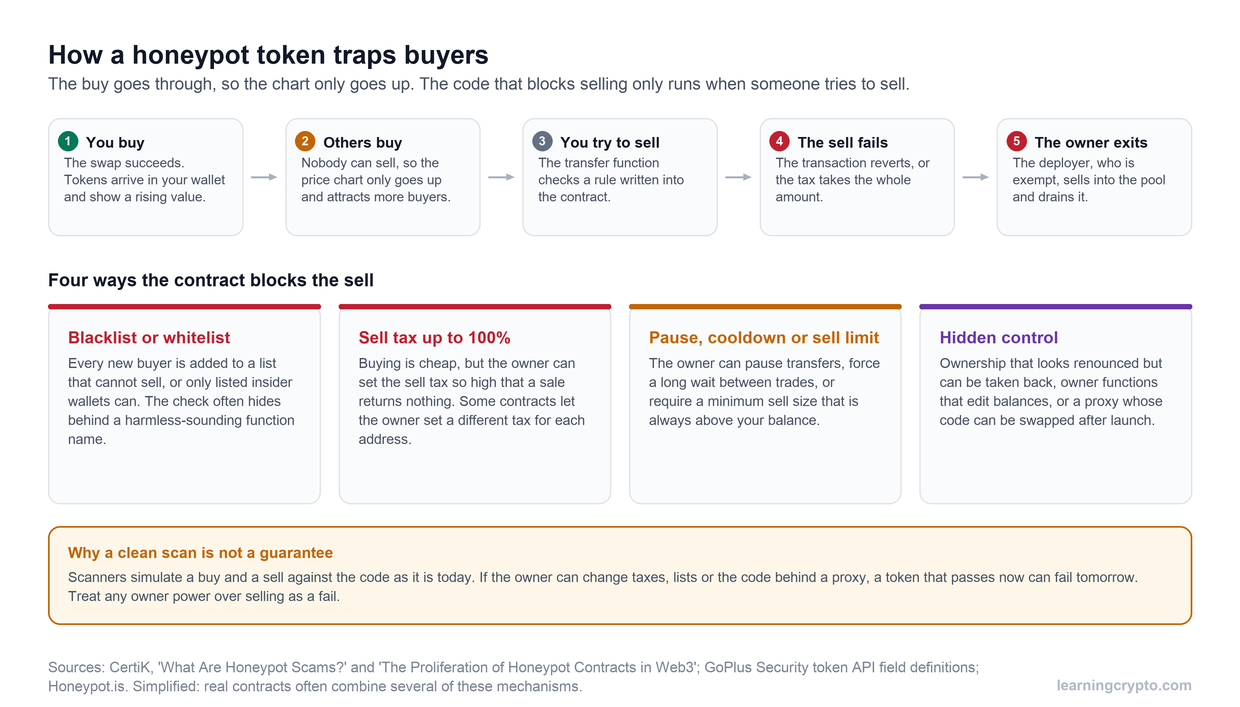
Most stolen crypto is handed over voluntarily. Fake support agents, romance and "investment mentor" scams, phishing emails that mimic your exchange, and airdrops that require you to "verify" your wallet all work by persuading you to act quickly. The defence is a rule: no urgency, no unsolicited help, no giveaways.
Warning signs worth memorising:
- Anyone contacting you first about your crypto, including on social media or by phone.
- Guaranteed returns or "risk-free" yields.
- Requests to move funds to a "safe" wallet or to share your screen.
- Links in messages rather than sites you went to yourself.
- Pressure to act before an offer expires.
Our no-nonsense guide to spotting crypto scams lists the current playbooks, and the scams and risk hub is updated as new ones appear. If something feels off and you want a fast, unbiased second opinion before you click, Ask Crypto can walk through the red flags with you.
What should you do if you have been compromised?
Move whatever is still safe, then cut off the attacker's access, then document everything. Speed matters more than tidiness in the first hour, because an attacker with your seed phrase or login can empty accounts in minutes.
- If a seed phrase or private key is exposed, create a new wallet on a clean device and move all remaining funds to it immediately. The old wallet is gone.
- If an exchange account is compromised, log in from a clean device, change the password, revoke all sessions and API keys, freeze withdrawals if possible, and contact support through the official site only.
- If you signed a malicious approval, revoke it with a token approval tool, then move assets to a fresh wallet. If you do not know how the compromise happened, assume the device is infected and wipe it.
- Document everything: transaction IDs, addresses, screenshots, timestamps, the messages you received. Report to the exchanges involved, who can sometimes freeze incoming funds, and to law enforcement.
- Expect follow-up scams. Victims are targeted again by "recovery services" and fake officials. Nobody legitimate asks for a fee to recover your funds.
Future Trends and Predictions
As the crypto industry expands, we're seeing a sharp rise in emerging security technologies like MPC (Multi-Party Computation) and zero-knowledge proofs. These innovations aim to enhance wallet protection and enable private transactions without compromising data integrity.
AI-powered threat detection systems are also gaining traction, helping exchanges and wallets identify unusual behavior in real time. These tools will play a vital role in reducing fraud and strengthening proactive security measures. Attackers use the same tools: AI-written phishing and voice-cloned "support calls" are routine in 2026, which makes the "no unsolicited help" rule more important than ever.
On the regulatory front, governments are rapidly catching up. Global compliance frameworks, especially from the EU and G20 nations, are expected to become stricter, focusing on KYC norms, custodial accountability, and cross-border crypto flows.
This evolution means companies in the crypto space will need to balance innovation with increased scrutiny. Adopting security-first design and staying ahead of regulatory shifts will be essential to win user trust and ensure long-term sustainability.
Takeaway
The security of cryptocurrencies is a continuous challenge that requires awareness and proactive regulatory measures. Given the irreversible nature of crypto transactions, you as an investor must take responsibility for protecting your assets by securing private keys, using strong authentication methods, and staying informed about emerging threats.
At the same time, regulatory frameworks play a crucial role in improving security by enforcing transparency, holding fraudulent entities accountable, and ensuring that crypto platforms implement robust security measures. As governments and financial authorities continue to refine their regulatory approaches, the overall security of the cryptocurrency market is expected to improve.
If you are looking to deepen your understanding of crypto security best practices, Learning Crypto is an excellent resource. We provide comprehensive information to help you get started with bitcoin learning.
How to trade crypto safely
To trade crypto safely, keep only the amount you are actively trading on the exchange, lock the account down with hardware or app-based two-factor authentication and a withdrawal allowlist, and move profits to a wallet you control. Every other rule follows from the fact that transactions are final and the attacker's easiest route is your login.
Before you place a trade:
- Choose a well-run, regulated exchange and reach it through a bookmark, never a search result. Sponsored results and lookalike domains are a favourite phishing route.
- Use a dedicated email address for exchange accounts and a unique, long password. Turn on an anti-phishing code so you can recognise genuine emails.
- Enable a withdrawal address allowlist. Funds can then only go to addresses you approved in advance, and adding a new one triggers a waiting period, so someone inside your account cannot send coins to themselves.
- Make trading bot and tracker API keys read-only and delete keys you no longer use.
While you trade:
- Avoid public Wi-Fi. Use your phone's hotspot if you must trade away from home.
- Send a test amount before any large transfer to a new address, and take addresses from a saved address book rather than transaction history, which address poisoning can pollute.
- Treat any unexpected message as an attack. Fake support agents, "investment mentors" and urgent offers are how most trading losses actually happen.
After you trade, move anything you are not about to sell into self-custody. An exchange balance is a claim on the exchange, not coins you control, and Mt. Gox customers waited more than a decade for partial repayment. Our review of whether Kraken is safe shows what these settings look like on one large platform.
This guide is part of stage 3 of 8, holding it safely, in the free Learning Crypto curriculum. Next: Multisig wallets explained.
Watch: how we protect our crypto in 2026
Our May 2026 security update: exchange concentration, the Bybit hack, and the practical checklist we use ourselves. Watch it on our CryptoTips channel.
FAQ
Is a hardware wallet really necessary?
For small amounts you are actively using, a reputable mobile or browser wallet is acceptable. For savings, yes. A hardware wallet keeps your private keys off any device that can be infected, and the cost is trivial compared with the value it protects. Buy directly from the manufacturer, never second-hand.
What is the safest way to back up a seed phrase?
Two physical copies in separate secure locations, ideally at least one on metal to survive fire and water. Never store it digitally. Some people split the phrase or add a passphrase for extra protection, but only do this if you understand the recovery process, because complexity is itself a risk.
Can I recover crypto that was stolen?
Rarely. Blockchain transactions cannot be reversed, and the "recovery services" that advertise online are usually a second scam aimed at victims. Report the theft to the exchange involved and to law enforcement, document everything, and be extremely wary of anyone who promises to get your funds back for a fee.
Is it safe to keep crypto on an exchange?
For the amount you are actively trading, a well-run, regulated exchange with the security settings above enabled is reasonable. For savings, no. An exchange balance is a claim on the exchange, not coins you control, and Mt. Gox showed such claims can take years to pay out.
What is the most common way people lose crypto?
Being talked into it. Phishing, fake support, romance and investment scams, and malicious approvals cause far more individual losses than exchange hacks or broken cryptography. The second most common cause is losing a seed phrase that was never properly backed up. Both are prevented by habits, not technology.
What are the top crypto security tips for beginners?
Four habits prevent most losses: hold long-term coins in a wallet where you control the keys, back up the seed phrase offline and never digitally, turn on app-based or hardware two-factor authentication everywhere, and never act on an unexpected message. Add a test transaction before any large transfer and buy hardware wallets only from the manufacturer, and you have covered the basics.
How do I secure my crypto wallet?
Install wallet software only from the official source, keep it updated, and use a separate browser profile or a dedicated device for crypto. Write the seed phrase on paper or metal and store it offline. Keep a small hot wallet for spending and a hardware wallet for savings, read every transaction before you sign it, and revoke token approvals you no longer need.
What are the best security practices for an NFT wallet?
Use a separate burner wallet for minting and unaudited sites so a malicious approval can only drain that one wallet, and keep valuable NFTs in a cold wallet that only signs transactions you planned in advance. Read what you are signing every time you connect to a site, reject requests you did not initiate, and review and revoke token approvals regularly.
What does high-level crypto security look like?
A hardware security key such as a YubiKey as your second factor, a multi-signature wallet with keys stored in different places so one lost key cannot move funds, a dedicated device used only for crypto, withdrawal allowlists on every exchange, and a written inheritance plan. Emerging tools such as multi-party computation and zero-knowledge proofs add further protection at the wallet and transaction level.
Is SMS two-factor authentication safe enough for crypto?
No. SMS codes can be hijacked with a SIM swap, where an attacker takes over your phone number. Use an authenticator app or, better, a hardware security key, which only signs for the real domain and cannot be phished. Remove SMS as a recovery method where the exchange allows it, and ask your carrier for a port-out PIN to make SIM swapping harder.
Related reading: Is Trezor safe? The full security record.
Related reading: Lost or stolen hardware wallet: what happens to your crypto.