
Most people defending their crypto are guarding the wrong door. They protect the recovery words, buy a hardware wallet, and then lose everything to a transaction they approved themselves. Token approval phishing is how the majority of wallet drains happen now, and it never touches your seed phrase.
How does token approval phishing actually work?
It abuses a legitimate feature. On Ethereum and every chain that copied its token standard, a smart contract cannot take your tokens on its own. You have to grant it permission first, with a transaction called an approval, and only then can the contract move that token on your behalf.
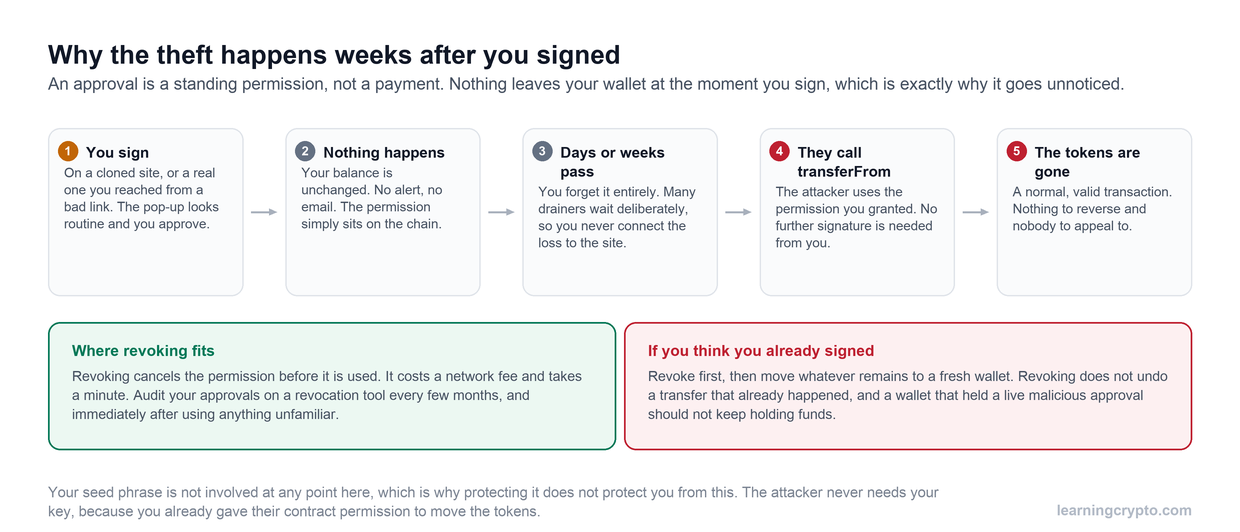
Nothing leaves your wallet when you sign, which is exactly why it goes unnoticed. Many drainers wait deliberately so that you never connect the loss back to the site that asked for the signature.
This is not a flaw. It is how a decentralised exchange swaps your USDC, how a lending market takes your collateral, and how almost every useful application in DeFi works. The ERC-20 standard deliberately separates permission from transfer.
An attacker exploits the gap between those two steps. They put a contract in front of you that looks like a claim page, a swap or a mint, and get you to sign an approval granting it permission over your tokens, usually for an unlimited amount. Nothing appears to happen. Your balance does not change and there is no obvious theft. Then, minutes or months later, the attacker calls the transfer function and takes the tokens at a moment of their choosing. The drain is a separate transaction, which is why so many people cannot work out what they did wrong.
Why doesn't protecting your seed phrase stop this?
Because nothing was stolen. Your seed phrase was never exposed, never typed into a website and never left your device. You were not hacked in any conventional sense. You signed a valid transaction with your own key, and the blockchain did exactly what you told it to.
This is also why a hardware wallet does not save you by itself. A Trezor or a Ledger protects the key from being extracted. It will still happily sign a malicious approval if you confirm the prompt on the device, because from the device's point of view you are the owner and this is an authorised instruction. Self-custody protects the key. It does not protect your judgement, and this attack targets judgement.
Which signatures should you actually worry about?
Five, and the last two are the dangerous ones precisely because they feel harmless.
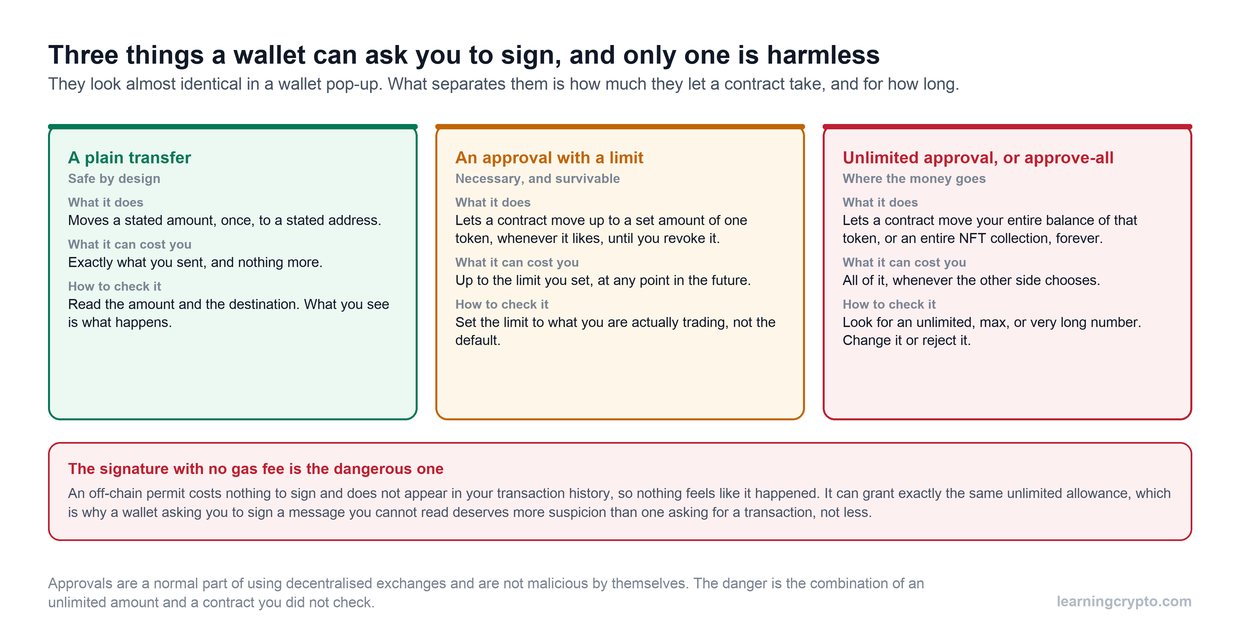
All three look nearly identical in a wallet pop-up. The difference is how much a contract can take and for how long, and the signature that costs no gas fee is the one that deserves the most suspicion.
| Signature | What it grants | Why it matters |
|---|---|---|
| approve | Permission for one contract to spend up to a set amount of one token | The standard case. Risk depends entirely on the amount, and interfaces often default to unlimited |
| increaseAllowance | Raises an existing permission | Easy to wave through because a permission already existed |
| setApprovalForAll | Permission over an entire NFT collection | One signature exposes every item in that collection, present and future |
| Permit (EIP-2612) | An off-chain signed message granting an allowance | Costs no gas, so there is no transaction fee to give you pause, and it does not appear in your on-chain history |
| Permit2 | A batched permission covering multiple tokens through one contract | Broad scope in a single signature, and the prompt is hard to read |
The gasless signatures deserve particular suspicion. People have learned to slow down when a wallet asks them to pay a fee, because the fee makes the action feel consequential. A Permit signature asks for no fee at all, produces no on-chain record you can later find, and can hand over the same authority. Attackers know this.
What is blind signing, and why does it matter?
Blind signing is approving a transaction whose contents your device cannot display in readable form. Instead of "approve unlimited USDC for contract 0xabc", you get a screen of hexadecimal. You are confirming that you agree to something you cannot read.
Clear signing is the opposite: the device decodes the transaction and shows you the actual action, the token, the amount and the destination. Where a wallet or device offers it, use it, and treat an unreadable payload as a stop signal rather than an inconvenience.
The related habit worth building is trusting only the hardware wallet screen. The website can display whatever it likes and a compromised front end will happily show you a friendly summary that bears no relation to what you are signing. The device screen is the one display an attacker cannot rewrite. If the two disagree, the device is right and you should reject.
How do people end up on the malicious site?
Almost never by wandering onto an obviously sketchy website. The delivery is the sophisticated part.
- Paid search results. An advert for a lookalike domain sitting above the real protocol in search results. People click the first result.
- Typosquatted and hijacked domains. A character swapped, a different top-level domain, or a genuinely expired domain bought by someone else.
- Compromised social accounts. A real project's X or Discord account posting a claim link, which is far more convincing than a stranger's message.
- Airdrop and claim pages. The pretext works because claiming genuinely does require signing something, so the request looks legitimate.
- Supply-chain compromise of a real front end. The URL is correct, the site is the real one, and the injected code is malicious. The Ledger Connect Kit compromise in December 2023 is the reference case: a widely used library was tampered with, and users on legitimate sites were shown drainer prompts.
That last category is why "only visit official sites" is necessary but not sufficient advice. Sometimes the official site is the attack.
What should you check before you sign?
- Read the domain character by character. Do not trust a link from a message, a post or an advert; navigate from a bookmark you created yourself.
- Read what the prompt is actually requesting. Is it a swap, or is it an approval? Which token, and what amount?
- If it is an approval, set a specific amount rather than unlimited wherever the interface allows it. The small extra cost of approving again later is the price of a bounded loss.
- Check the contract address against the project's official documentation, not against the page asking you to sign.
- Never sign anything you did not initiate. If a prompt appears because someone told you to go somewhere, stop.
- If the device shows an unreadable payload for a transaction you expected to be simple, reject it.
If you are unsure what a contract or a prompt is doing, members can ask Ask Crypto AI for a private second opinion before signing rather than after.
How do you audit and revoke existing approvals?
Every approval you have ever granted is still live unless you removed it. Most people have years of them, including to protocols that no longer exist and contracts that were never audited.
Tools that show them: Revoke.cash lists approvals across many chains and lets you remove them, and most block explorers have a token approval checker built in, such as Etherscan's. Several wallets now expose an approvals screen directly.
Three things to understand before you start. Revoking is an on-chain transaction, so it costs a network fee per revocation. Approvals are per chain, so clearing Ethereum does nothing for your positions on Arbitrum, Base or BNB Chain and you have to repeat the exercise on each. And revoking does not recover anything already taken; it only closes the door for the future.
Make it a periodic habit rather than a one-off panic. Once or twice a year, review what has permission over your funds and remove anything you are not actively using.
What should you do in the first ten minutes if you signed something bad?
Order matters, because you are racing an automated script.
- Move the remaining assets first. Send anything still in the wallet to a fresh wallet with a new seed phrase. Do not start by revoking. Revocation needs a transaction to confirm, and a drainer bot can empty you while you wait for it.
- Then revoke the malicious approval, so the permission cannot be used against anything that arrives later.
- Check every other chain that address has used. The same approval pattern may exist elsewhere.
- Treat the wallet as burned. Do not reuse the address. If you signed on a hardware wallet, the device is fine, but that account's permissions history is not worth maintaining.
Be realistic about recovery: on-chain transfers are final and there is no support desk that can reverse them. Anyone who contacts you offering to recover the funds, particularly quickly after the loss, is running a follow-up scam on a person they know is desperate. That pattern is covered in our guide to spotting crypto scams.
What actually prevents this?
Structure rather than vigilance, because vigilance fails on the day you are tired.
Keep a separate wallet for interacting with anything new, funded with only what you are willing to lose on that experiment. Keep long-term holdings in a wallet that never touches an unknown contract at all, ideally on a hardware device; our comparison of cold and hot wallets covers how to divide holdings, and Trezor versus Ledger covers the devices. Understanding what you are approving helps too, which is what our explainer on smart contracts is for, and our guide to earning in DeFi covers the legitimate uses of approvals. If you use browser wallets daily, the risks specific to them are covered in is MetaMask safe. There is more on staying safe in our scams and risk hub.
The mental model worth carrying: a signature is not a confirmation, it is a grant of authority. Treat every one as though you are handing someone a key, because that is what you are doing.
Frequently asked questions
What is token approval phishing?
It is an attack that tricks you into granting a malicious smart contract permission to spend your tokens, then uses that permission later to transfer them out. Your recovery phrase is never exposed and no password is stolen. The theft happens through a transaction you signed yourself, which is why hardware wallets do not prevent it on their own.
Can someone drain my wallet without my seed phrase?
Yes. If you sign an approval giving a contract permission over your tokens, that contract can move them without ever seeing your recovery words. This is the most common way wallets are emptied today. The defence is reviewing what you sign and periodically revoking permissions you no longer use, not just protecting your seed phrase.
How do I check what token approvals I have granted?
Use a revocation tool such as Revoke.cash or the token approval checker built into a block explorer like Etherscan, and connect the wallet address you want to review. Many wallets now include an approvals screen as well. Remember to check each chain separately, because approvals granted on one network are not visible from another.
Does revoking an approval get my stolen tokens back?
No. Revoking only cancels future permission, so it stops further losses through that approval but cannot reverse transfers that already happened. On-chain transactions are final and no exchange, developer or court can undo them. Anyone promising to recover stolen crypto for a fee is almost certainly running a second scam.
Are gasless signature requests safe because they cost nothing?
No, the opposite. Off-chain signatures such as Permit and Permit2 grant real spending authority without a transaction fee, which removes the moment of friction that makes people think twice, and they leave no record in your on-chain transaction history. Treat a free signature request with more suspicion than one that costs gas.
Does a hardware wallet protect me from wallet drainers?
Only partly. It stops your private key being extracted, but it will sign a malicious approval if you confirm it on the device. Its real value here is the screen: it shows what you are actually signing, independent of the website. Reject anything the device displays as unreadable data when you expected a simple action.
Should I use one wallet or several?
Several. Keep long-term holdings in a wallet that never connects to new applications, and use a separate wallet with limited funds for anything experimental. This way a bad signature costs you the contents of the small wallet rather than your savings, and it is the single most effective structural defence against this attack.
This guide is part of stage 6 of 8, avoiding the traps, in the free Learning Crypto curriculum. Next: Fake Crypto Support Scams: How the Con Works.