
This guide is general education about wallet security, not financial advice. Test any setup with a small amount before you trust it with savings.
Plenty of people have an old phone sitting in a drawer, and a common question is whether it could hold crypto instead of a hardware wallet. It can, if you set it up properly and understand what you are giving up. This guide walks through the setup on a spare or brand new phone, how sending works, and the honest comparison with a dedicated device like a Trezor.
Can an old phone really work as a hardware wallet?
Yes, with a caveat. A phone that is wiped, kept permanently offline and running a signing app does the core job of a hardware wallet: it creates your private keys, stores them away from the internet and signs transactions without ever exposing the keys to a connected device.
What it is not is a purpose-built hardware wallet. A Trezor runs a small, single-purpose firmware on a chip designed to guard one secret. A phone runs a full operating system with millions of lines of code, cameras, microphones and wireless radios that were all designed to be online. The industry term for what you are building is an air-gapped signer: a device that holds keys and talks to the outside world only through QR codes.
That approach is not new. Bitcoiners have been signing transactions on offline laptops since the early days, and the QR method used by today's phone apps follows the same Partially Signed Bitcoin Transaction standard (BIP-174) that dedicated air-gapped devices use.
How does a phone cold wallet work?
You use two phones. Your everyday phone runs a watch-only wallet that can see your balance and build transactions but holds no keys. The old phone holds the keys and never connects to anything.
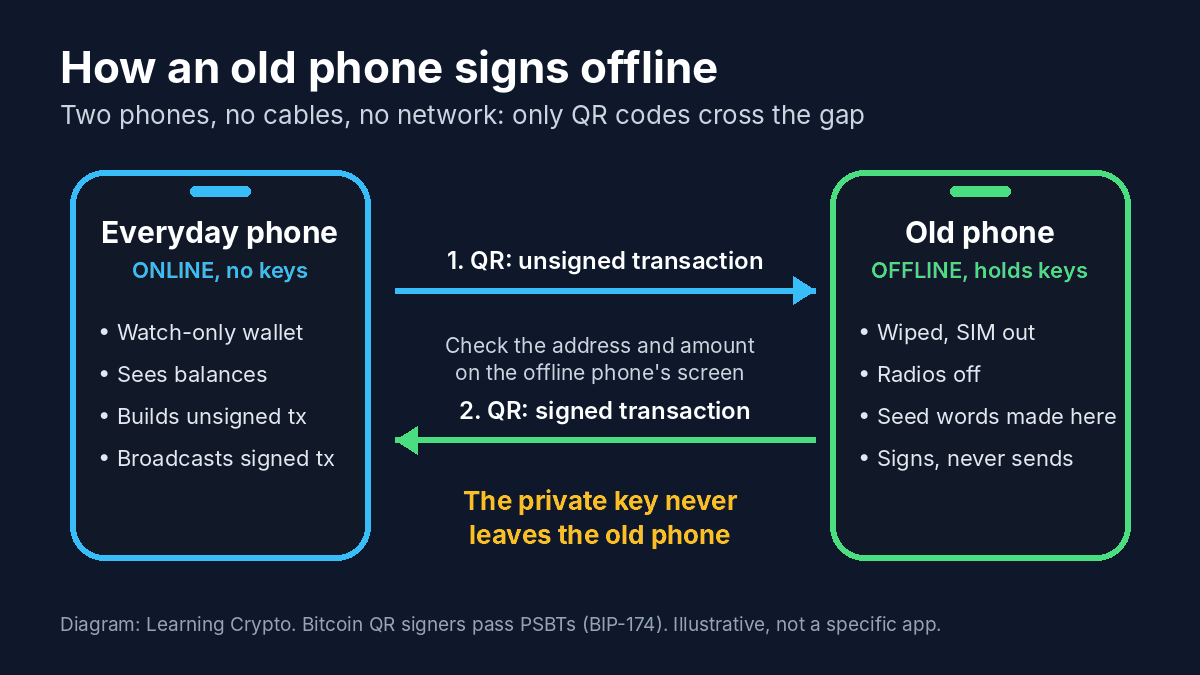
The whole system in one picture: only QR codes cross between the two phones, so the private key never touches a device that is online.
When you want to send, the online phone shows the unsigned transaction as a QR code. The offline phone scans it, displays the address and amount for you to check, signs it, and shows the signed result as a second QR code. The online phone scans that and broadcasts it. Because a camera can only read what is put in front of it, there is no cable or network link for malware to travel along.
The best-known app for this is AirGap, made by the Swiss company Papers. Its Vault app runs on the offline phone, its Wallet app on the online one, and the code for both is open source. It supports Bitcoin, Ethereum and a handful of other networks. Bitcoin-only users can also pair an offline signing app with a watch-only wallet such as Sparrow on a computer, which speaks the same QR formats.
Old phone or brand new phone: which should you use?
Both work. The trade-off is between a phone whose history you know and a phone with no history at all.
| Your own old phone | Brand new phone | Second-hand phone | |
|---|---|---|---|
| Cost | Free | Often as much as an entry-level hardware wallet | Low |
| History | Known, but it spent years online with your apps and accounts | None, sealed from the maker | Unknown |
| Security updates | May have stopped | Current for several years | Varies |
| Battery | Aged, may swell in storage | Fresh | Unknown |
| Our view | Fine for learning and modest amounts | The better choice if you go this route | Avoid |
We would not use a phone bought second-hand from a stranger. A device that passed through unknown hands is the same supply chain problem behind the Ledger reseller thefts reported this week, and a factory reset does not prove the phone underneath is clean. If you buy new, buy it sealed from the manufacturer or a major retailer.
For a more hardened option, technically confident users run GrapheneOS on a Google Pixel. It adds a per-app Network permission that blocks an app from every network, which is a stronger guarantee than trusting airplane mode alone.
What do you need before you start?
- The spare phone, charged, with the SIM card and any memory card removed.
- Your everyday phone or computer for the watch-only side.
- Pen and paper, or a metal backup plate, for the recovery phrase. Never a photo, screenshot, notes app or cloud document.
- A signing app you have checked: open source, still receiving updates, and using a standard BIP-39 recovery phrase so you can restore your funds in other wallets if the app is ever abandoned.
- A small test amount of crypto to send in and out before anything larger.
How to set up an old phone as an offline signer, step by step
The order matters. The app has to be installed while the phone is online, so the reset and lockdown come before your keys exist, and the keys are created only after the phone goes offline for good.
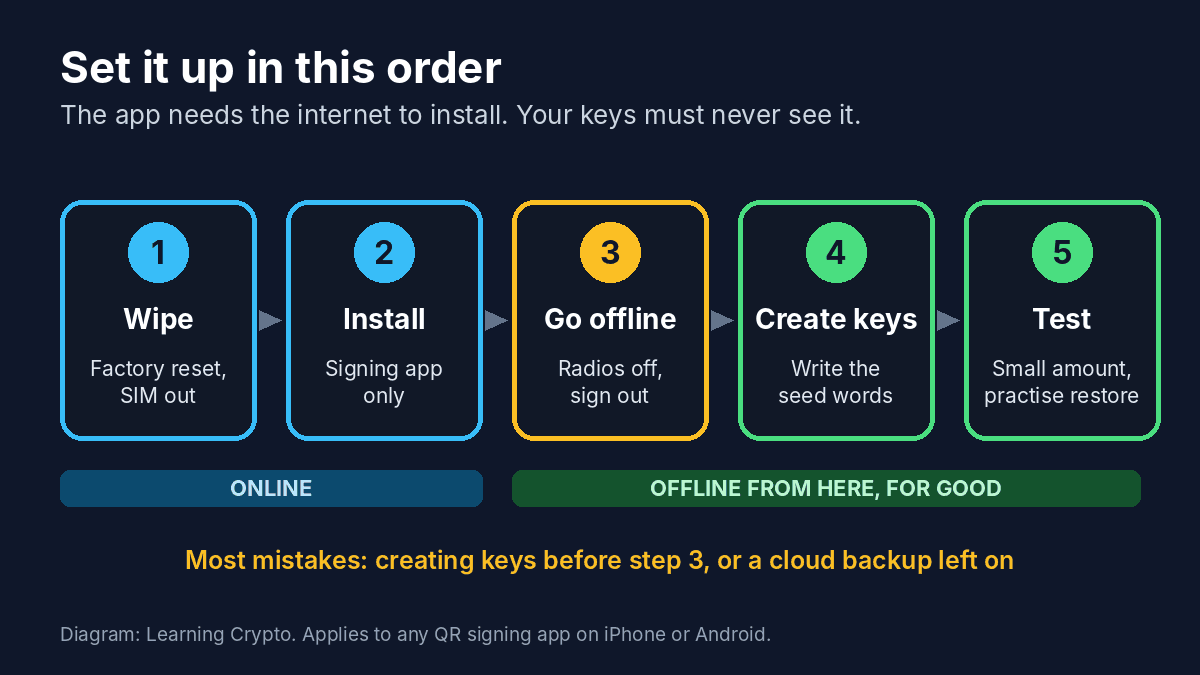
Install while online, then cut the phone off before your recovery phrase exists. Creating keys before going offline is the mistake that undoes the whole setup.
- Factory reset the phone. On iPhone use Settings, General, Transfer or Reset iPhone, Erase All Content and Settings. On Android the reset option is usually under Settings, System or General management. This clears your old apps and accounts.
- Set it up as a new device with a fresh Apple or Google account that is not your main one. Do not restore a backup, and turn off cloud backups, photo sync and keyboard learning.
- Install the signing app and nothing else. Use the official app store link from the developer's own website, or on Android the signed release from the developer's GitHub page.
- Cut every connection. Turn on airplane mode, then check that Wi-Fi, Bluetooth and NFC are each off, because some phones allow them back on inside airplane mode. Forget all saved Wi-Fi networks and sign out of the app store account.
- Set a strong device passcode and turn off any lock-screen previews.
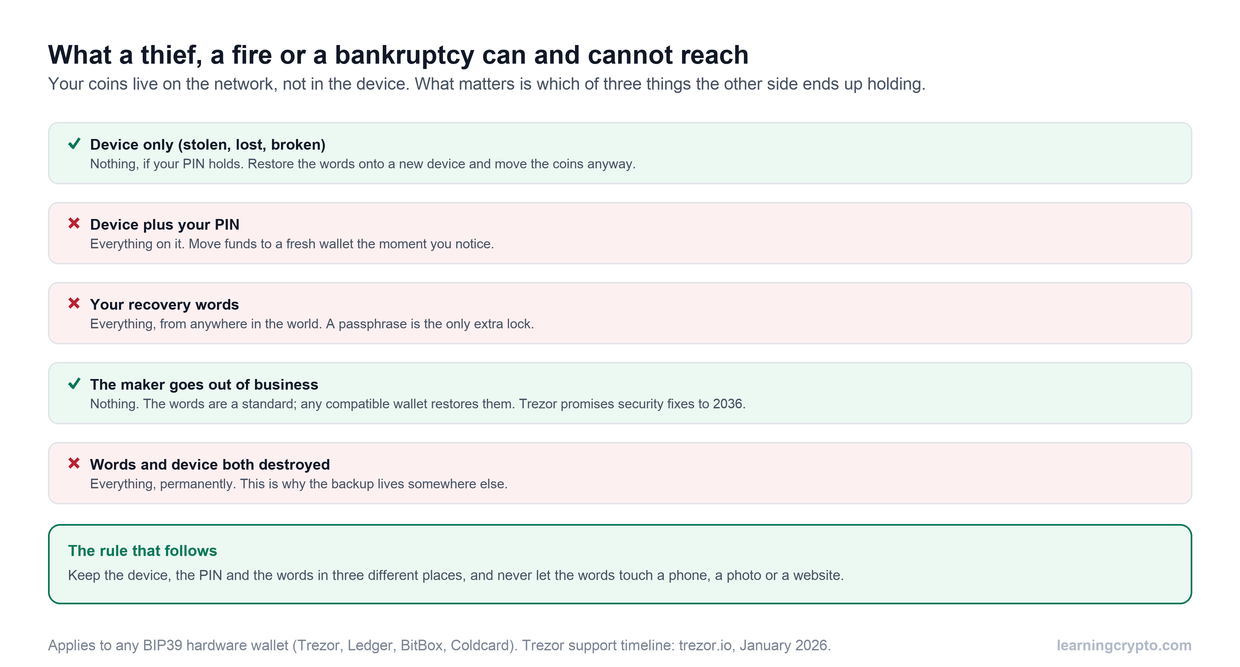
- Create a new wallet in the signing app. Write the recovery phrase on paper as it appears, check every word, and store it where you keep important documents. Our guide to losing a hardware wallet explains why the phrase, not the device, is what you are really protecting.
- Export the watch-only account to your everyday phone by QR code, so it can show balances and receive addresses.
- Test the full loop. Send a small amount in, send it back out, then reset the old phone and restore it from your written phrase to prove the backup works before you add more.
From then on the phone never goes online again. Keep it charged every few months, because a lithium battery left flat for a long time can fail, and an old phone with a dead battery is a phone you cannot sign with.
How do you send crypto from a phone cold wallet?
Sending takes about the same effort as with a hardware wallet, with a camera in place of a USB cable.
- On your everyday phone, start a send in the watch-only wallet and enter the address and amount.
- Tap the option to sign with your offline device. A QR code appears.
- Enter the passcode on the offline phone, open the signing app and scan the QR code.
- Check the address and amount on the offline phone's screen, not the online one. This is the step that protects you if your everyday phone is compromised.
- Approve, and the offline phone shows a signed QR code. Scan it with your everyday phone and broadcast.
Receiving needs no signing at all. Always confirm a receive address on the offline phone before you share it, for the same reason. If you want to watch balances across several wallets without exposing any keys, our Portfolio Tracker works from public addresses only.
Where does an air-gapped phone fall short of a real hardware wallet?
This is the part most videos on the topic skip. A phone signer is a reasonable tool, but on almost every security measure a dedicated device does better.
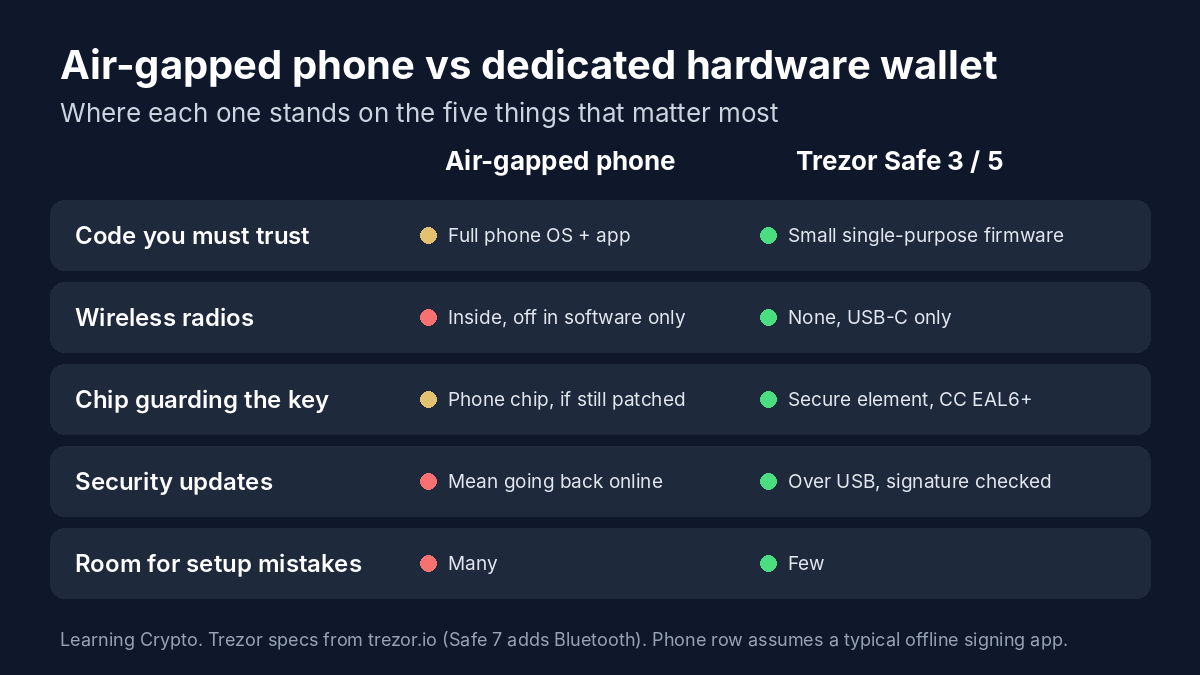
The five differences that matter most at a glance. The full comparison follows in the table below.
| Air-gapped phone | Trezor Safe 3 or Safe 5 | |
|---|---|---|
| Code you have to trust | A full phone operating system plus the app | Small, open-source firmware built for one job |
| Wireless radios | Wi-Fi, Bluetooth, cellular and NFC hardware still inside, switched off in software | None. USB-C only |
| Key protection | Depends on the phone's chip and how current its software is | Secure element certified to CC EAL6+ |
| Security updates | Need the phone online, which breaks the air gap | Installed by USB, signature checked by the device |
| Coins supported | Whatever the one app supports | Wide support through Trezor Suite and other wallets |
| Passphrase (25th word) | Depends on the app | Built in |
| Mistakes possible during setup | Many: a leftover backup, a radio left on, a screenshot | Few: the device is offline by design |
Old phones add one more problem. Once a model stops receiving security updates, any known flaw in its lock screen or storage stays open forever. Being offline stops remote attacks, but someone who steals the phone has unlimited time to try those known weaknesses. That is why we treat a phone signer as an extra layer, not a replacement for good physical security of the device and the recovery phrase. Trezor's own page on built-in hardware security lists what a purpose-built device adds.
Who should use a phone signer, and who should just buy a Trezor?
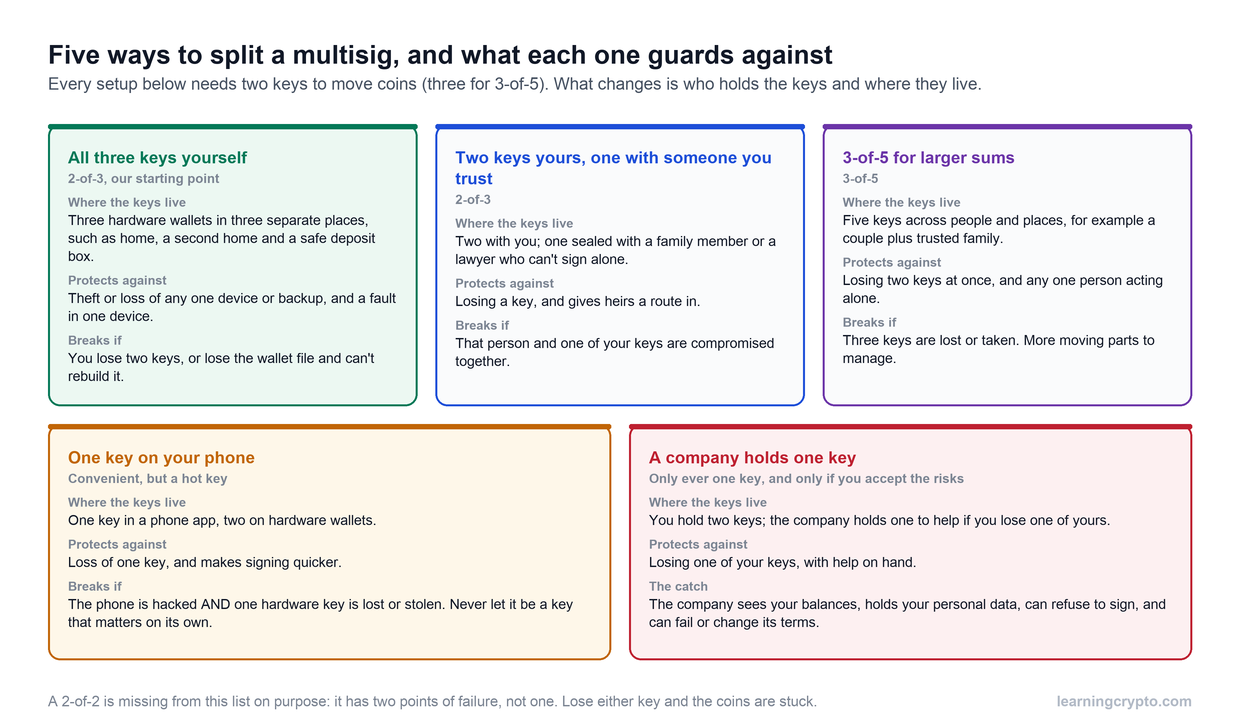
A phone signer makes sense if you want to learn how cold storage works without spending money, if you hold a modest amount, or if you want a second signing device from a different maker for a multisig wallet, where one weak key alone cannot move funds.
For anyone keeping real savings in crypto, and especially for anyone setting this up for a parent or partner, we recommend a dedicated hardware wallet. It removes most of the ways the setup above can go wrong, and it is simpler to use for years. We use and recommend Trezor: open-source firmware, a secure element on the Safe 3 and Safe 5, and passphrase support. Our review Is Trezor Safe? covers its full record, including the problems.
Whichever you choose, buy it direct from the manufacturer. Get a Trezor from Trezor's own shop here (this is our referral link, which supports Learning Crypto at no extra cost to you). If you are still deciding between online and offline storage, start with cold wallet vs hot wallet, and browse the rest of our wallets and custody guides.
Frequently asked questions
Is an old phone as safe as a hardware wallet?
No. A properly air-gapped phone is far safer than a normal phone wallet, but a dedicated hardware wallet is still safer. It runs much smaller code, has a secure element built to protect keys, and has no wireless radios on models like the Trezor Safe 3 and Safe 5. A phone signer suits learning, modest amounts and multisig backup keys.
Is airplane mode enough to keep a phone offline?
Not on its own. Airplane mode is a software switch, and many phones let Wi-Fi, Bluetooth or NFC be turned back on while it is active. Remove the SIM, check each radio is off, forget saved networks and sign out of accounts. On a Pixel running GrapheneOS you can also deny the signing app all network access.
Can I use an iPhone as a cold wallet?
Yes. Apps such as AirGap Vault are available on iOS as well as Android. You need an Apple account and an internet connection to install the app, so do that first on a freshly erased iPhone, then go offline, turn off iCloud backup and only create your wallet afterwards.
What happens if the old phone breaks?
Your crypto is safe as long as you have the written recovery phrase. The coins live on the blockchain, not on the phone. Restore the phrase into the same app on another offline phone, or into any wallet that supports standard BIP-39 phrases, including a Trezor. This is why you should test a restore before adding real money.
Do I need to update the app on my offline phone?
Only when a change matters to you, such as support for a new coin or a fixed security problem. Updating means bringing the phone back online, which breaks the air gap. The safer route is to set up a fresh offline phone, or a hardware wallet, and move your funds across to it.
Which apps can turn a phone into a cold wallet?
AirGap Vault is the best-known open-source option and supports Bitcoin, Ethereum and several other networks. Some Bitcoin-only apps also act as QR signers for watch-only wallets like Sparrow. Whichever you pick, check that it is open source, still maintained, downloaded from the developer's own link and uses a standard BIP-39 recovery phrase.
Keep learning
- Cold Wallet vs Hot Wallet: Key Differences Explained
- Is Trezor Safe? The Honest Record for the Safe 3, Safe 5 and Safe 7
- Lost or Stolen Hardware Wallet, or the Maker Goes Bust: What Happens to Your Crypto
- How to Set Up a Multisig Wallet: Bitcoin and Ethereum, Step by Step
- Ledger "Hack" Explained: Who Is Affected, What Happened and Why You Should Never Buy a Hardware Wallet From a Reseller
- More guides in the Wallets and Custody hub
- Free headlines: the Learning Crypto news feed on Telegram