
This guide is general education, not financial advice. DeFi carries risks a hardware wallet does not remove. Device features, supported apps and firmware requirements change, so check your wallet maker's current documentation.
If you keep Ethereum and tokens on a Ledger or Trezor and want to use a DeFi app without handing over your keys, this guide is for you. By the end you will know how the connection works, what the device screen can and cannot protect you from, and a short routine to run before every signature.
Can you use DeFi with a hardware wallet?
Yes. A hardware wallet stores your private keys on the device, and a DeFi app asks for signatures that the device produces after you confirm them on its own screen. The app never receives your keys or your recovery phrase.
That is a real improvement over a browser-only wallet, where the keys live on an internet-connected computer. It does not make DeFi risk-free, though. The device protects the keys, and it does nothing about a bad contract, a fake website or a transaction you approve without reading. For that reason, the useful way to think about DeFi from cold storage is this: the question shifts from "who can steal my keys?" to "what exactly am I signing?". If you are new to the device itself, start with our guide to how to use a cold wallet.
How does a hardware wallet connect to a DeFi app?
Usually through a software wallet that acts as a bridge. The DeFi site talks to the bridge, the bridge passes each request to your device, and the device shows it and waits for your confirmation. Trezor describes this setup for MetaMask, and its guide states that every outgoing transaction is confirmed on the device because the private keys never leave it.
The steps below follow Trezor's guide to connecting MetaMask, which describes the browser-extension version. Ledger also offers direct connections to some apps from inside its own software, so check Ledger's current documentation for your device.
- Plug in the device and enter your PIN. If you use a passphrase, enter it now, because a passphrase opens a different set of accounts.
- Install MetaMask from its official source. MetaMask asks you to create its own wallet first, with its own recovery phrase and password. Those only protect MetaMask's own accounts, not the ones on your Trezor.
- Add the hardware wallet. Click the account name at the top, choose Add wallet, then Connect a hardware wallet, then Trezor, and select the device in the browser prompt.
- Approve the connection in Trezor Suite. Suite asks for permission and shares only public keys. You can verify the key against the device screen.
- Choose the accounts you want. Pick only the ones you plan to use with DeFi.
Trezor's guide gives one warning first: never type your recovery phrase into MetaMask or any other app, website or extension. To disconnect, reopen the account selection screen and choose Forget this device. For the wider question of whether a browser wallet is itself a safe place to work from, see our guide on whether MetaMask is safe.
What is blind signing, and why does it matter in DeFi?
Blind signing means approving a smart contract transaction whose details you cannot read on the device. Ledger Academy's explanation of clear signing frames blind signing as the problem that clear signing solves, and says it is switched off by default. To use it on a Ledger you open the coin app, such as Ethereum, go to Settings, turn on Blind Signing and accept the warning.
It matters because DeFi transactions are not simple sends. A swap, a deposit or an approval is a call to a contract, and the data for that call is a long block that is meaningless to a person. If the device cannot decode it, the screen shows little more than a hash or a "data present" notice. You are then trusting the website to have described the transaction truthfully.
Ledger's own guidance says software wallets are always online and can be tampered with, so what they display is not proof of what will be signed. Only the device screen counts, which is why blind signing is the setting to treat with the most suspicion.
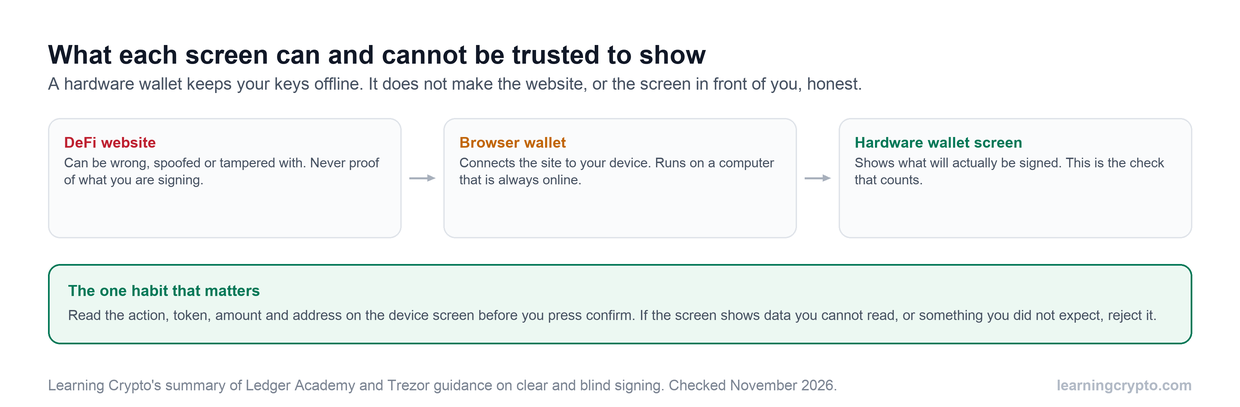
The website and the browser wallet sit on an online computer. The device screen is the one display that is checked against the transaction itself, so it is where you decide.
What is clear signing?
Clear signing makes the device show a contract call in plain language: the action, the tokens and amounts, and the address involved. It depends on ERC-7730, an open standard in which a protocol publishes metadata that describes how its transactions should be displayed.
Both makers support it. Ledger's page says its generic parser reads ERC-7730 metadata, so an app that supplies it can be clear signed. Trezor's clear signing guide lists the Model T, Safe 3, Safe 5 and Safe 7 on Universal firmware 2.12.4 or later, and says the Model One shows raw transaction data instead. Trezor also says the display is the same whether the request arrives through Trezor Suite, WalletConnect or Trezor Connect.
The limit is coverage. Trezor says a contract needs a published descriptor in the registry before the device can decode it, and for contracts without one it falls back to the hash warning. You may see both kinds of screen in the same session. The practical rule is that readable details are good, a hash warning is a reason to stop and think, and neither replaces your own check that the details match what you meant to do.
What does the Bybit theft teach about trusting the screen?
It showed that a hardware wallet is only as safe as the transaction you confirm. The FBI said on 26 February 2025 that North Korea was responsible for the theft of about $1.5 billion in virtual assets from Bybit, on or about 21 February 2025. That was an exchange moving its own funds, not an individual using DeFi, but the lesson transfers.
According to Sygnia's March 2025 summary of the investigations, the attackers compromised a developer at Safe{Wallet}, a multisig wallet provider, and modified JavaScript served for its web app. The altered code changed the content of the transaction and delegated execution to a malicious contract. The site where the transaction was prepared could no longer be treated as honest.
We do not know from these sources exactly what each signer saw on their device, so this guide does not claim to. The point is narrower and well supported: a website can be compromised even when the wallet product behind it is respected, so the web page is not the final check. For a lower-risk setup that spreads signing across several devices, see our guide to multisig wallets and multisig key setups.
Should DeFi funds be separate from your long-term savings?
Our view is yes. Keep long-term holdings on one account or device that never connects to a DeFi site, and use a separate account for DeFi with only the funds you plan to use. Ledger's own checklist suggests using a separate burner wallet, checking the URL, using reputable dApps and avoiding links sent in social media direct messages.
| Account | What it holds | Connects to DeFi sites? |
|---|---|---|
| Vault | Long-term holdings | Never |
| DeFi account | Only the amount you plan to use | Yes, one app at a time |
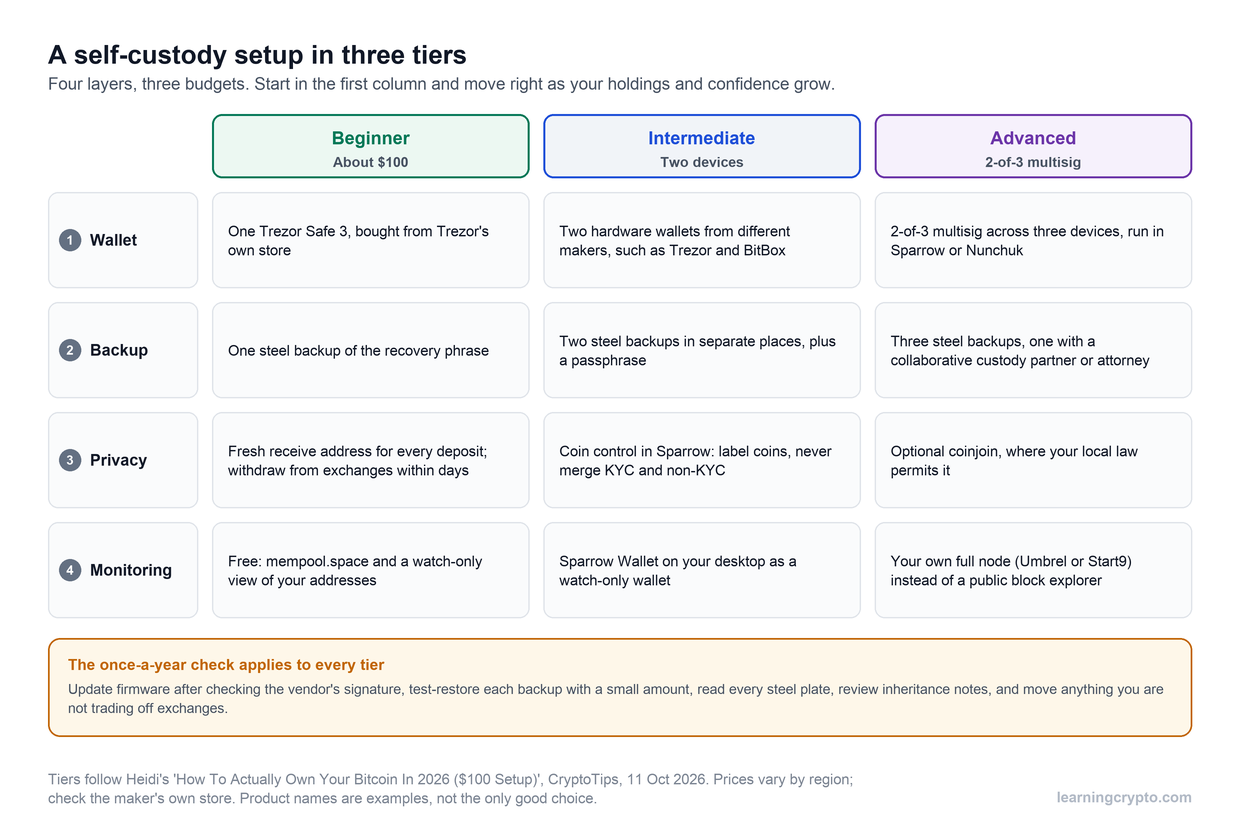
Both accounts can come from the same device, but the separation limits what one mistaken approval can reach. A second device for DeFi goes further. This is a habit, not a guarantee: a contract you approve can still spend what is in that account. Our guide on self-custody covers the wider picture of how to hold your own keys.
What are token approvals, and how do you revoke them?
A token approval is permission for a contract to spend a token from your account. ethereum.org's guide explains that approvals have no expiry date, that apps often ask for permission to spend an unlimited amount to save gas later, and that disconnecting your wallet from a site does not remove the permission.
That is why DeFi cleanup is a regular job. A revoke is itself a transaction, and ethereum.org says you pay a fee for it to go through. It names Etherscan's token approval checker and Revoke.cash among the tools. Treat the revoke screen like any other signature: read it on the device. Our guide to token approval phishing shows how scammers abuse the same mechanism, and our guide to using a blockchain explorer shows how to look at your own address.
What risks does a hardware wallet not remove?
It protects your keys, and nothing else on this list.
- Contract risk. A protocol can have bugs, or its own keys can be abused. See what Aave is for one lending example.
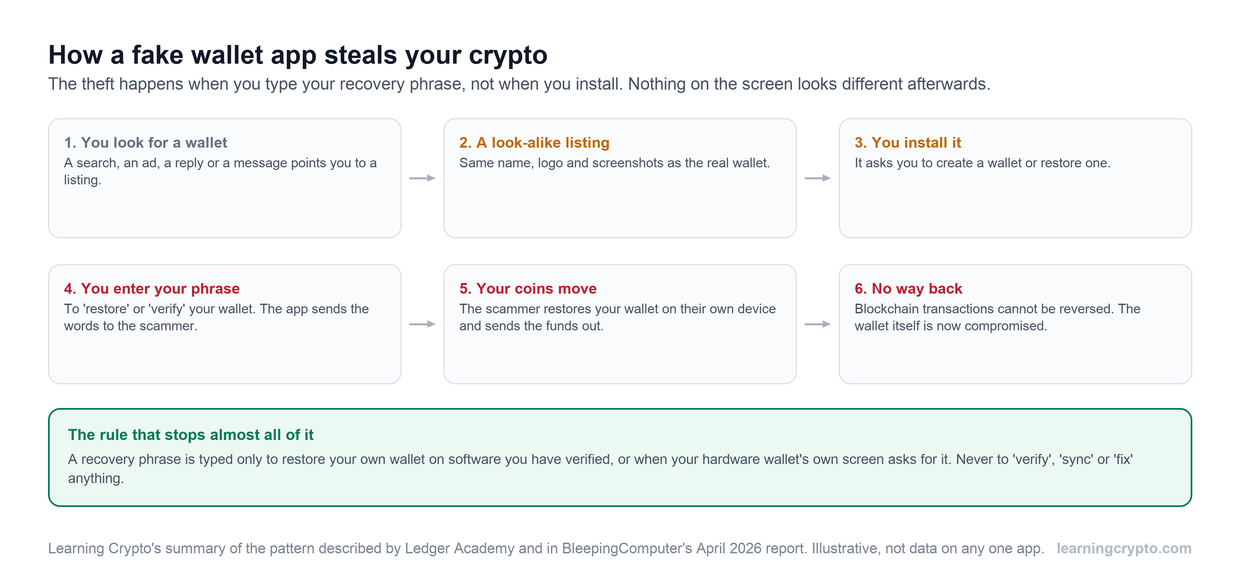
- Fake sites and apps. A convincing copy of a real app still produces valid transactions that you then sign. Our guide to fake wallet apps covers the impersonation side.
- Unreadable prompts. If the device cannot decode the data, you are back to trusting the website.
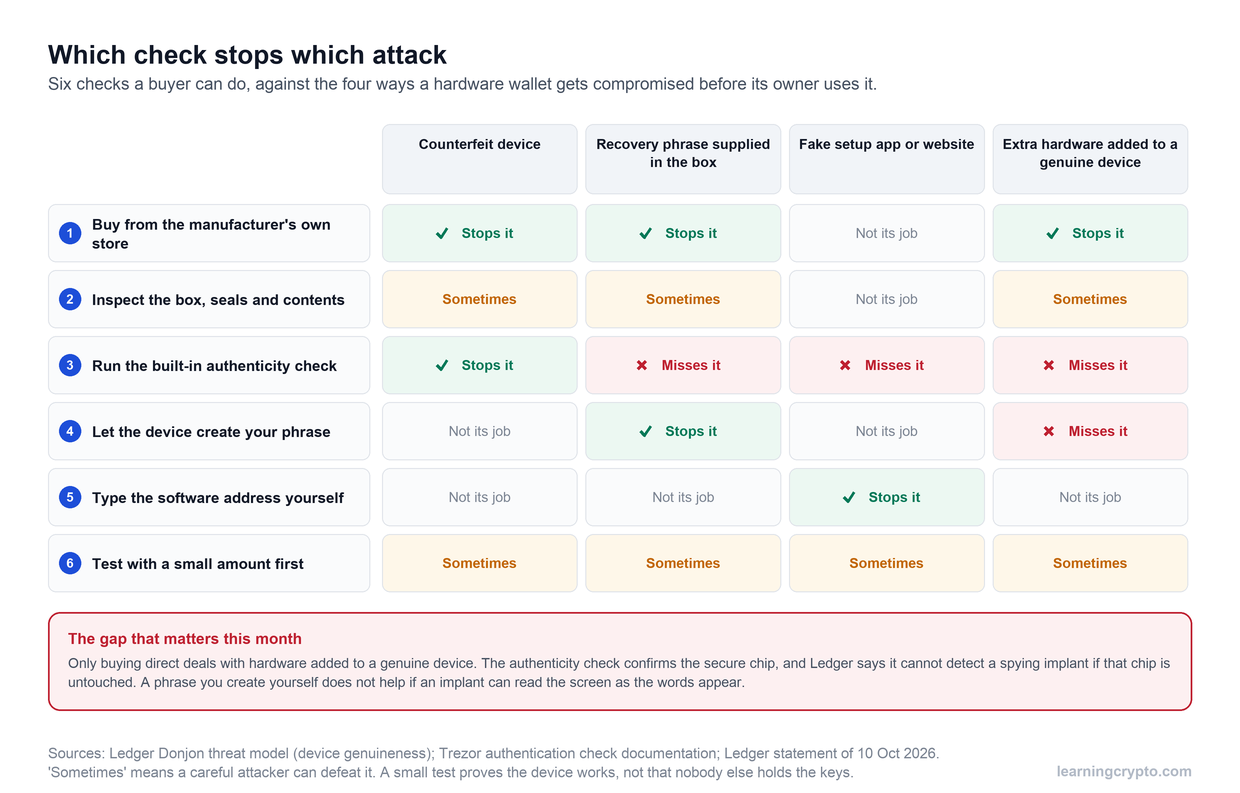
- A fake or tampered device. Check yours with our guide on how to check a hardware wallet is genuine.
- Passphrase confusion. Trezor's guide says a different passphrase shows different accounts, so a missing balance is often the wrong passphrase, not a theft.
What should you check before every DeFi signature?
Run the same short routine each time, because mistakes happen when the transaction feels routine. The six checks below take about two minutes.
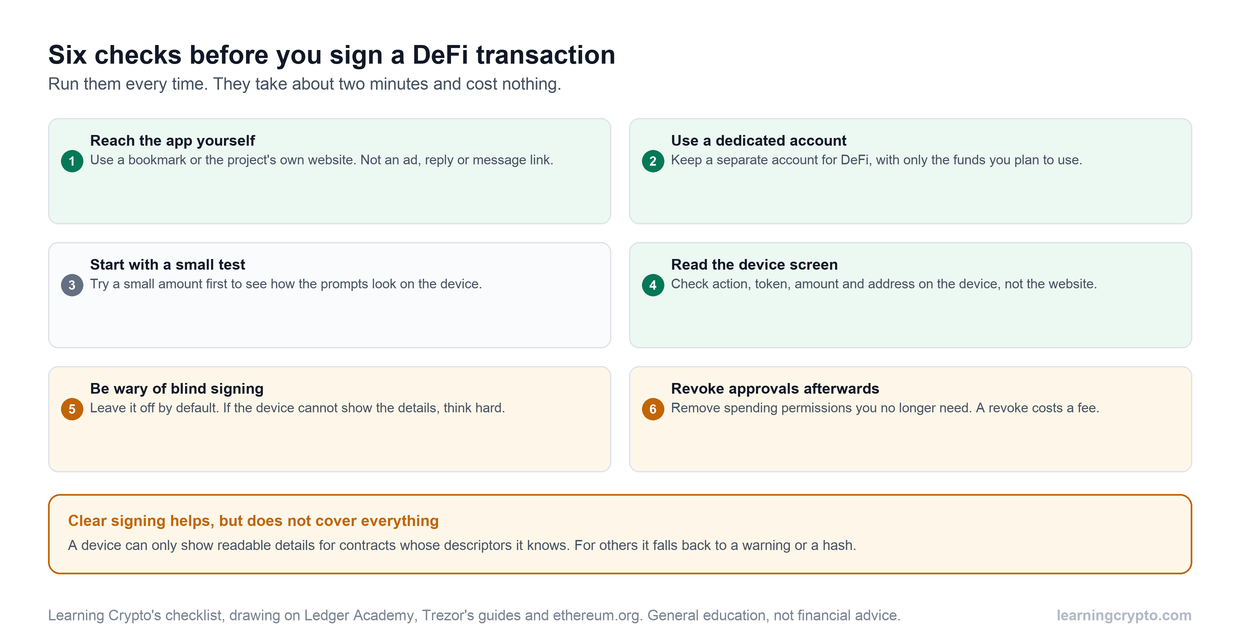
The two checks that matter most are reading the device screen and keeping blind signing off unless you have a specific reason and understand the transaction.
Members can ask Ask Crypto to explain a term or a transaction screen you do not understand, and more guides on keys and devices are in the Wallets and Custody hub. If the screen shows something you did not expect, reject it. A rejected transaction costs nothing, and a signed one cannot be undone.
Frequently asked questions
Is it safe to use DeFi with a Ledger or Trezor?
It is safer than using a browser-only wallet, because your keys stay on the device and every transaction needs your confirmation on its screen. It is not risk-free. A hardware wallet does not protect you from a flawed protocol, a fake site, or a transaction you approve without reading it. Safety depends mainly on what you sign.
Do I have to enable blind signing to use DeFi?
Not always. Ledger says blind signing is off by default, and apps that supply readable descriptors can be clear signed without it. Some contracts still need it because the device cannot decode them. If a transaction requires blind signing, treat that as a warning: understand it first, use a small test amount, and switch the setting off afterwards.
What is the difference between blind signing and clear signing?
With blind signing, the device asks you to approve contract data it cannot display, so you rely on the website's description. With clear signing, the device decodes the transaction and shows the action, tokens, amounts and address in plain language. Clear signing depends on the contract having a published ERC-7730 descriptor, so coverage is not yet universal.
Can I use a hardware wallet with MetaMask?
Yes. Trezor's guide describes adding a Trezor in MetaMask through Add wallet, Connect a hardware wallet, then approving in Trezor Suite. MetaMask keeps its own wallet and recovery phrase, separate from the device's accounts. Never enter your device's recovery phrase into MetaMask, and use Forget this device when you want to disconnect the hardware wallet.
How do I remove a DeFi app's access to my tokens?
Revoke the token approval, because disconnecting your wallet from the site does not do it. Use a token approval tool such as Etherscan's checker or Revoke.cash, connect the account, and revoke the contract you no longer use. Each revoke is a transaction, so you pay a network fee and confirm it on your device.
Should I use a separate wallet for DeFi?
We recommend it. Keep long-term holdings on an account that never touches a DeFi site, and fund a separate account with only the amount you plan to use. The separation limits what one mistaken approval can reach. It is a habit rather than a guarantee, because an approved contract can still spend what is in the DeFi account.
Keep learning
- How to Use Cold Wallets for Crypto Like a Pro (Step-by-Step)
- How to Set Up a Multisig Wallet: Bitcoin and Ethereum, Step by Step
- Token Approval Phishing: How Wallet Drainers Empty Wallets
- How to Check a Hardware Wallet Is Genuine, and What the Checks Miss
- How to Use a Blockchain Explorer: Check Any Transaction, Address or Token
- More guides in the Wallets and Custody hub
- Free headlines: the Learning Crypto news feed on Telegram