
Coin support changes with firmware and app updates. Everything below was checked against Trezor's own coin pages on October 14, 2026. Check trezor.io/coins again before you send anything.
If you own a Trezor, or are choosing one, and want to know whether it will hold the coins you actually have, this page answers that coin by coin. It covers the ones people ask about most, including Algorand, Polkadot, Hedera and Bittensor, and what to do when the answer is no.
Which coins does Trezor support?
Bitcoin first, then a short list of large networks. Trezor Suite, the official app, shows and sends Bitcoin, Ethereum and ERC-20 tokens, Litecoin, Dogecoin, Ethereum Classic, Polygon, Zcash, Solana, Cardano, Tron and XRP directly. A second group works only when you pair the Trezor with a partner wallet, and a third group is not supported at all.
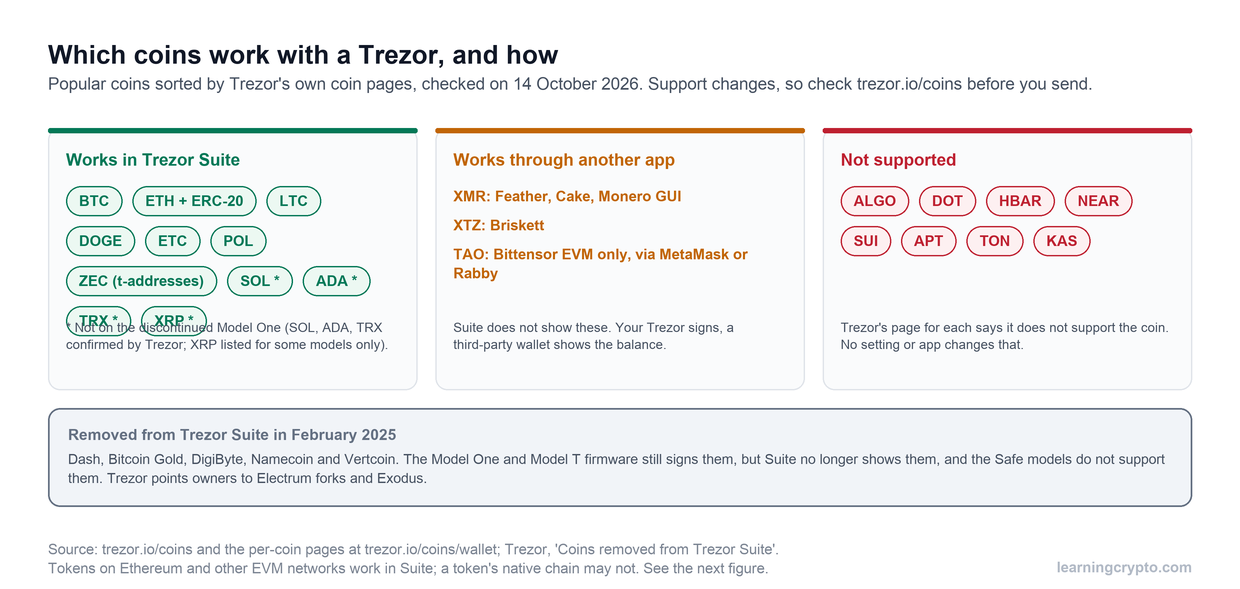
Where popular coins stood on October 14, 2026, sorted from Trezor's own coin pages. The asterisked coins do not run on the old Model One.
That narrow list is a choice, not an oversight. Trezor has always put Bitcoin first and adds a chain only once it has built firmware support for it. It has also removed coins: in February 2025 Suite dropped Dash, Bitcoin Gold, DigiByte, Namecoin and Vertcoin, which the Model One and Model T firmware can still sign but Suite no longer displays. If one of those is your coin, Trezor's migration page names the wallets to use instead.
Is Algorand supported on Trezor?
No. Trezor's own Algorand page says "Currently, Trezor does not support Algorand", and there is no partner app that adds it. You cannot hold ALGO on a Trezor today, by any route.
The same is true of Polkadot (DOT), Hedera (HBAR), NEAR, Sui, Aptos, TON and Kaspa, each of which has a Trezor page saying it is not supported. Any guide that asks you to type your Trezor recovery phrase into another app to "add" one of these coins is a scam.
Can I store Bittensor (TAO) on a Trezor?
Only on the Bittensor EVM network, and only through MetaMask or Rabby. Trezor's Bittensor page lists "Bittensor EVM" as the supported network and states that Trezor Suite does not show it. TAO on Bittensor's native chain, where staking to validators happens, is not covered.
In practice that means a Trezor can secure TAO you have moved to an EVM address, but not your native coldkey. If you stake, our Bittensor wallet guide walks through the native options, including Ledger's Bittensor app.
Which coins need a third-party app?
Monero and Tezos are the main ones. The Trezor holds the keys and signs, but a different wallet shows your balance and builds the transaction.
| Coin | App Trezor names | Note |
|---|---|---|
| Monero (XMR) | Feather, Cake Wallet, Monero GUI or CLI | Not in Suite. Support through Exodus has ended. Trezor's own pages currently disagree on whether the Safe 7 works yet, so check before buying for Monero |
| Tezos (XTZ) | Briskett | Not in Suite |
| Bittensor (TAO) | MetaMask, Rabby | Bittensor EVM network only |
| Solana, Cardano | Suite, or NuFi, Backpack, Yoroi and others | Partner apps are optional here, useful for staking or dapps |
A partner app is not a weaker setup if it is the app Trezor names. The keys never leave the device and you still confirm every send on its screen. The risk is in picking an app Trezor does not list, or a fake copy of one. Our Monero buying guide covers getting XMR into a wallet you control.
Does it matter which Trezor model I have?
Yes, for a few coins. Trezor says Solana, Cardano and Tron do not run on the Model One, and its coin list marks XRP and Monero as available on some models only. The Model One and Model T left Trezor's shop in January 2026, so anyone buying new gets a Safe 3, Safe 5 or Safe 7.
A few coin pages also contradict themselves. Stellar, Avalanche and BNB Smart Chain each have a Trezor page that calls Suite "an app designed to work with" the coin while another line, or another Trezor page, says Suite does not support it natively. Treat those as "probably yes, test first". Our Is Trezor safe? review covers the differences between models, and the Trezor Safe 7 review covers the newest.
Our setup walkthrough of a Trezor Safe 3 in Trezor Suite, the app where the Suite-supported coins in this guide appear. Watch it on our CryptoTips channel.
How do I check a coin before I send it to my Trezor?
Answer four questions, all on trezor.io rather than on the exchange you are withdrawing from.
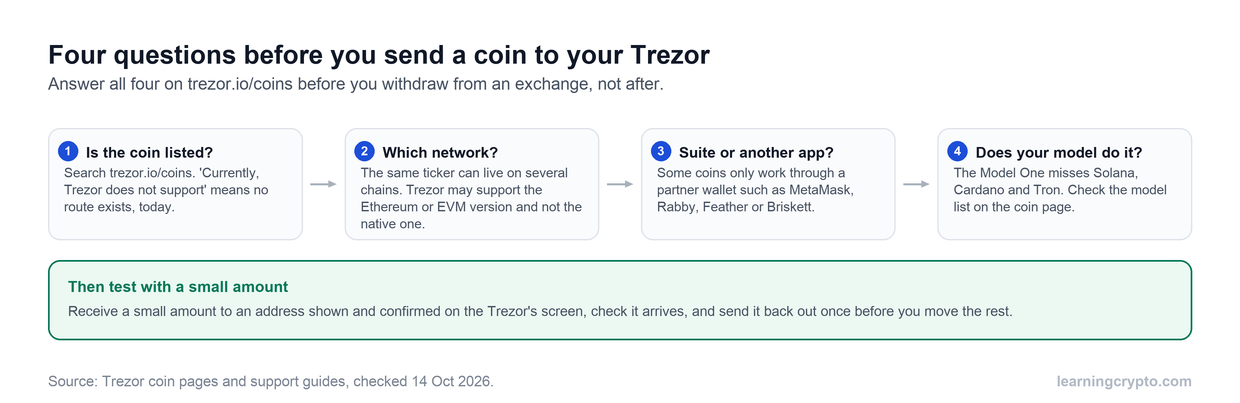
The network question is the easiest one to miss. A token you can hold on Ethereum may not be the same thing as the coin on its own chain.
- Is the coin listed? Search trezor.io/coins. A page saying "Currently, Trezor does not support" means stop.
- Which network? Many coins have a token version on Ethereum or another EVM chain. Trezor can hold ERC-20 tokens, but that does not mean it can hold the coin on its native chain. Match the network on the coin page to the one the exchange will send on.
- Suite or another app? If the coin page names a partner wallet, install that wallet from its official site.
- Does your model do it? Check the model list at the top of the coin page.
- Test small. Send a small amount to an address you have confirmed on the Trezor's own screen, and send it out again once before you move the rest.
What should I do with coins Trezor doesn't support?
Pick one of three options, depending on how much the coin is worth to you.
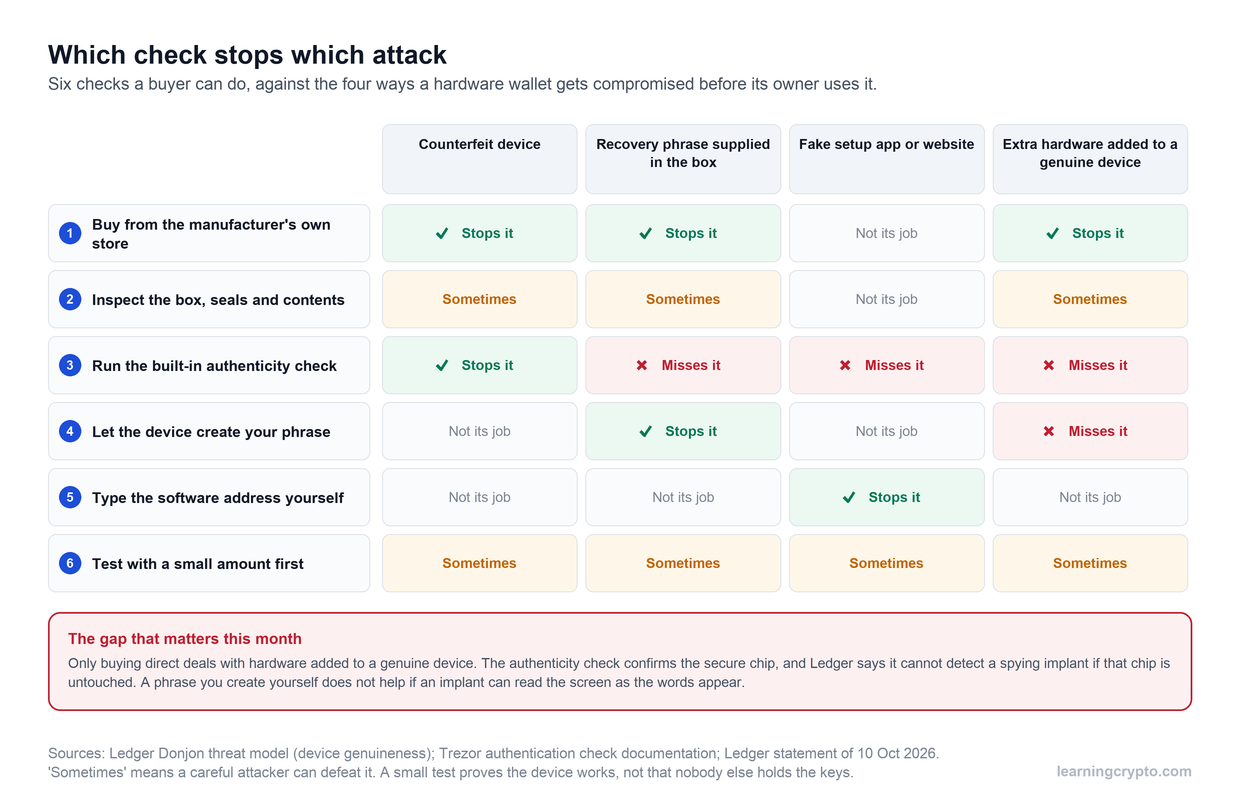
- Use a second hardware wallet for those coins. Ledger's coin pages list Algorand, Polkadot and Hedera as supported in its Ledger Wallet app. If you go that way, buy it from Ledger's own store and run every check in our guide to checking a hardware wallet is genuine. This month's reseller thefts are a reminder that where you buy matters.
- Use the coin's own wallet for small amounts. The official software wallet for a chain is a reasonable home for an amount you could afford to lose. It is a hot wallet, and our cold vs hot wallet guide explains what that trade-off means.
- Ask whether you need the coin at all. We say this as Bitcoin-first investors: holding a long tail of altcoins is what pushes people into juggling several devices and seed phrases. Fewer coins means fewer recovery phrases to protect.
Spreading coins across devices makes them harder to keep track of. Adding the public addresses to a watch-only tool such as our Portfolio Tracker puts every balance in one view without exposing any keys. More custody guides sit in the Wallets and Custody hub, and our comparison of Trezor vs Ledger sets the coin lists side by side with security.
If Bitcoin is the main thing you hold, Heidi's $100 self-custody setup for 2026 walks through the whole stack. Watch it on our CryptoTips channel.
Frequently asked questions
Does Trezor support Algorand (ALGO)?
No. As of October 2026, Trezor's Algorand page says Trezor does not currently support Algorand, and no partner app adds it. You cannot hold ALGO on any Trezor model. If you want ALGO on a hardware wallet, Ledger's coin page lists Algorand as supported in its Ledger Wallet app; buy any device directly from the manufacturer.
Does Trezor support Polkadot (DOT)?
Not as of October 2026. Trezor's Polkadot page states that Trezor does not currently support Polkadot, on any model or through any partner app. Polkadot holders who want hardware storage need a different device; Ledger lists Polkadot, including staking, in its Ledger Wallet app. Check the coin page again before buying, because support lists change with firmware updates.
Can I store Hedera (HBAR) on a Trezor?
No. Trezor's Hedera page says Trezor does not currently support Hedera, and there is no partner wallet route, as of October 2026. Ledger lists HBAR as supported. Be wary of any guide claiming a Trezor workaround for Hedera, especially one that asks for your recovery phrase, which no legitimate wallet ever needs to request.
Does Trezor support Bittensor (TAO)?
Partly. Trezor supports TAO on the Bittensor EVM network only, through MetaMask or Rabby, and Trezor Suite does not display it. TAO held on Bittensor's native chain, including coldkeys used for staking to validators, is not supported. Check which network your TAO is on before sending it to a Trezor-controlled address.
Why doesn't Trezor Suite show my Monero?
Because Suite does not support Monero directly. A Trezor can hold XMR, but you use it through a Monero wallet such as Feather, Cake Wallet or the official Monero GUI, which connects to the Trezor for signing. Support through Exodus has ended. Trezor's pages disagree on Safe 7 support, so check the Monero page for your model.
Can the Trezor Model One hold Solana or Cardano?
No. Trezor says Solana, Cardano and Tron do not run on the Model One, and it does not plan to add Solana there. The Model T, Safe 3, Safe 5 and Safe 7 support all three in Trezor Suite. The Model One and Model T are no longer sold by Trezor, so a new purchase will be a Safe model.
Keep learning
- Is Trezor Safe? The Honest Record for the Safe 3, Safe 5 and Safe 7
- Trezor vs Ledger (2026): Which Hardware Wallet Should You Trust?
- Trezor Safe 7 Review - Is It Worth It?
- Comprehensive Guide to Bittensor Wallets: Securing Your TAO
- How to Check a Hardware Wallet Is Genuine, and What the Checks Miss
- More guides in the Wallets and Custody hub
- Free headlines: the Learning Crypto news feed on Telegram