
This guide is general security education, not personal advice. Product features and support pages change, so check the manufacturer's own documentation before you rely on any single step.
If you have just bought a hardware wallet, have one sitting unopened, or are about to buy one after this month's Ledger news, start here. By the end you will know the six checks to run before a device holds any money, what each one actually proves, and the one kind of tampering that none of the on-screen checks can catch.
Why are people checking their hardware wallets this month?
Because a supply chain attack just worked at scale. On October 9, 2026 Ledger began investigating thefts from customers who bought devices through CryptoBilis, a reseller in Malaysia, Indonesia and the Philippines, and on October 10 it confirmed that one affected device "contained an unauthorized hardware implant". On-chain estimates put losses near $93 million. We cover the incident itself in our explainer on the CryptoBilis thefts.
Three days later MediaMarkt, Europe's largest electronics chain, removed every Ledger product from its stores and website, according to Cointelegraph, after a buyer said two units from its shops had extra components inside. That claim is unverified, and Ledger has not confirmed any tampered device in Europe. The reaction tells you how many people now own a wallet and are no longer sure who touched it before they did.
None of this is new in kind. In June 2021, after a leak of Ledger's customer database, criminals posted fake Nano X units to Ledger customers with a letter claiming to be a security replacement. Ledger confirmed a flash drive implant had been wired onto the board, and the bundled "Ledger Live" program asked victims for their 24 words (Bitdefender's write-up). The 2026 version is better hidden, and the defence is the same.
Heidi breaks down the CryptoBilis drain: what was found inside the devices, how a shop on Ledger's reseller list changed hands, and how to tell whether your own wallet is affected. Watch it on our CryptoTips channel.
What are the six checks, in order?
Run them in this sequence. The first one happens before you pay, and the last one before you send any real amount.
- Buy from the manufacturer's own store. Order from trezor.io or ledger.com directly. Every reseller, marketplace seller or "discounted bundle" is one more set of hands you cannot see.
- Inspect the box before you open it. Look for torn, lifted or re-glued seals, shrink-wrap that is not the manufacturer's, and anything inside that the manufacturer's unboxing guide does not list.
- Reject any wallet that is already set up. A new device should ask you to create a PIN and generate a recovery phrase. If it already has a PIN, or a phrase is printed on a card or scratch-off sheet in the box, stop there. A new Trezor also arrives with no firmware at all, so a Trezor that boots straight into a wallet is a reason to stop.
- Get the setup software from an address you type. Type trezor.io/start or ledger.com yourself. Do not click a search ad or a link in an email, and never run software that came on a USB stick or inside the device itself.
- Run the authenticity check during setup. Trezor Suite runs it when you first connect a Safe model, and Ledger Wallet runs Genuine Check during setup. A failure means stop and contact the manufacturer.
- Write down your own phrase, then test small. Copy the words the device shows you by hand, send a small amount in, check the receiving address on the device screen, and only then move savings.
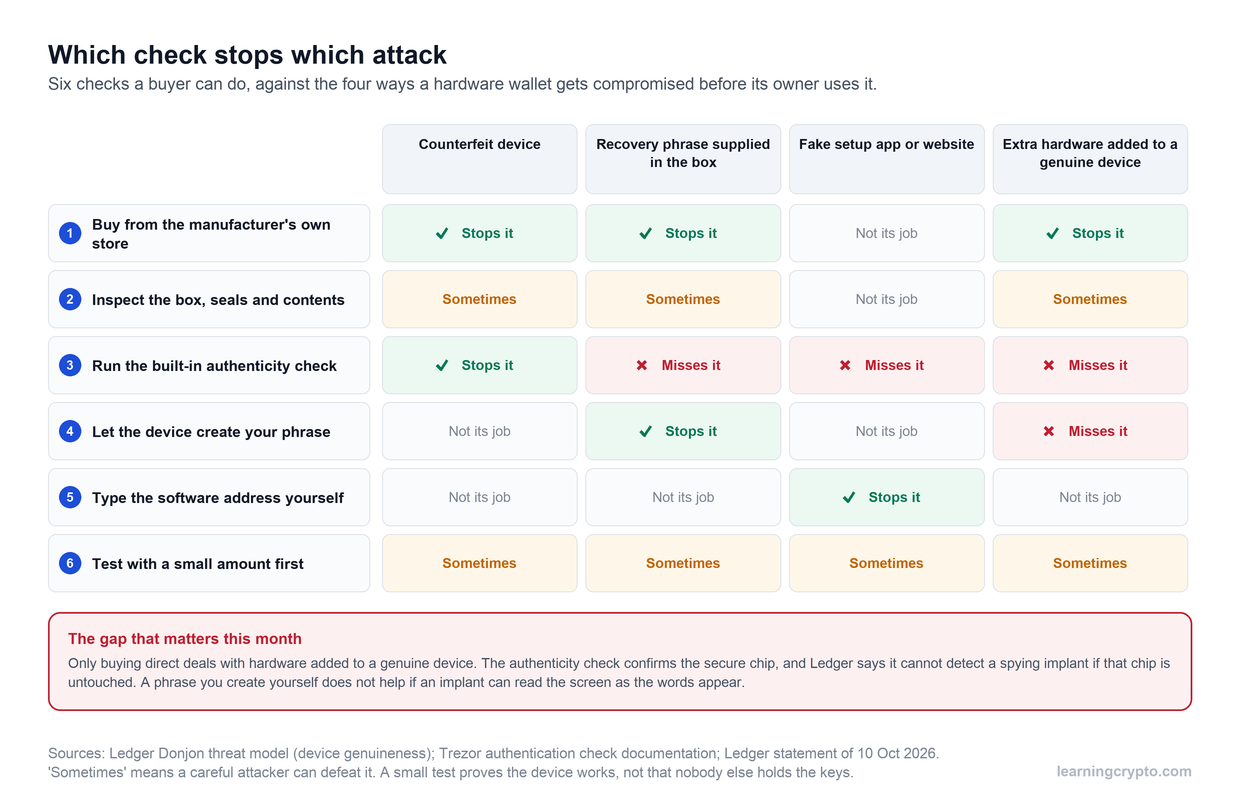
No single check covers everything. The authenticity check is strong against fakes and blind to added hardware, so where you buy carries the most weight.
Where should you buy a hardware wallet?
From the company that makes it, on its own website. That is the only purchase route where the box goes from the manufacturer's warehouse to a courier to you. Ledger itself says that buying from "unlisted, unauthorised sellers adds a number of security risks" and keeps a list of authorised resellers.
We go one step further than Ledger does. CryptoBilis was a seller Ledger worked with, and it changed owners in 2026 without most customers knowing. An authorised badge tells you about a contract, not about who had the stock last week. Amazon, eBay, Telegram sellers, second-hand listings and a friend's spare device all fall into the same bucket: fine for a phone charger, wrong for the thing that guards your savings.
If you already bought from a reseller and the device passes every check below, you do not need to panic. You do need to decide whether the money on it justifies replacing it with a unit bought direct, and for anything you could not afford to lose, our answer is yes.
What should you look for when the box arrives?
Look before you cut anything. Compare the box with the manufacturer's own unboxing page or video, and check these points:
- Seals and shrink-wrap are intact, straight and not re-glued. Current Trezor models carry a holographic seal over the USB-C port, and Trezor says it should be clean, firmly attached and free from tears; the sticky residue it leaves when peeled is part of the tamper-evident design. Packaging that has clearly been opened is a reason to contact the manufacturer before you go further.
- The contents match the official list. A scratch card with words on it, a leaflet telling you to use a supplied phrase, or a USB stick with "setup software" are all signs of a doctored package.
- The device does not power up already configured. It should greet you as a new device, not ask for a PIN you never set.
Be honest with yourself about what this step can do. Ledger warns that counterfeits "are often designed to pass visual inspection", and a professional who opens a box carefully can close it carefully too. Packaging checks catch lazy tampering. They do not prove a device is clean, which is why they sit second in the list and not first.
How does the authenticity check work?
It is a cryptographic test of the secure chip. When you connect the device, the official app sends it a random challenge, the chip signs it with a private key installed at the factory, and the app checks that signature against the manufacturer's certificate. A counterfeit device cannot produce a valid signature, so it fails.
On Trezor, Trezor's documentation says each Safe 3, Safe 5 and Safe 7 receives a unique certificate before it leaves the production line, and Suite checks it when you connect the device. You can switch the check off in Suite's settings, and Trezor strongly advises against doing that on an official device. The older Model One and Model T have no secure element, so this check does not apply to them. On Ledger, Genuine Check runs in Ledger Wallet (the app formerly called Ledger Live) during setup, and Ledger says you must always run it when you first initialise a device.
Our full setup walkthrough of a Trezor Safe 3, from unboxing to the first receive, including the point where Suite checks the device. Watch it on our CryptoTips channel.
What can the authenticity check not detect?
Extra hardware added to a genuine device. Ledger's own security team states it plainly in its threat model: "a Genuine check cannot detect unauthorized physical modifications to the hardware", such as a spying implant, as long as the original secure element is intact. It also "cannot verify the device's physical supply chain history".
That fits the CryptoBilis pattern. Mark Karpelès, the former Mt. Gox chief executive, took apart a Nano X bought in Malaysia and found a cellular modem, an eSIM and a chip wired to read the display, all hidden behind the screen, as reported by Crypto Briefing. Parts like those sit beside a genuine secure element, so a device like that passes Genuine Check, lets you generate your own phrase, and reads the words off the screen as they appear. Ledger has confirmed an implant in one affected device but has not yet said whether every drained wallet held the same parts.
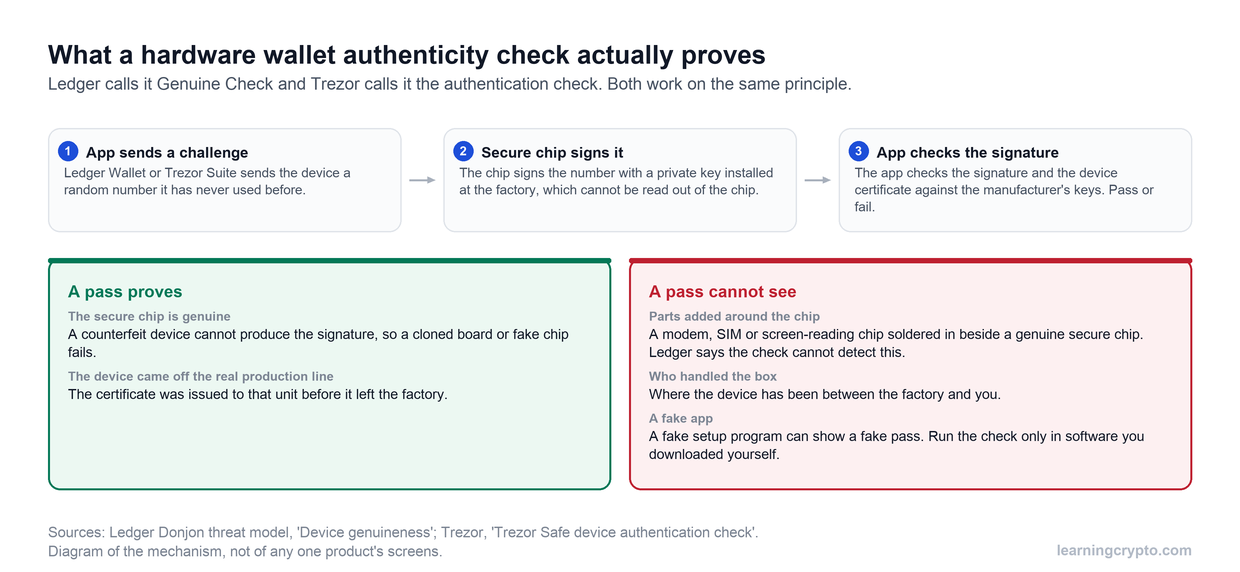
The check answers one question well: is this the manufacturer's chip? It says nothing about what else is on the board or who held the box.
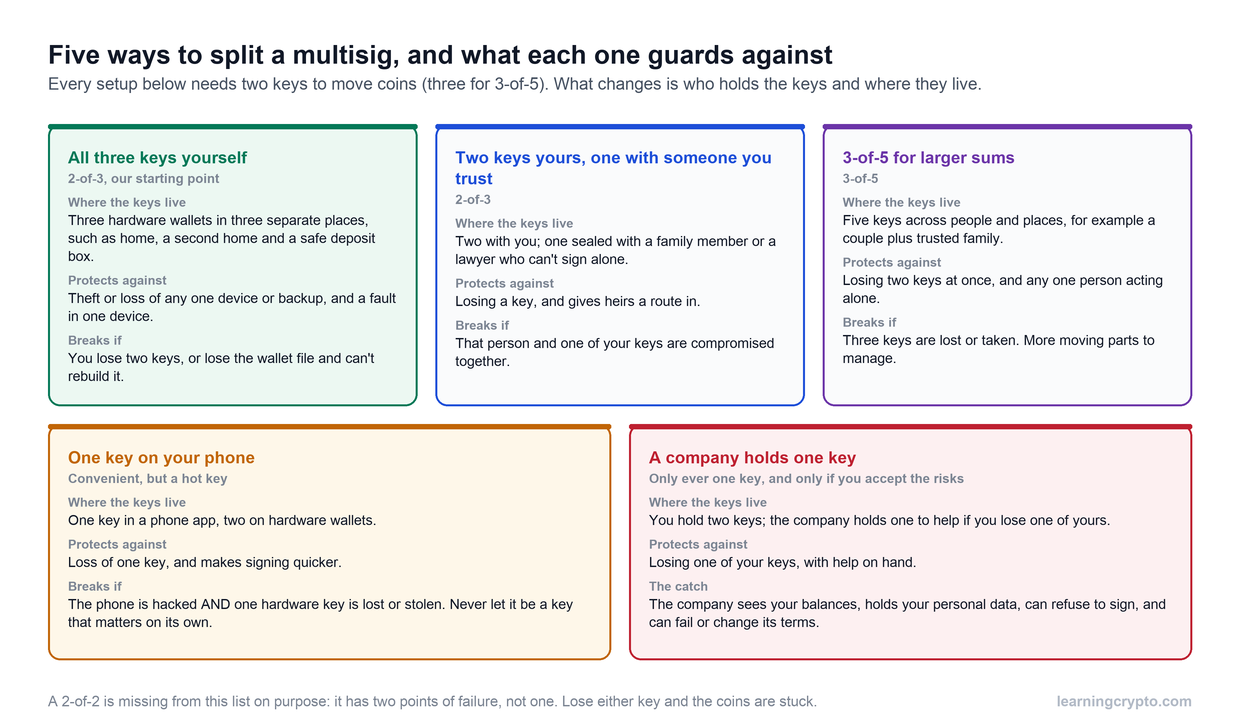
Every brand that verifies a secure chip shares this blind spot, Trezor included. A passphrase does not rescue a device you suspect, because an implant that reads the screen can read the passphrase too, so the answer there is replacement. What does remove the single point of failure is a multisig setup, where spending needs signatures from two or more devices bought at different times from different places.
What if a check fails, or something looks wrong?
Stop and keep the device offline. Do not move funds onto it, do not type an existing recovery phrase into it to "test" it, and do not contact anyone who reached out to you first. Then:
- Photograph the packaging, the seals and anything unusual you found inside.
- Contact the manufacturer through the support address on the site you typed in, and give them the order details.
- If you already used the device, move funds to a new wallet with a freshly generated phrase, on a device bought direct. Our guide to what to do with a lost or compromised hardware wallet covers the order of steps.
- Watch the addresses that were on it. Adding the public addresses to a watch-only view such as our Portfolio Tracker shows any outgoing transaction you did not make, without putting keys anywhere.
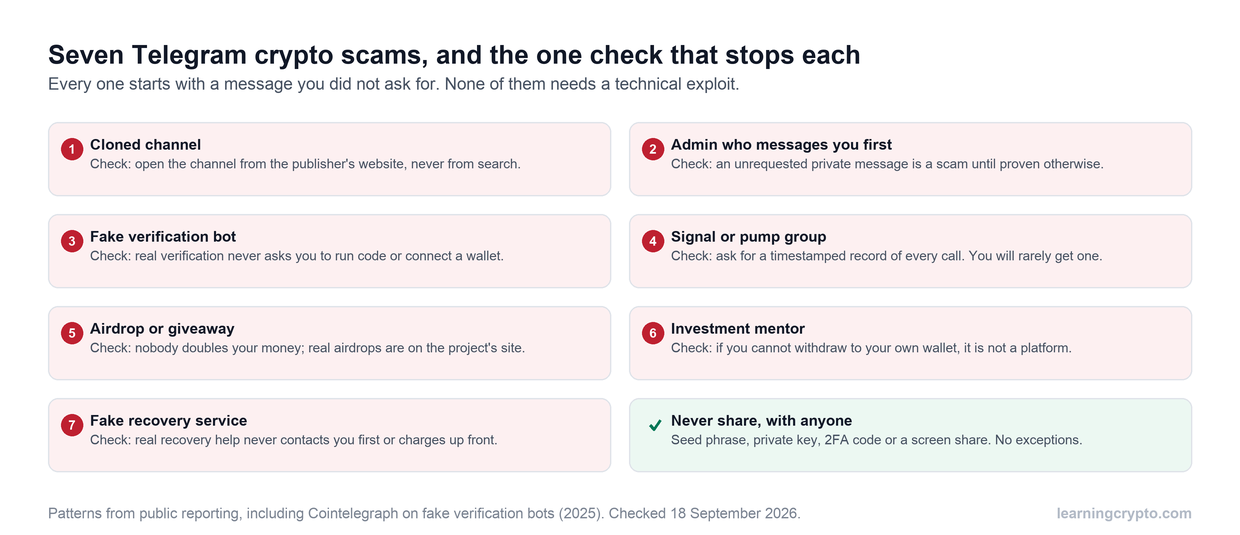
Expect fake support to find you. Two searches we ran for Ledger setup instructions on October 14 returned look-alike "ledger.com/start" pages built on free website tools, listed alongside the real site. Ledger and Trezor will never ask for your recovery phrase, and our guide to fake crypto support scams shows the scripts they use.
Which wallet do we recommend, and how do we buy it?
We use and recommend Trezor, bought from Trezor's own store. That is our referral link and it costs you nothing extra. The firmware is open source, the Safe models run the authentication check described above, and every model supports a passphrase. Our full assessment is in Is Trezor safe? and the head-to-head is in Trezor vs Ledger.
Heidi's $100 self-custody setup for 2026, built step by step. Watch it on our CryptoTips channel.
The lesson of this month applies to Trezor too. CryptoBilis sold more than one brand, and any device that passes through a middleman carries the same risk. Whatever you choose, buy it from the maker, set it up yourself and follow the rest of our cold wallet setup guide. More custody guides sit in the Wallets and Custody hub.
Frequently asked questions
How do I know if my Ledger is genuine?
Connect it to Ledger Wallet, the app formerly called Ledger Live, downloaded from ledger.com, and complete Genuine Check during setup. A counterfeit device fails it. Also confirm the device asked you to set a new PIN and generated a fresh 24-word phrase. A pass proves the secure chip is Ledger's, but not that nothing was added to the device, so where you bought it still matters.
How do I check a Trezor is authentic?
Download Trezor Suite from trezor.io, connect the device and let Suite run its authentication check, which Safe 3, Safe 5 and Safe 7 models support. Leave the Device Check setting switched on. Every new Trezor ships without firmware, so Suite should install it during setup. If firmware was already present, the seal is damaged or the check fails, contact Trezor support first.
Does the Genuine Check detect a hardware implant?
No. Ledger's security team says Genuine Check cannot detect unauthorised physical modifications to the hardware, such as a spying implant, if the original secure element is still in place. It proves the chip is genuine, not that the rest of the circuit board is untouched. That is why buying directly from the manufacturer remains the main defence against this kind of tampering.
Is it safe to buy a hardware wallet from Amazon or a reseller?
We would not. Any seller between the factory and you has the chance to open the box, swap the device or add a printed recovery phrase, and you cannot see who handled your unit. Even authorised resellers can change owners, as CryptoBilis did in 2026. Buy from the manufacturer's own website and run every setup check before funding the wallet.
What if my hardware wallet came with a recovery phrase?
Do not use it, and do not send any funds to that device. A genuine hardware wallet never ships with a recovery phrase or a PIN already set; it generates the phrase on its own screen during setup. A supplied phrase means someone else already knows the keys. Contact the manufacturer, and set up a new device bought directly from them.
Can a tampered hardware wallet still pass setup normally?
Yes, if the tampering leaves the secure chip alone. A device with an added modem or screen-reading chip can pass the authenticity check, let you create a PIN and show you a fresh phrase, while copying that phrase as it appears. That is why the purchase route matters more than any on-screen check, and why multisig across separately bought devices adds protection.
Keep learning
- Ledger "Hack" Explained: Who Is Affected, What Happened and Why You Should Never Buy a Hardware Wallet From a Reseller
- Is Trezor Safe? The Honest Record for the Safe 3, Safe 5 and Safe 7
- Lost or Stolen Hardware Wallet, or the Maker Goes Bust: What Happens to Your Crypto
- How to Use Cold Wallets for Crypto Like a Pro (Step-by-Step)
- How to Set Up a Multisig Wallet: Bitcoin and Ethereum, Step by Step
- More guides in the Wallets and Custody hub
- Free headlines: the Learning Crypto news feed on Telegram