
This guide is general education, not financial advice. Explorer features and layouts change; the steps here describe what every major explorer shows, not one site's exact buttons.
If you have ever sent crypto and wondered whether it arrived, been told a payment is "on its way", or wanted to check a token before buying it, this guide is for you. By the end you will be able to look up any transaction, confirm a payment yourself, read an address's history and check a token contract, using free public tools and without connecting a wallet.
What is a blockchain explorer?
A blockchain explorer is a website that lets you search a public blockchain: every transaction, address, block and token on it. Because the ledger is public, anyone can check a payment without asking an exchange, a seller or a support agent, which makes an explorer the most useful free safety tool in crypto.
Each explorer reads one chain, or one family of chains. A Bitcoin transaction will not appear on an Ethereum explorer, so the first step is always to pick the explorer for the network the coins were sent on.
Which blockchain explorer should you use?
Use the long-established explorer for the chain you are checking, reached by typing its address or from a bookmark. Fake explorer sites exist, and a real explorer never asks you to connect a wallet just to look something up.
| Network | Widely used explorers | Good for |
|---|---|---|
| Bitcoin | mempool.space, Blockstream Explorer | Confirmations, fee rates, stuck transactions |
| Ethereum | Etherscan | Transactions, tokens, contracts, approvals |
| Other EVM chains | Etherscan's sister sites, such as Arbiscan and BscScan | The same layout as Etherscan for Arbitrum, BNB Smart Chain and others |
| Solana | Solscan, Solana Explorer | Transactions and token accounts |
For Bitcoin, mempool.space also shows the queue of transactions waiting to be confirmed, which explains most "why hasn't it arrived?" questions. For Ethereum and tokens, Etherscan is the reference most wallets link to.
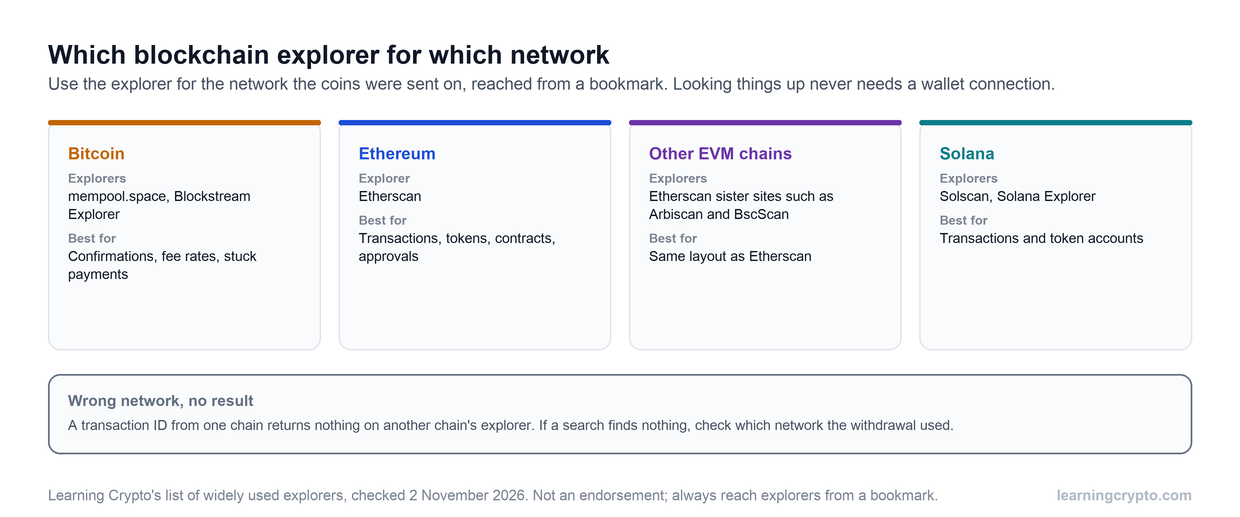
Pick the explorer for the network the coins were sent on. A transaction ID pasted into the wrong chain's explorer simply returns nothing.
How do you check a transaction on a blockchain explorer?
You check a transaction by copying its transaction ID, also called the hash, from your wallet or exchange, and pasting it into the search box of the right explorer. The result page shows whether it has confirmed, how much moved, to which address and what fee was paid.
- Get the transaction ID. Your wallet's activity list or the exchange's withdrawal history shows it, usually with a link or copy button.
- Open the explorer for that network and paste the ID into the search box.
- Read the status. "Unconfirmed" or "pending" means it is waiting to be included in a block; "confirmed" or "success" means it is on the chain. On Ethereum, also check it did not say "failed".
- Check the details. The receiving address, the amount and the fee should match what you expected. If the address differs from the one you meant to use, the coins went there.
- Count the confirmations. Each new block on top adds one. Exchanges credit deposits after their own set number, so a confirmed transaction can still be waiting on the exchange's side.
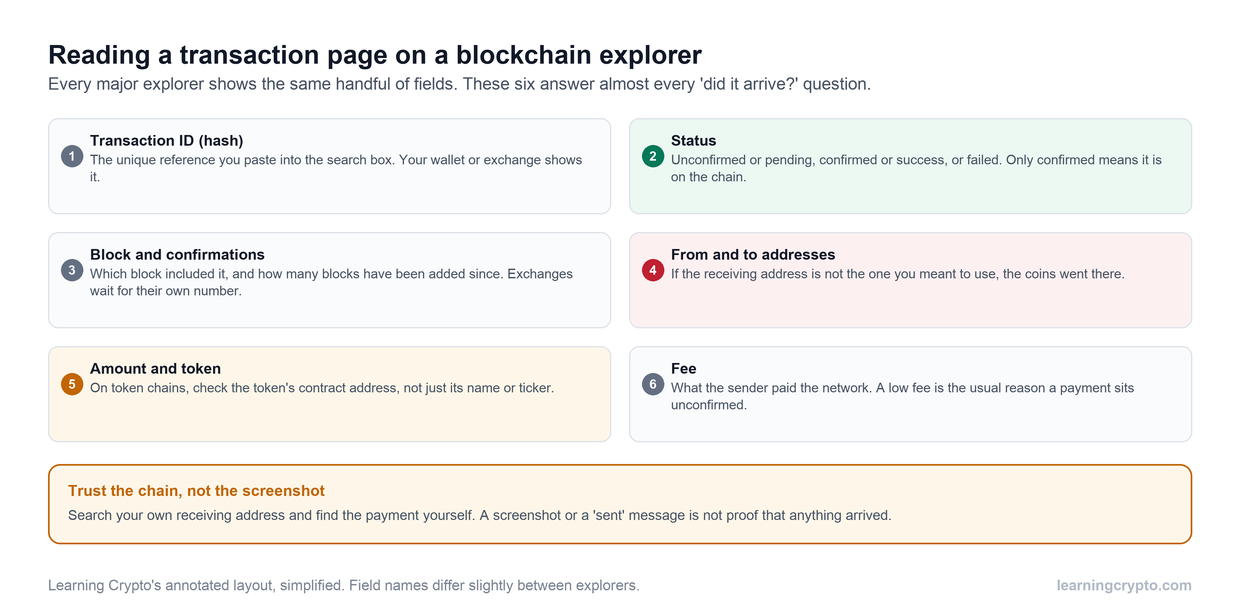
Every major explorer shows the same handful of fields. Status, receiving address and confirmations answer almost every 'did my payment arrive?' question.
How do you confirm someone actually paid you?
You confirm a payment by finding it on the explorer yourself, not by trusting a screenshot. Search your own receiving address, find the incoming transaction, and check that it is confirmed and that the amount is right.
- Ignore screenshots and "pending" claims. A transaction ID the sender gives you is useful only if the explorer shows it confirmed and paying your address.
- Wait for confirmations before you hand anything over. On Bitcoin a new block arrives about every ten minutes on average, and larger amounts deserve several confirmations.
- Check the token, not just the name. On Ethereum and similar chains, a fake token can carry the same name and ticker as a real one. The token's contract address is what identifies it.
Our guide to how long Bitcoin takes to send explains confirmation times and stuck transactions in more detail.
How do you look up a wallet address?
You look up an address by pasting it into the explorer. The page shows its current balance and every transaction in and out, which is useful for checking your own wallet or a project's treasury, and a reminder that anyone can do the same to you.
This works because addresses are public. Our explainer on what a BTC wallet address is covers the formats, and our guide to on-chain analysis shows how analysts read the same data across the whole market. It is also why privacy-minded holders use a new receiving address for each payment, which most modern Bitcoin wallets do by default.
How do you check a token or smart contract?
On Ethereum-style chains, paste the token's contract address into the explorer to see who holds it, whether its code is verified, and its recent transfers. These checks catch many fake and trap tokens before you buy.
- Get the contract address from the project's own site, cross-checked on a major data site, never from a chat or a reply.
- Look for verified source code on the contract page. Unverified code is a warning sign.
- Read the holders list. If a few wallets other than the pool and burn address hold most of the supply, they can crash the price.
- Review the approvals your wallet has granted and revoke the ones you no longer use. Our guide to token approval phishing explains why.
For the full token checklist, see how to check a token before you buy. Members can ask our Ask Crypto AI to walk them through an explorer page step by step, and more guides are in the Analysis hub.
Frequently asked questions
What is a blockchain explorer used for?
A blockchain explorer lets you search a public blockchain for transactions, addresses, blocks and tokens. People use it to check whether a payment confirmed, see the fee paid, read an address's history, and verify a token's contract before buying. It is free, needs no account, and lets you check a transaction yourself instead of trusting an exchange, a seller or a screenshot.
Which blockchain explorer is best for Bitcoin?
Widely used Bitcoin explorers include mempool.space and Blockstream's explorer. Both show transactions, confirmations and addresses, and mempool.space also shows the queue of unconfirmed transactions and current fee rates, which helps when a payment seems stuck. Reach them by typing the address or from a bookmark, and never connect a wallet to an explorer just to look something up.
How do I find my transaction ID?
Your wallet's activity or history list shows each transaction, usually with a button to copy its ID or open it in an explorer. On an exchange, look in the withdrawal history; the transaction ID appears once the withdrawal has been broadcast to the network. If an exchange shows no ID, the withdrawal has not left the exchange yet, and the explorer cannot see it.
What does unconfirmed mean on a blockchain explorer?
Unconfirmed means the transaction has been broadcast but not yet included in a block. It is waiting in the queue, usually because its fee is low compared with others. Most unconfirmed transactions confirm once demand eases or a block has room. Until it confirms, do not treat the payment as received, and do not hand over goods or coins in return.
Can anyone see my transactions on a blockchain explorer?
Yes. Bitcoin, Ethereum and most blockchains are public, so anyone with your address can see its balance and full history. They cannot see your name unless it has been linked to the address, for example by an exchange. Using a new receiving address for each payment, which most Bitcoin wallets do by default, makes your history harder to piece together.
Is it safe to use a blockchain explorer?
Looking things up is safe, because an explorer only reads public data and needs no wallet connection. The risk is fake explorer sites that copy the design and ask you to connect a wallet or sign something. Reach explorers from a bookmark, never connect a wallet just to search, and never enter a seed phrase on any website.
Keep learning
- On-Chain Analysis: Reading Blockchain Data to Understand Markets
- How Long Does It Take To Send or Receive Bitcoin? - Understanding Crypto Transactions
- What Is a BTC Wallet Address?
- Token Approval Phishing: How Wallet Drainers Empty Wallets
- How to Send Bitcoin to Another Wallet: A Step-by-Step Guide
- More guides in the Analysis hub
- Free headlines: the Learning Crypto news feed on Telegram