
If you’re exploring self-custody for the first time, you might be wondering is Coinbase Wallet secure, or is it just another app with a big brand name attached.
It’s a fair question when you’re moving beyond the beginner stage and starting to take full ownership of your crypto.
And honestly? The answer isn’t a simple yes or no.
The real question is, how safe is Coinbase Wallet for the way you plan to use it?
After we unpack the good, the bad, and the things people often overlook, you’ll know exactly where Coinbase Wallet stands from a real-world safety perspective.
We’ll walk through the parts that make this wallet feel solid and the parts that deserve a raised eyebrow so you can make your own call with confidence.
Coinbase Wallet vs. Coinbase Exchange: What's the Actual Difference?
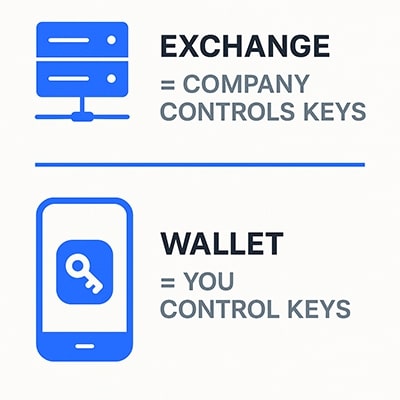
It’s often assumed that Coinbase Wallet is just a feature inside the Coinbase account, but Coinbase Wallet and Coinbase Exchange aren't the same thing at all.
Coinbase Exchange (Coinbase.com):
When you buy crypto on Coinbase.com, they hold it for you. Your private keys? Coinbase has them. It's convenient, insured to some degree, and you can call customer support if something goes sideways. But you don't actually control the crypto. If Coinbase freezes your account or gets hacked, you're at their mercy.
Coinbase Wallet (the mobile app):
This is self-custody. You get a 12-word recovery phrase, and those words are the only way to access your crypto. Coinbase can't see your funds, can't freeze them, can't help you recover them if you lose that phrase. It's all on you.
You get total control, but that means total responsibility.
It also opens the door to the full Web3 world dApps, NFTs, token swaps, the works.
What This Means When Comparing Safety
The reason this difference is so important is simple:
People judge Coinbase Wallet using assumptions from the exchange, and that leads to the wrong expectations.
Here’s how the security mindset changes:
Exchange = Coinbase protects you.
They secure the servers, handle the cold storage, manage authentication, and step in if you lose access.Coinbase Wallet = You protect yourself.
Your device, your seed phrase, your storage habits, your scam awareness, that’s the whole ballgame.
Neither model is “better,” they’re just built for different purposes. Many experienced traders use both: the exchange for buying and selling, the wallet for actually holding crypto, and DeFi trading.
Worth noting: When someone asks, "Is Coinbase safe?" they're usually thinking about the exchange. Everything from here on out is about the self-custody wallet, not the exchange.
Want to know if the exchange is secure? Read our Coinbase Exchange Guide.
Coinbase Wallet Security Features
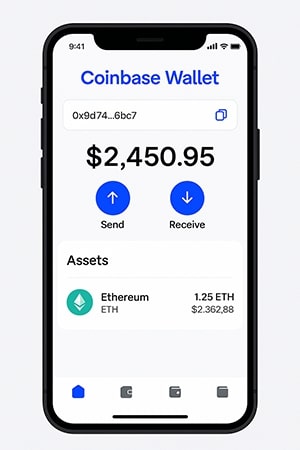
When you strip away the marketing buzzwords, Coinbase Wallet’s security comes down to a few core pillars. These are the things the wallet genuinely does well, and understanding them makes it much easier to judge how safe it feels in daily use.
Coinbase Wallet Security Features Overview
Feature | What It Does | Protection Level | User Responsibility |
Self-Custody Private Keys | Keys generated and stored locally on your device | ⭐⭐⭐⭐ | Very high: must protect your seed phrase |
AES-256 Encryption | Encrypts private keys at rest on device | ⭐⭐⭐⭐ | Moderate: keep device secure and updated |
Biometric + PIN Protection | Adds Face ID/fingerprint + app PIN to unlock wallet | ⭐⭐⭐ | Low: set strong PIN and enable biometrics |
Local Transaction Signing | Transactions signed on your device, never sent to servers | ⭐⭐⭐⭐ | Moderate: verify details before sending |
Phishing Detection | Alerts for suspicious URLs or contracts | ⭐⭐⭐ | Medium: still need to avoid unknown links |
Token Approval Controls | View and revoke smart contract permissions | ⭐⭐⭐ | Medium: must check approvals regularly |
Multi-Chain Support | Single recovery phrase for all supported chains | ⭐⭐⭐ | Low: ensure you’re on the correct network |
Encrypted Cloud Backup (Optional) | Stores encrypted recovery phrase in your cloud account | ⭐⭐ | High: must secure cloud login & 2FA |
Built-in Swap + NFT Support | Allows DeFi activity directly in wallet | ⭐⭐ | High: smart contract risk is on you |
Self-Custody and Private Key Control
As we touched on earlier, Coinbase Wallet is self-custody. You're in the driver's seat from day one.
When you set up the wallet, it generates a 12-word recovery phrase directly on your device. Those words are your private keys in human-readable form, and they never leave your phone or get transmitted to Coinbase's servers. Not during setup, not during transactions, not ever.
This non-custodial architecture is the whole point. Coinbase can't access your funds, freeze your account, or seize your crypto even if they wanted to. You're not trusting a company to hold your assets. You're holding them yourself.
But because it’s created on your phone and never sent to Coinbase’s servers, there’s no “reset my password” safety net if you lose it.
That’s the upside and downside of self-custody wrapped into one.
For anyone who wants genuine ownership, this is the strongest part of the wallet. It also means the responsibility piece is baked in from the start.
Encryption and Device Security
Coinbase Wallet doesn’t rely on trust; it relies on cryptography. The private keys stored on your device are encrypted using AES-256, the gold standard used across the banking and cloud-security world.
Your phone’s own hardware also steps in:
Secure Enclave (iOS) and Android Keystore keep keys isolated from normal apps
Biometrics (Face ID, fingerprint) add a quick, secure way to unlock the app
App-level PINs give you a separate layer beyond the phone’s lock screen
Encrypted cloud backups (optional), you can store a protected version of your recovery phrase. It’s a useful feature, but only if you understand how to secure your cloud account properly.
This setup isn’t unique to Coinbase Wallet, but it’s well-implemented and regularly updated.
Transaction Security Features
Every transaction you make gets signed locally on your device before it's broadcast to the blockchain. So your private keys never need to leave your phone, even when you're sending crypto or interacting with a dApp.
The wallet also has some built-in guardrails. If you're about to pay an unusually high gas fee, it'll warn you. If you're connecting to a dApp that it doesn't recognize, you'll get a heads-up. If a site is flagged as a known phishing scam, it'll block it outright.
You can also manage token approvals. Those permissions you grant to smart contracts when using DeFi. The wallet lets you view which dApps have access to your tokens and revoke permissions you're no longer using.
This is a bigger deal than it sounds, because unlimited token approvals are one of the most common ways people lose funds in DeFi.
None of this replaces personal vigilance, but it does reduce the chance of a “whoops” moment.
Multi-Chain Support and Architecture
If you’re planning to explore Web3, Coinbase Wallet is built for it. One recovery phrase unlocks multiple blockchains, including Ethereum, Polygon, Arbitrum, Optimism, Base, Avalanche, BNB Chain, and Solana, to name the big ones.
Behind the scenes, each chain still gets its own address, which keeps things isolated and reduces cross-chain mix-ups. There’s also:
A built-in swap feature (using aggregated DEX routing)
Native NFT support with a clean gallery view
Smooth switching between networks
Open-Source Components
Coinbase Wallet isn't fully open-source, but parts of it are, so security researchers can actually audit the code and flag problems before they become exploits.
The wallet uses industry-standard protocols that have been battle-tested across the crypto ecosystem.
Recovery phrases follow BIP-39, the same standard used by Ledger, Trezor, and pretty much every other legitimate wallet. This means rather than being some proprietary Coinbase format, your seed phrase is universal.
The Web3 provider API follows Ethereum standards, too, so when you connect to a dApp, you're using the same interaction model as MetaMask or any other Web3 wallet. No weird custom implementations that could introduce unexpected vulnerabilities.
Coinbase also pushes regular security updates. When new threats emerge or bugs get discovered, patches go out. Your job is to actually install them.
What Coinbase Wallet Does NOT Have
For all the strengths, it’s important to be clear about what’s missing. These aren’t flaws, just limitations of hot wallets in general:
There's no multi-signature support. If you want a setup where multiple people need to approve transactions, you'll need a different wallet.
Hardware wallet integration exists, but only through the browser extension, not the mobile app. So if you want to pair your Ledger or Trezor with Coinbase Wallet on your phone, you're out of luck.
There's no built-in 2FA beyond your device's biometrics. No authenticator app, no SMS codes, nothing. The app lock is your only layer.
Customer service can't recover a lost seed phrase. This isn't a limitation - it's how non-custodial wallets work, but it bears repeating. If you lose those words, Coinbase can't help you.
There's no insurance for user error or device compromise. If you fall for a phishing scam or your phone gets hacked, you're not getting reimbursed.
And there are no transaction limits or spending controls. If someone gets access to your wallet, they can drain it instantly. There's no daily withdrawal cap, no time delays, nothing to slow them down.
Coinbase Wallet Vulnerabilities and Risks
Even though Coinbase Wallet has a solid security foundation, it’s still a hot wallet, and that label comes with a built-in set of risks, no matter which brand you choose.
Hot Wallet Inherent Risks
Because Coinbase Wallet lives on an online device, it inherits the same weaknesses that all hot wallets do. Being constantly connected gives attackers a much larger “attack surface” to probe. If your phone has malware, if someone gains remote access, or if a bad app slips through, the wallet cannot isolate itself the way a hardware wallet can.
This isn’t a flaw in Coinbase Wallet; it’s simply what hot wallets are.
Check out our guide on Hot Wallets vs Cold Wallets to see how a hybrid approach shores up your weak points.
Device Security Dependencies
For a hot wallet, your phone is the real security model. If the device is compromised, the wallet is compromised.
Here's what could happen:
Malware could access the encrypted wallet data stored on your device.
A keylogger could capture your PIN or password when you unlock the app. Screen recording malware could reveal your seed phrase if you ever view it on-screen.
Clipboard hijacking tools could swap the address you copied with an attacker's address.
Remote access trojans could authorize transactions without you even knowing.
These aren't hypothetical scenarios. All of these attacks happen regularly, and crypto wallets are prime targets because that's where the money is.
How to protect yourself:
Keep your phone's operating system updated. Security patches close vulnerabilities that malware exploits, and running outdated software is one of the easiest ways to get compromised.
Only install apps from official stores. Think Apple App Store or Google Play. Third-party app stores and sideloaded apps are common malware vectors.
Use a strong device passcode. Not your birthday, not something someone could guess by looking at your social media.
Enable automatic security updates so you don't have to remember to patch things manually.
Don't jailbreak or root your device. The moment you do that, you're bypassing the security protections that keep malicious apps contained.
User Error Risks (Most Common)
The wallet itself usually isn't the problem. User mistakes are.
Phishing attacks are the number one way people lose funds. You get a link to a fake Coinbase Wallet site or a convincing copycat app. You enter your seed phrase thinking you're "verifying" your wallet or claiming a reward. Now the attacker owns your crypto.
Seed phrase exposure happens in ways people don't always think about. Typing your phrase into a notes app, screenshotting it for "backup," storing it in cloud storage, emailing it to yourself—all bad ideas. If it's digital, it can be hacked. If it syncs to the cloud, you don't control who can access it.
Clipboard malware is sneaky. You copy an address to send funds, go to paste it in your wallet, and malware silently swaps it with the attacker's address. If you don't verify every single character before confirming, your crypto goes to the wrong place.
Social engineering works because it exploits trust. Someone DMs you pretending to be Coinbase support, says there's an urgent problem with your wallet, and asks you to verify your seed phrase. Legitimate support will never, ever ask for that.
Approval scams happen when you connect to a malicious dApp that requests unlimited token approvals. You click "approve" without reading what you're actually signing, and now that smart contract can drain every token you own whenever it wants.
Wrong network transfers are permanent and irreversible. Send USDC on Ethereum to a Solana address? It's gone. The transaction completes, but the funds arrive in a format that doesn't exist on that chain. No one can retrieve them.
DeFi and Smart Contract Risks
Coinbase Wallet opens the door to dApps, tokens, swaps, NFT minting, and everything else Web3 has to offer. But when you’re stepping into smart contract territory, not every project has been audited (or even built honestly).
Potential hazards include:
Unaudited smart contracts can have bugs or backdoors. If you deposit funds into a protocol that hasn't been properly reviewed by security experts, you're trusting code that might be broken or intentionally malicious.
Unlimited token approvals are more dangerous than most people realize. When a dApp asks permission to spend your tokens, the default is often unlimited access. If that contract gets exploited later or if it was malicious from the start, it can drain your entire balance.
Rug pulls happen when developers launch a project, attract deposits, build up liquidity, then drain everything and vanish. Your wallet can't protect you from that.
Honeypot tokens look like legitimate investments until you try to sell. Then you discover the contract has code that prevents anyone except the creator from selling. Your tokens become worthless, and there's nothing you can do about it.
Flash loan attacks don't directly compromise your wallet, but if you have funds deposited in a protocol that gets exploited, you can still lose everything. The wallet can't tell the difference between a legitimate protocol and one that's about to be drained.
Front-running and MEV exploitation can eat into your profits. Bots monitor pending transactions and insert their own trades ahead of yours to profit from the price movement you're about to create.
Once again, the risks aren’t from the wallet itself; they come from what you connect it to.
Known Security Incidents
It’s worth addressing a common misconception: when people search for “Coinbase hacks,” they often find headlines about past security incidents, but these events involved Coinbase’s exchange platform and customer accounts, not Coinbase Wallet's self-custody system.
Over the years, Coinbase has dealt with issues such as an SMS-based account recovery flaw, phishing attacks fueled by stolen customer data, and occasional ecosystem-wide smart contract risks.
These situations affected some Coinbase users, but none of them involved a breach of Coinbase Wallet’s private keys, seed phrases, or on-device encryption.
In every verified case, the problem was tied to:
account access on the Coinbase Exchange, or data exposure that enabled phishing, or risks within the broader DeFi ecosystem
So - not the Coinbase Wallet app itself.
As of writing, there have been no confirmed incidents where Coinbase Wallet’s core self-custody architecture was compromised. The wallet’s main risks still come from device security, phishing, and smart contract interactions, which are the same risks shared by all hot wallets.
Coinbase Wallet vs. Other Wallet Types
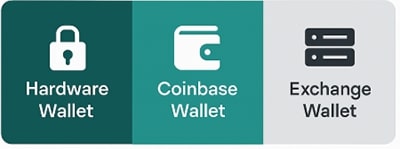
Coinbase Wallet works well for on-the-go activity, but it sits somewhere in the middle of the security spectrum. Here’s how it compares with the most common alternatives.
Quick Wallet Comparison
Wallet Type | Security Level | Convenience | Best For |
Hardware Wallet | Highest | Low–Medium (requires physical device) | Long-term storage, large holding |
Coinbase Wallet (Hot Wallet) | Moderate–High for hot wallet | High (mobile-first, quick access) | Active DeFi use, daily transactions, moderate holdings |
MetaMask (Hot Wallet) | (Similar to Coinbase Wallet) | High (strong for browser workflows) | Web3 on desktop, Ethereum ecosystem |
Trust Wallet (Hot Wallet) | (Similar risk profile) | High (simple mobile UI) | Multi-chain users, beginners |
Exchange Wallet (Custodial) | (Depends on platform) | High (no seed phrase) | Beginners, people who prefer account recovery |
Coinbase Wallet vs. Hardware Wallets
Security:
When it comes to pure security, hardware wallets win without breaking a sweat. They keep your private keys on a physical device that never connects to the internet. Transaction signing happens offline; even if your computer or phone is completely compromised, your keys stay safe.
Coinbase Wallet is solid for a hot wallet, but it can't compete with that level of isolation.
Convenience:
This is where Coinbase Wallet pulls ahead. You've got instant access from your phone. Want to swap tokens or connect to a dApp? Takes seconds. Hardware wallets require you to have the physical device with you, plug it in, navigate their interfaces, and manually confirm every transaction. It's slower and more deliberate, which is kind of the point.
Best Use:
Hardware wallets make sense for large holdings you're not actively using. If you've got a good amount sitting in crypto for the long haul, the extra security is worth the inconvenience.
Coinbase Wallet is better for active use, such as DeFi interactions, frequent swaps, and moderate amounts you're actually doing things with.
Coinbase Wallet vs. MetaMask
MetaMask is the “default” Web3 wallet for many people, especially on desktop. Coinbase Wallet takes a slightly different approach, leaning heavily into mobile-first usability.
Security:
Roughly equivalent. Both are hot wallets with similar risk profiles. Both store encrypted keys on your device, both offer biometric locks, both depend on your device security. Neither has a meaningful edge here.
Features:
MetaMask has been around longer and is more established. Coinbase Wallet has a cleaner mobile experience and tends to be more intuitive for people new to self-custody.
Support:
MetaMask has a massive community. If you run into an issue, you'll find forum posts, Discord help, and YouTube tutorials. Coinbase Wallet's community is smaller, but if you're just starting out, the beginner-friendly interface makes it easier to avoid problems in the first place.
Integration:
Both work with all major DeFi protocols and dApps. You're not missing out on functionality by choosing one over the other.
Coinbase Wallet vs. Trust Wallet
Trust Wallet is another popular mobile-first wallet, so this is the closest comparison.
Security:
Comparable. Both are non-custodial mobile hot wallets with similar security models.
Multi-chain:
Trust Wallet supports more blockchains out of the box. If you're holding obscure layer-1 tokens, you might need Trust Wallet. For mainstream chains, Coinbase Wallet covers what most people need.
User base:
Trust Wallet has a larger, more established user base. It's been around longer and has wider adoption.
Company backing:
Coinbase is a publicly traded company with regulatory oversight. Binance (which owns Trust Wallet) is private and has faced more regulatory scrutiny. Whether that matters to you depends on how much you care about corporate structure behind a non-custodial wallet.
Coinbase Wallet vs. Exchange Wallets
This is the “control vs. convenience” comparison.
Control:
With Coinbase Wallet, you control the keys. With an exchange, they do. That's the fundamental split.
Risk:
Wallet security depends on your device and habits. Exchange security depends on the company's infrastructure, plus regulatory risk, account freezes, and platform downtime.
Recovery:
Lose your seed phrase? Your crypto is gone forever. Lose access to your exchange account? Customer support might be able to help.
DeFi:
Coinbase Wallet gives you full access to DeFi. Exchanges give you limited or no access. You can't connect an exchange account to Uniswap.
Insurance:
Coinbase Wallet has no insurance for user error or device compromise. Some exchanges offer limited coverage if their platform gets breached, but you're still exposed to other risks like account freezes or insolvency.
Read Our Complete Beginners' Guide to Crypto Wallets to learn more.
Final Verdict: Is Coinbase Wallet Safe?
Our rating: 3.5 out of 5. Safe for moderate holdings and DeFi use. It is a self-custody hot wallet, so long-term savings still belong on hardware.
Very, but with context. Coinbase Wallet is secure for what it's designed to be: a convenient, self-custody hot wallet for active crypto users.
But it's still a hot wallet, which means your holdings are only as protected as your device and your habits. For moderate amounts and regular use? Certainly safe enough. For your entire net worth? Look into cold storage.
Wallet security is baseline. The next step is understanding what to buy, when to move, and how to track it all.
Learning Crypto offers AI-powered learning, portfolio tracking, and market analysis designed for real investors. Get personalized guidance from AI helpers Tobo and Heido, keep tabs on your holdings, and get the market context you need to make better moves.
Get Started with Learning Crypto today →
FAQs
Is Coinbase Wallet safe from hackers?
Coinbase Wallet's infrastructure is solid. Your keys are encrypted and stay on your device. But if your phone gets compromised or you fall for a phishing scam, hackers can still drain your funds. The wallet protects against remote attacks on its servers, not attacks targeting your device or you directly.
Which is safer, Coinbase or Coinbase Wallet?
Different types of safe. Coinbase Exchange protects you from device hacks but exposes you to company risk - freezes, breaches, and regulatory issues. Coinbase Wallet gives you full control but puts all responsibility on you. Neither is universally safer; it depends on whether you trust yourself or Coinbase more.
Can I use Coinbase Wallet without the Coinbase exchange?
Yes, they're completely separate. You don't need a Coinbase account to use Coinbase Wallet. You can download the app, create a wallet, and start using it immediately. The only connection is the brand name. The wallet works independently and doesn't require any relationship with the exchange at all.
Is Coinbase Wallet safe for beginners?
It can be, but only if you understand the responsibility. If you're comfortable with tech, follow instructions carefully, and can handle the pressure of being your own bank, then yes.
Can I recover my Coinbase Wallet on a different wallet app?
Yes. Coinbase Wallet uses a standard 12-word BIP-39 recovery phrase, so you can restore it in MetaMask, Trust Wallet, and most other compatible wallets. You’re not locked into Coinbase Wallet. Just keep in mind that different wallets support different blockchains, so some assets may only appear if the wallet supports that network.
Keep learning
- Is MetaMask Safe? Risks and Best Practices for Security
- Is Exodus Wallet Safe? Breaking Down Its Security Features
- Trezor Safe 7 Review - Is It Worth It?
- More guides in the Wallets & Custody hub
- Members: Portfolio Tracker, see all your wallets in one place