
If you’ve landed here, you’ve probably asked yourself some version of “Is Exodus a safe wallet, or am I being seduced by a pretty interface?” That’s fair.
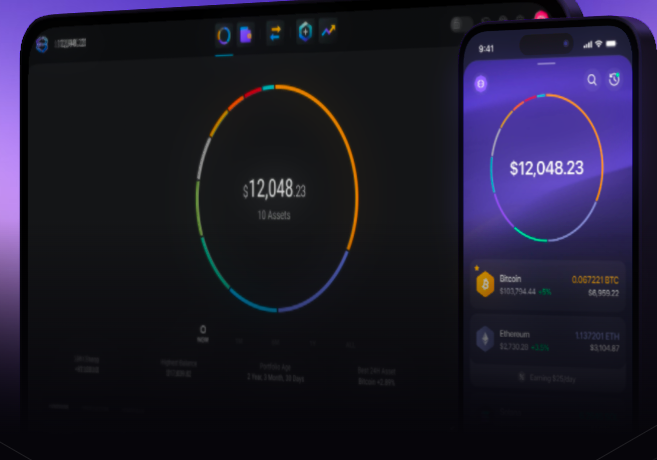
Exodus has carved out a niche as the “beautiful” desktop-first crypto wallet with clean dashboards, smooth animations, built-in swaps, and multi-asset support all in one place.
It looks more like a polished fintech app than a grungy command-line tool, which is exactly why a lot of crypto investors like it.
So what gives? Is Exodus playing security theater with a pretty interface, or does it actually have the chops to protect your crypto?
By the end of this guide, you'll know exactly whether Exodus deserves a spot in your crypto toolkit or if you should keep searching around.

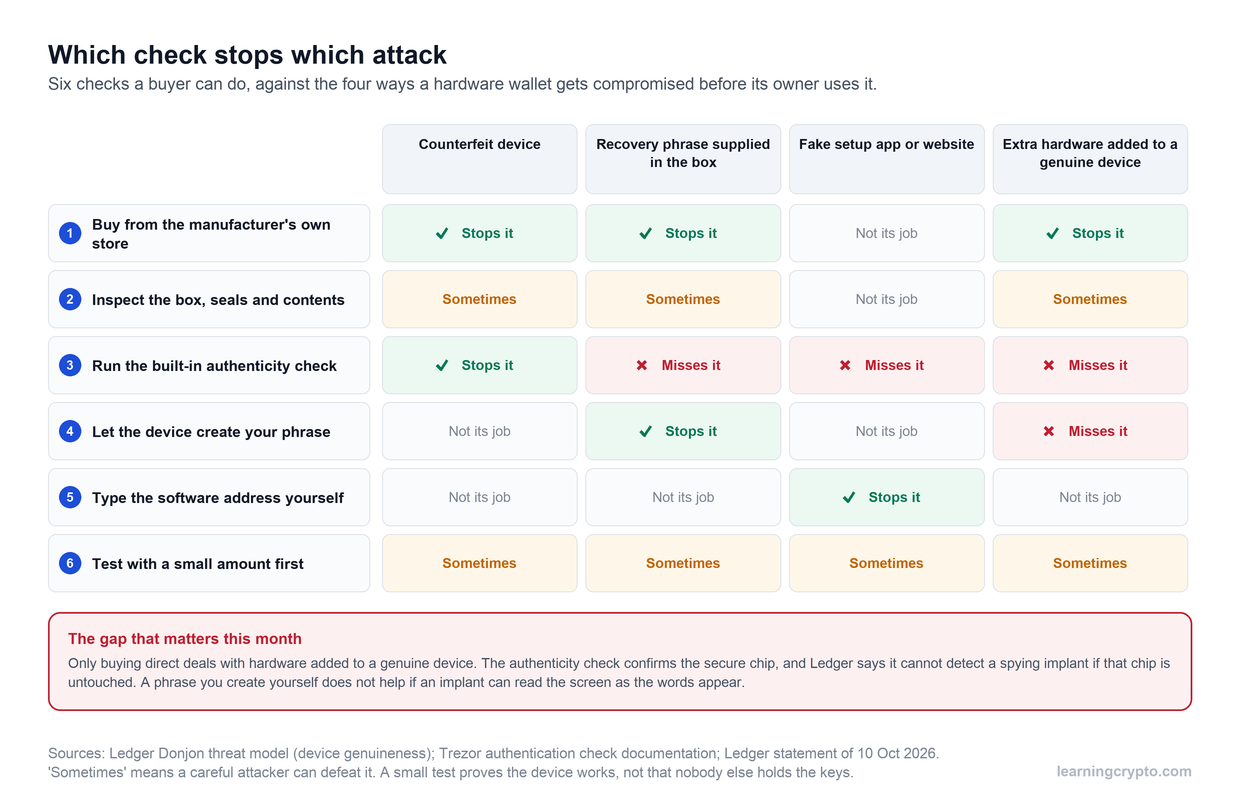
Exodus Wallet Security Features Quick Overview
Feature | What It Does | Protection Level | User Responsibility |
Self-Custody Private Keys | Keys generated and stored locally on your device | ⭐⭐⭐⭐ | Critical: must protect your seed phrase |
AES-256 Encryption | Encrypts private keys at rest on device | ⭐⭐⭐⭐ | Moderate: keep device secure and updated |
Local Transaction Signing | Transactions signed on your device, never sent to servers | ⭐⭐⭐⭐ | Moderate: verify details before sending |
Encrypted Cloud Backup (Mobile) | Optional passkey-based backup to iCloud or Google Drive | ⭐⭐⭐ | High: secure cloud account with strong 2FA |
Trezor Integration (Desktop) | Hardware wallet support for cold storage security | ⭐⭐⭐⭐⭐ | Moderate: protect Trezor device and PIN |
Ledger Integration (Mobile) | Bluetooth hardware wallet pairing for offline signing | ⭐⭐⭐⭐⭐ | Moderate: secure Ledger device properly |
Biometric & PIN (Mobile) | Face ID, Touch ID, or fingerprint to unlock app | ⭐⭐⭐ | Low: enable biometrics on supported devices |
Auto-Lock (Desktop) | Wallet locks after inactivity and requires a password to reopen. | ⭐⭐⭐ | Low: set appropriate timeout period |
What Makes Exodus Different from Other Wallets
Exodus is not your typical crypto wallet. It has quirks, strengths, and a few design choices that set it apart from the usual suspects like MetaMask, Coinbase Wallet, or Electrum.
Some of these choices make the experience smoother. Some introduce trade-offs you should know about before committing your funds to it.
Desktop-First Architecture
Exodus started life as a desktop-only wallet for Windows, Mac, and Linux. The mobile app came later, which means its entire DNA is built around a desktop-style security model.
This has a few consequences:
Desktop operating systems are more complex, which means a larger attack surface if your machine is not well maintained.
On the positive side, desktops have more computing power, so Exodus can use stronger encryption without worrying about slowing your phone down.
The desktop and mobile versions sync with each other, but this also creates an additional point where data can potentially be targeted if your devices are compromised.
This does not make Exodus unsafe by default. It simply means it was born in a desktop world first, and that legacy still influences how it behaves today.
Closed-Source Software Model
This is the most controversial part of Exodus. The wallet is not fully open source. Some parts are published on GitHub, but the core components remain private.
For the average user, this may not matter. For security-focused users, it absolutely does.
Most respected crypto wallets - MetaMask, Electrum, MyEtherWallet proudly publish their source code on GitHub for anyone to audit. The crypto community loves this because transparency theoretically means thousands of eyes can spot security flaws before bad actors exploit them. It's the "many eyes make bugs shallow" philosophy.
Exodus doesn't play that game. Their code is proprietary.
The company's reasoning? They've invested heavily in creating a beautiful UI and smooth UX, and they don't want competitors to rip off their innovations.
They also argue that keeping code private means attackers can't study it for vulnerabilities, the classic "security through obscurity" defense.
But the security through obscurity makes many crypto enthusiasts break out in hives.
The counterargument is that good security shouldn't depend on secrecy about how it works, only on keeping the actual keys secret.
It all boils down to whether you’re philosophically okay with trusting a company's development practices when you can't verify their claims independently.
Some people are fine with it. Others wouldn't touch closed-source crypto software with a ten-foot Ledger.
Built-In Exchange Integration
One of Exodus's killer features is the ability to swap cryptocurrencies right inside the wallet interface.
Under the hood, Exodus partners with exchanges like Changelly, ChangeNOW, and SimpleSwap. When you initiate a swap, you're actually using one of these services.
How safe is Exodus wallet when you're using these integrated swaps? Well, that's where things get layered.
Exodus itself doesn't custody your funds during the exchange, which is good. But you're now trusting the security practices of whatever third-party exchange is processing your trade.
If ChangeNOW gets compromised or decides to act shady, that's not technically an Exodus security failure, but your crypto still ends up gone.
There's also the simple reality that more features mean more code, and more code means more potential bugs. Every integration point with an external service is a potential vulnerability.
Is the API secure? Are the exchange partners trustworthy? What happens if one of them gets hacked mid-transaction?
For what it's worth, Exodus has been pretty good about vetting their exchange partners and responding quickly when issues pop up.
But the convenience of built-in swaps comes with additional attack surface compared to a wallet that just does wallet things.
Design-Centric Philosophy
There's no other way of describing it, Exodus is gorgeous. Like, unreasonably pretty for financial software. This isn't just aesthetic fluff; it genuinely makes the wallet more accessible to regular people.
But does prioritizing design mean compromising on security? Are they spending resources on making things look good instead of locking down code?
The honest answer is: probably a bit of both. Exodus clearly has talented designers and developers who care about the user experience. But that also means they're allocating time and money to features that don't directly improve security.
That said, good design can support security. If a wallet is so confusing that users regularly make mistakes, then usability IS a security feature.
Massive Multi-Asset Support
Exodus supports over 280 tokens. That's... a lot.
This is genuinely useful if you're the type who dabbles across different chains or holds a diverse portfolio. Managing everything in one interface beats juggling five different specialized wallets.
But each blockchain integration represents another chunk of code that needs to be written, tested, and maintained. Each one is a potential source of bugs. Some chains have quirky features or edge cases that might not play nice with others. The complexity grows exponentially.
When you're evaluating is Exodus wallet safe, this multi-asset support cuts both ways. It's convenient as hell, but it also means the codebase is massive.
Exodus Security and Where It Stands Among Hot Wallets
Exodus wallet security is pretty standard for a reputable hot wallet. You get AES-256 encryption, local key storage, the usual 12-word recovery phrase setup—all the baseline protections you'd expect.
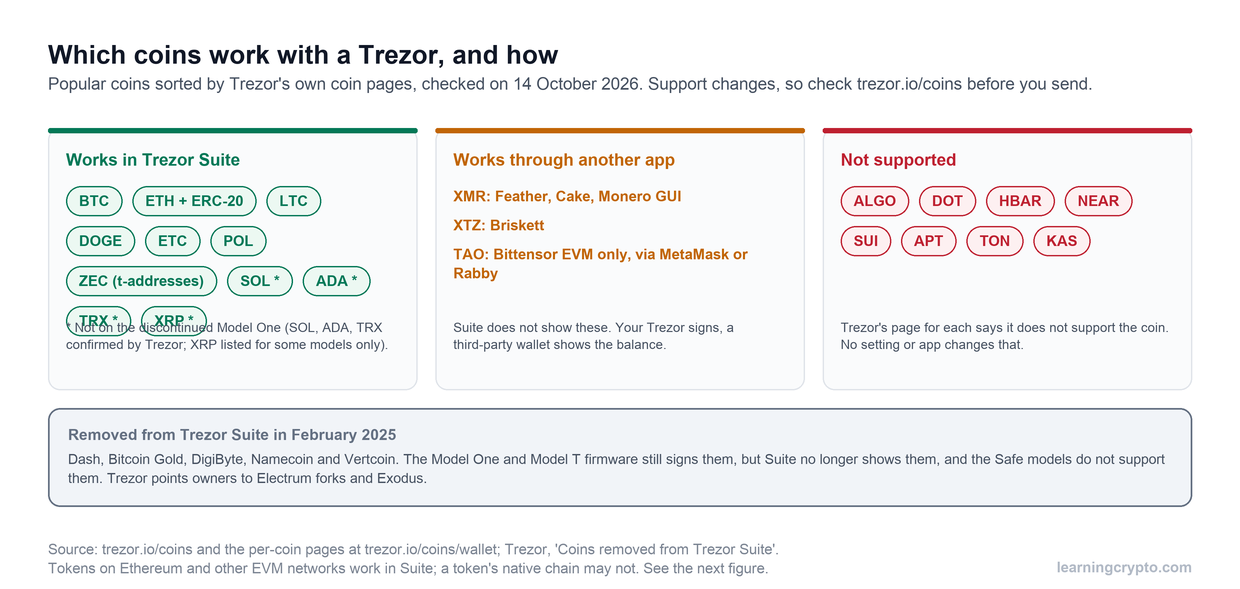
Where Exodus actually stands out is its hardware wallet integration with both Trezor (desktop) and Ledger (mobile), which lets you bolt proper cold storage security onto their sleek interface.
Encryption and Key Storage
Exodus uses AES-256 encryption to lock down your private keys, the same military-grade standard everyone uses. Your keys are encrypted on your device and password-protected.
Password requirements: Exodus requires at least 8 characters with numerals and special characters, though this is still relatively lenient compared to some wallets that enforce 12+ characters with uppercase/lowercase mix and symbols. You can create a reasonably weak password, and it will still accept it. Therefore, the strength of your encryption still largely depends on your password discipline.
The upside? Your keys never leave your device. They don't sync to Exodus servers, don't get transmitted anywhere, just sit encrypted on your hard drive or phone. When you make a transaction, everything happens locally. The wallet signs it right there with your private key, then broadcasts the signed transaction to the blockchain.
This is standard hot wallet architecture, but worth emphasizing: if someone gets your device AND cracks your password, it's game over.
Recovery and Backup System
During setup, Exodus generates a 12-word recovery phrase using the BIP-39 standard (the same system most wallets use). You see it once during setup, then it's on you to write it down and store it somewhere safe.
Key points:
Cross-platform recovery - Your phrase works on any device running Exodus
One phrase for everything - That single 12-word phrase recovers Bitcoin, Ethereum, Solana, all 260+ supported assets
Manual backup traditionally required - Write it on paper, store it safely
Cloud Backup with Passkey Protection (Mobile Only)
You can back up your mobile wallet using iCloud or Google Drive with passkey protection.
How it works:
Your 12-word phrase gets encrypted and stored in iCloud (iOS) or Google Drive (Android)
A passkey is created and stored in your device's passkey manager (secured by Face ID, Touch ID, PIN, or password)
The encrypted backup is useless without the passkey—even if someone hacks your cloud storage, they can't decrypt it
To restore, you need: the same OS (iOS or Android), your cloud account, your passkey manager, and the same biometric/PIN you used originally
Important:
The encrypted cloud backup is not the same as your phone's automatic iCloud/Google backup (which doesn't include your crypto wallet)
You should still write down your 12-word phrase as a backup to the backup. If you lose access to your cloud account or passkey manager, you need that phrase.
Device-Level Security Features
On Desktop:
Your main protection is application-level password with automatic lock after inactivity (customizable timeout). Exodus also attempts to clear your clipboard after copying addresses, though that only partially protects against clipboard hijacking malware.
What you don't get: biometric authentication. No fingerprint scanner, no face unlock. Just your password and whatever OS-level security you've configured (FileVault on Mac, BitLocker on Windows).
On Mobile:
The mobile experience is genuinely more locked down:
Biometric authentication (Face ID, Touch ID, fingerprint)
PIN protection as an alternative (6-digit passcode on iOS)
Same AES-256 encryption as desktop
Encrypted sync with the desktop wallet if you use both
Passkey-protected cloud backup (the new 2024 feature)
The mobile version feels more secure in daily use thanks to the biometrics, though the underlying encryption remains the same.
Transaction Security
Everything inside Exodus is designed to keep your private keys as far as possible from anything risky.
Every transaction gets signed locally on your device, which is table stakes for any self-custody wallet. Before sending, Exodus shows you a preview with the recipient address, amount, and estimated fees.
This is what most people expect from a hot wallet, and Exodus does a good job of keeping things simple. You don’t get multi-signature options, you can’t set spending limits, and there is no advanced approval system.
It’s built for regular users who want fast, straightforward transactions. If you need a complex multi-step security workflow, Exodus isn’t the tool for that job.
Hardware Wallet Integration: Trezor (Desktop) and Ledger (Mobile)
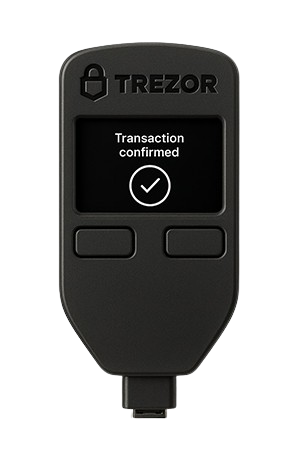
This is where Exodus genuinely differentiates itself from most hot wallets. You can use Exodus as a beautiful interface while a hardware wallet handles the actual key storage and transaction signing. Genuinely the best of both worlds.
The Trezor integration (desktop) turns Exodus into essentially a fantastic-looking frontend for your cold storage. Your private keys stay on the Trezor device, offline and untouchable by malware.
Every transaction gets signed on the hardware wallet itself; you physically press buttons to approve sends. If your computer is crawling with keyloggers and remote access trojans, they still can't touch your funds because the keys never enter your computer's memory.
The Ledger integration (mobile) brings the same concept to your phone. Your Ledger handles the cryptographic heavy lifting while Exodus manages the portfolio visualization, swap aggregation, and transaction building. You get cold storage security without sacrificing the convenience of checking your portfolio on the go.
Network Security
Exodus connects directly to blockchain nodes, so transactions don't route through Exodus's servers. When you broadcast, it goes straight to the relevant blockchain network.
Portfolio data stays local. The app doesn't phone home with your balances or transaction history. You can optionally enable anonymous usage analytics, which can be disabled and doesn't include financial data.
Exception: Built-in exchange features use third-party partners (Changelly, ChangeNOW, etc.). During swaps, you're trusting the security of those services, not just Exodus.
What Exodus Does NOT Offer
Let's be straight about missing security features:
No open-source verification - Can't audit code yourself
No multi-sig - Can't require multiple signatures for approvals
No built-in 2FA beyond device security - Your password/biometrics are it
No spending controls - No daily limits, no transaction approval workflows
No insurance - If crypto disappears due to a bug or breach, there's no compensation fund
Limited third-party security audits - Fewer than major open-source projects get
No staking from Trezor portfolio - You can only stake from your regular Exodus wallet, not from the hardware wallet integration
These are not unusual omissions for hot wallets, but they matter if you plan to store large amounts of crypto for a long period.
Discover the differences between hot and cold wallets in our guide.
How to Secure Your Exodus Wallet Properly
Even the best security architecture can fall apart with a sloppy setup. Here's how to get Exodus locked down correctly from the beginning.
Set a Strong Password (Not Just Any Password)
Exodus requires 8 characters with numbers and special characters, but that doesn't mean you should use "Password1!" and call it a day. A compromised password means anyone with access to your device can open your wallet.
Use a password manager to generate and store a genuinely random 16+ character password.
Back Up Your 12-Word Phrase Properly
When Exodus shows you those 12 words during setup, that's your one chance to get it right. Write them down on paper in order and double-check every word.
Write on durable paper with permanent ink
Store in a fireproof safe or safety deposit box
Consider metal backup solutions for long-term storage
Create a second copy kept in a separate secure location
Test your backup by restoring it on a second device with a small amount first
Use the Encrypted Cloud Backup Carefully
The new passkey-protected cloud backup is convenient for mobile users, but its security is only as strong as your cloud account. If you enable this feature:
Use a strong, unique password for your iCloud or Google account
Enable two-factor authentication on your cloud account
Regularly audit devices with access to your cloud storage
Understand that if your cloud account gets compromised, so does your backup
Still maintain an offline paper backup as your primary recovery method
This feature is best used as a convenience backup, not your only backup.
Keep Your Operating System Updated
Outdated software is one of the easiest ways for malware to slip through. Security patches exist because vulnerabilities are constantly discovered.
On desktop:
Enable automatic updates for Windows, macOS, or Linux
Don't postpone security updates when they appear
Keep your antivirus/anti-malware current if using Windows
On mobile:
Install iOS or Android updates promptly
These updates often patch exploits that target wallet apps specifically
Set Up Hardware Wallet Integration When Ready
If you're holding more than a few thousand dollars, the Trezor (desktop) or Ledger (mobile) integration is worth the investment. This moves your keys to a physical device while keeping Exodus's interface.
You don't need to do this on day one, but once your holdings reach a level where losing them would actually hurt, make the upgrade. The hardware wallet setup takes about 15 minutes and dramatically improves your security posture.
Test Your Recovery Before Trusting It
Before you put hefty funds into Exodus, test your recovery process:
Send a small amount ($20-50) to your new Exodus wallet
Write down your 12-word phrase
Delete the wallet or install Exodus on a different device
Restore using your recovery phrase
Verify you can access the test funds
Red Flags That Your Exodus Wallet May Be Compromised
Even with good security practices, things can go wrong. Here's how to spot trouble early.
Unauthorized Transactions
Check your transaction history regularly. If you see outgoing transactions you didn't authorize, your wallet is compromised. This is the most obvious sign, but by the time you notice, your funds may already be gone.
Wallet Asks for Your Seed Phrase
Exodus will never ask you to re-enter your 12-word recovery phrase during normal operation. If you suddenly see a prompt asking for your seed phrase, you're either:
Using a fake version of Exodus
Infected with malware that's spoofing the wallet interface
Being phished by a malicious website
Close the app immediately and verify you're using the legitimate Exodus from the official website.
Unexpected Password Resets or Login Issues
If your password suddenly doesn't work, or you receive unexpected password reset notifications, someone may be trying to access your wallet. This is less common with self-custody wallets but can happen if your device has been compromised.
Strange dApps or Token Approvals
Check your token approvals periodically (Exodus has a built-in tool for this). If you see approvals for protocols you've never heard of or didn't intentionally connect to, your wallet may have been exposed to a malicious smart contract.
What to Do Immediately If Compromised
Time matters. Every second counts when your wallet is compromised:
Create a new wallet on a clean device - Don't reuse the same device if it's infected
Transfer remaining funds immediately - Send everything to the new wallet
Revoke all token approvals - Use a tool like Revoke.cash if Exodus's built-in tool isn't working
Never reuse the compromised seed phrase - It's burned, even if you recovered some funds
Scan your device for malware - Run a full security scan before using it for crypto again
Don't waste time investigating how it happened until after your funds are safe.
Common Exodus Security Mistakes to Avoid
These crypto security mistakes are common across all hot wallets, not just Exodus. Avoid them and you'll sidestep most security issues.
Taking Screenshots of Your Seed Phrase
This seems convenient until you realize screenshots automatically sync to cloud storage. iCloud Photos, Google Photos, and Dropbox they all back up your screenshots by default. Now your seed phrase is sitting on a server somewhere, accessible to anyone who compromises your cloud account.
Storing Your Recovery Phrase Digitally
Whether it's in a notes app, password manager, email draft, or encrypted file on your computer, if it's digital, it can be stolen. Password managers are great for regular passwords, but your seed phrase should never exist in any digital format.
Malware specifically looks for files containing lists of words that match BIP-39 dictionaries.
Paper. Safe. Done.
Not Verifying the Downloaded App
Fake Exodus apps exist. They're in app stores, disguised as ads in search results, and linked from phishing sites. Always:
Download from exodus.com directly (desktop)
Download from official app stores only (mobile)
Check if the developer name matches "Exodus Movement Inc."
Verify the app has thousands of reviews and high ratings
Never click download links in unsolicited messages
Using Weak Passwords
A weak password means anyone who gets temporary access to your device (repair shop, borrowed by a friend, stolen in a coffee shop) can open your wallet.
Use a password manager. Generate something random. This applies to all hot wallets.
Not Verifying Addresses Before Sending
Clipboard hijacking malware is real and common. You copy an address, go to paste it, and malware silently swaps it for the attacker's address. If you don't verify every character before confirming the transaction, your crypto goes to the wrong place.
Check the first 6 and last 6 characters at a minimum. For large amounts, verify the entire address character by character. This is true for every wallet, both hot and cold.
Leaving Large Holdings in a Hot Wallet
Hot wallets are tools for active use, not long-term storage. If you're not actively trading, swapping, or using DeFi with those funds, they shouldn't be in a hot wallet.
Move long-term holdings to cold storage and keep only what you need for near-term activity in Exodus.
To reiterate, these practices aren't specific to Exodus. They're fundamental hot wallet security measures that apply whether you're using Exodus, MetaMask, Trust Wallet, or any other software wallet. The wallet can only protect you if you protect it first.
Exodus Wallet Track Record
Exodus appears to have no catastrophic breach of its own making up to now, which is reassuring.
This doesn't mean Exodus is invincible; it means the self-custody architecture has held up. When users lose funds from Exodus wallets, it's virtually always due to phishing attacks, compromised devices, exposed seed phrases, or malicious smart contract interactions. Not the wallet software itself.
These are the same issues that plague every hot wallet. Nothing unique to Exodus, and nothing that indicates fundamental security flaws.
Final Verdict: Is Exodus Wallet Safe?
Our rating: 3.5 out of 5. Safe for everyday use and moderate holdings. Marked down for being closed source and a hot wallet rather than cold storage.
Exodus is safe enough for its intended purpose. It’s a great-looking, user-friendly hot wallet for active crypto management and moderate holdings.
Got your wallet locked down? Good. Now comes the next part, actually managing your crypto intelligently.
Learning Crypto puts AI-powered education, portfolio tracking, and market analysis in your corner. Chat with AI assistants Tobo and Heido, monitor everything in one dashboard, and get insights that help you make better decisions.
FAQs
Can Exodus wallet be hacked?
Yes, any hot wallet can be hacked if your device is compromised. Exodus stores private keys locally with AES-256 encryption, but malware, phishing attacks, or weak passwords create vulnerabilities. Using Exodus with a Trezor hardware wallet will bolster security to a much higher degree.
What happens if Exodus shuts down?
Your crypto remains safe. Exodus doesn't hold your private keys; you do. Your 12-word recovery phrase lets you restore funds in any BIP-39 compatible wallet like Electrum or Coinomi, even if Exodus disappears tomorrow.
Is Exodus better than Coinbase Wallet?
Depends. Exodus offers a better design and built-in exchange features, while Coinbase Wallet is fully open-source and supports a wider range of dApps. Both are hot wallets with similar security, so neither is definitively "better," just different approaches.
Does Exodus support two-factor authentication (2FA)?
No, Exodus doesn't offer traditional 2FA. Security relies on your device password, biometrics on mobile, and the strength of your wallet password. This is standard for non-custodial wallets, as there's no login server to add 2FA to since you control the keys.
Does Exodus have customer support?
Yes, Exodus offers email support. Response times vary, but they're generally responsive. No phone support exists. For urgent issues, their knowledge base covers the most common problems. Don't expect support like you'd get from centralized exchanges.
Does Exodus Wallet collect any personal data when I use it?
Exodus does not require personal information to create a wallet, and portfolio data stays on your device. The app can send anonymous analytics if you enable them, but these can be turned off at any time for full privacy.
Is Exodus wallet open source or closed source?
Exodus is closed source. Some components are published on GitHub, but the core wallet code is proprietary, so you cannot audit it yourself the way you can with MetaMask, Electrum or Coinbase Wallet. Exodus says this protects its design work and denies attackers a roadmap; critics call it security through obscurity. Whether that matters depends on how much you want to verify rather than trust.
Is Exodus a cold wallet?
No. Exodus is a hot wallet: your keys are stored, encrypted, on an internet-connected computer or phone. It is not cold storage on its own. What Exodus does offer is hardware wallet integration, Trezor on desktop and Ledger on mobile, which keeps your keys offline on the device while you use the Exodus interface. Use that pairing for anything you would not want to lose.
Is Exodus a hot wallet?
Yes. Exodus is a self-custody hot wallet for desktop and mobile. Private keys are generated and kept on your device with AES-256 encryption and transactions are signed locally, but because the device is online, malware, phishing and weak passwords are the real risks. It is built for active use and moderate balances; larger long-term holdings belong on a hardware wallet, which Exodus can connect to.
What security features and passkey protection does Exodus offer?
Exodus protects keys with AES-256 encryption, local transaction signing, a wallet password with auto-lock on desktop, and Face ID, Touch ID, fingerprint or a PIN on mobile. The passkey feature is an optional encrypted cloud backup on mobile: your 12-word phrase is encrypted and stored in iCloud or Google Drive, and only the passkey on your device can decrypt it. Keep a paper backup as well.
Is Exodus wallet safe in 2026?
Yes, for everyday use and moderate holdings. Exodus has had no catastrophic breach of its own making; losses from Exodus wallets have come from phishing, compromised devices and exposed seed phrases, the same problems that affect every hot wallet. The trade-offs are closed-source code, no 2FA and no multisig. For large long-term holdings, pair it with a Trezor or Ledger or move them to cold storage.
Keep learning
- Trezor vs Ledger: Which Hardware Wallet Should You Choose?
- Is MetaMask Safe? Risks and Best Practices for Security
- What Is a Crypto Wallet Address and How Does It Work?
- More guides in the Wallets & Custody hub
- Members: Portfolio Tracker, see all your wallets in one place